Deutsch
  Español
  Français
  العربية
  Indonesia
  Italiano
  한국어
한국어  Nederlands
  Polski
  Português
  Türkçe
  简体中文
简体中文  ไทย
ไทย  Tiếng Việt
  Čeština
  فارسی
فارسی  Română
  Filipino
  日本語
日本語 


Geolocation Error on Sportsbooks: 12 Real Causes and the Fix for Each
You’re at home, on the same couch as always, and you open your sportsbook app to make a bet before kickoff. But instead of the usual home screen, you get an unexpected message like “Unable to verify your location” or “You appear to be outside an eligible area.” You haven’t moved, and nothing about your connection or location has changed since yesterday. So what’s that about? Why does the app think you’re somewhere else?
 Fawad Ali


 Quick Navigation
This can happen even when you’re in an eligible location. While sportsbook geolocation error messages usually appear when you’re outside an eligible betting area, that isn’t always the case. Location verification relies on multiple signals, and problems with any of them can cause the check to fail. Read on to find out the most common reasons for these issues and some practical ways to resolve them.
How sportsbook location checks work
For most websites, the task is easy. A quick look at your IP address can give them a rough idea of your location. But an IP doesn’t always reflect a user’s actual whereabouts. That’s why sportsbooks need to go way further (after all, real money and licensing agreements are on the line).
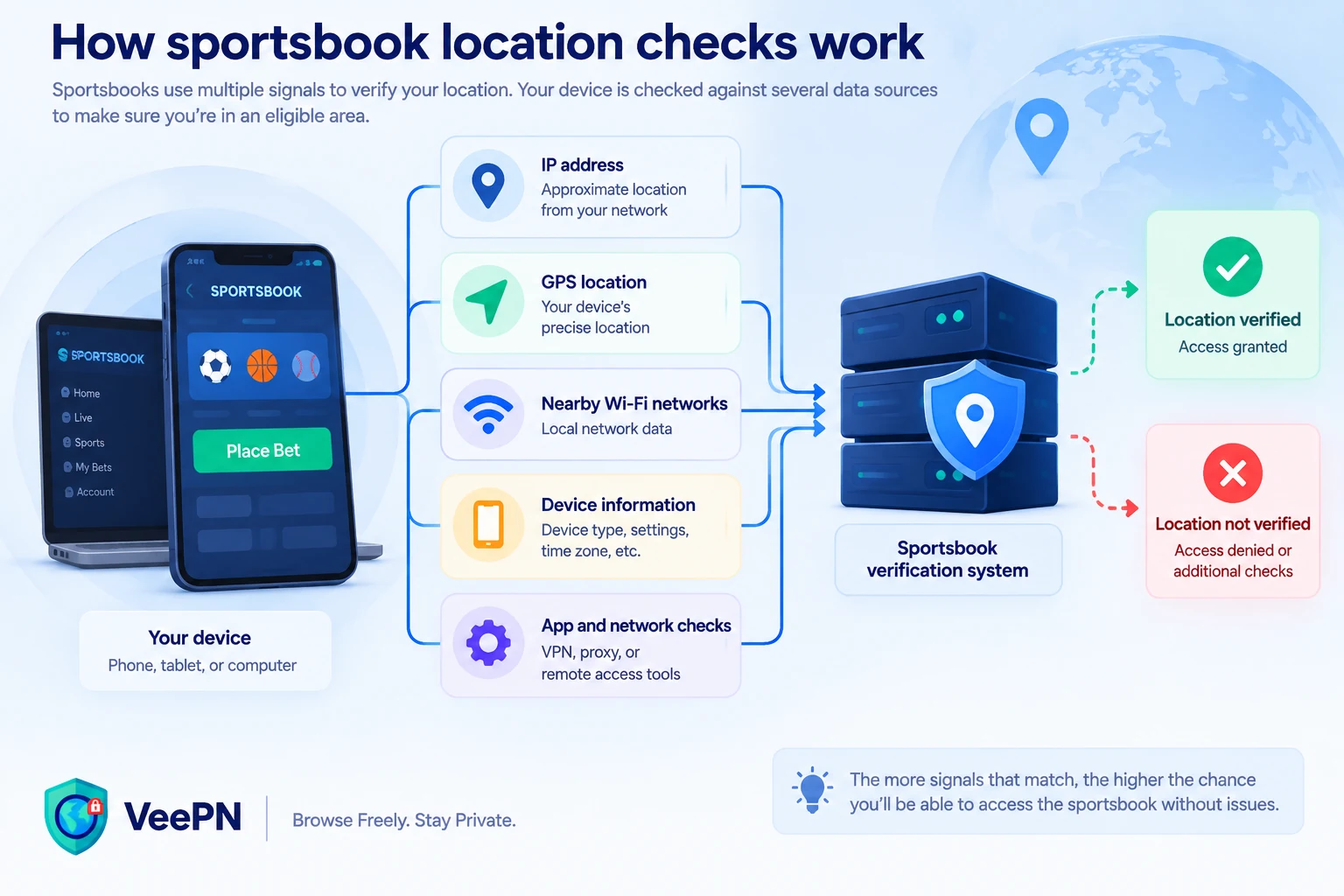
Depending on the service, the device type, and the state or country you’re in, verification may consider several factors simultaneously. Apart from the IP address, these may be your device’s GPS, nearby Wi-Fi networks, and sometimes even specific location-verification software in the background.
The same software can also flag tools or signals that may interfere with location verification, such as a VPN, a proxy server, or remote-access tools. The goal is to verify your actual location, which may not match the location suggested by your IP address or other device signals. When there’s a mismatch between those signals, or some of them look unreliable, are missing, or are blocked, you may get an error message. And that might happen even if you are right in an eligible betting area.
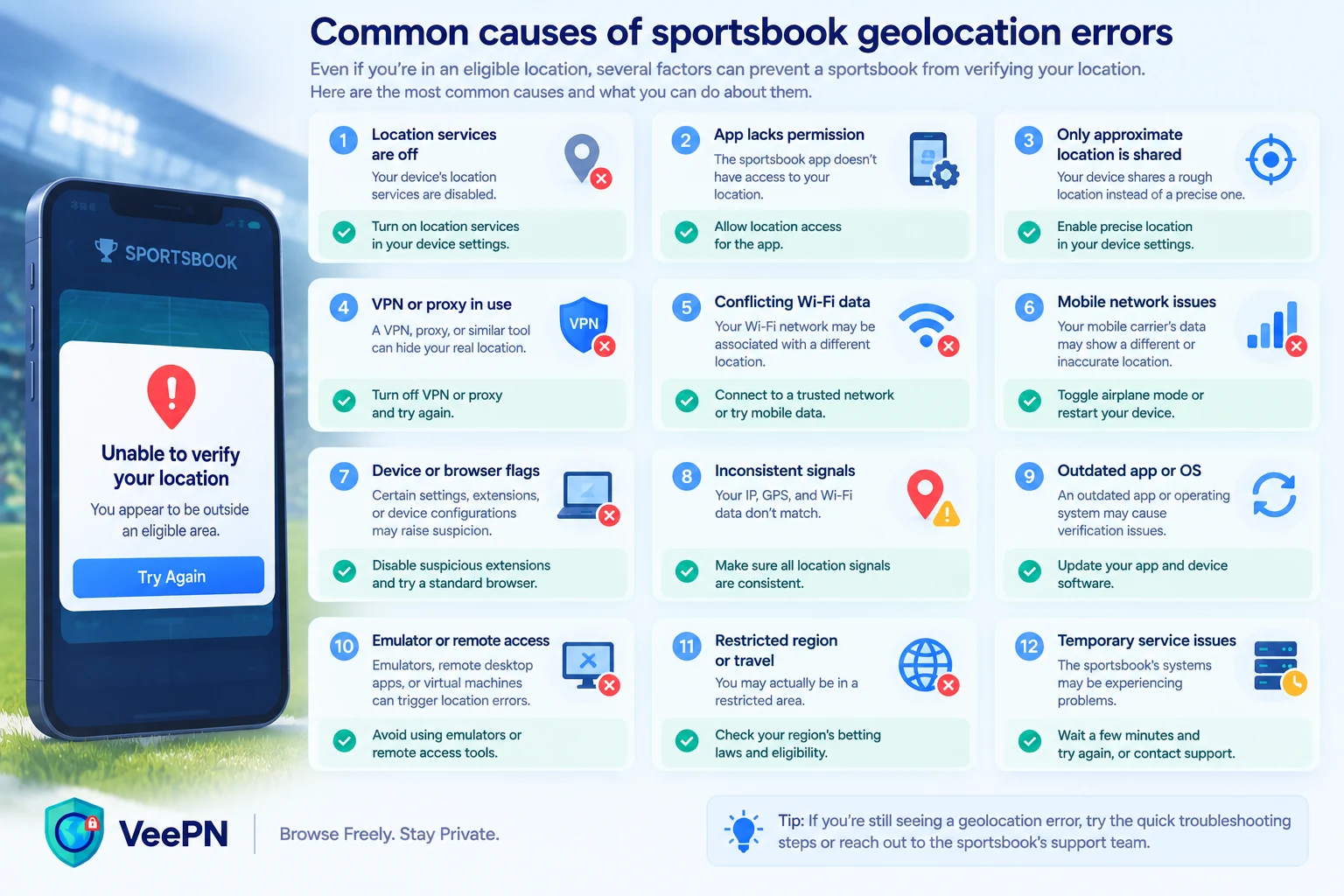
12 real causes and what to do about each
Here are the specific factors most likely to cause an error.
1. Location services are switched off entirely
If location services on your phone or laptop are disabled at the system level, your sportsbook may not be able to access the location data it needs for verification. So, if your sportsbook shows you a location error, check your device’s main settings menu first. Make sure location services are turned on before moving on to other troubleshooting steps.
2. The sportsbook app lacks permission
Even if location services are enabled on your device, the sportsbook app itself may not have permission to access them. Open your device’s app permission settings, check whether the sportsbook has location access, and enable it if it doesn’t.
3. You’ve only granted “approximate” location, not “precise”
On newer phones, it’s possible to share a rough location instead of an exact one. That may be your default privacy preference. Sportsbooks commonly need your precise location to function confidently. So, if your app has an option for “Precise Location” (or similar, depending on your device), turn it on.
4. Wi-Fi is turned off
If you’re on mobile data, consider turning Wi-Fi on. With Wi-Fi disabled, some location systems may not be able to use information about nearby networks to help verify your position. Enabling Wi-Fi, even without joining a specific network, may help resolve the error.
5. A VPN or proxy is active
Sportsbooks may flag VPN or proxy traffic because it can interfere with location verification. When a VPN or proxy server is active, your traffic is routed through another server, so the sportsbook may see a different IP address and IP-based location. While useful for your privacy, this can also trigger geolocation errors in sportsbook apps. Consider turning off your VPN or proxy and reconnecting using your normal mobile or Wi-Fi connection.
Note: VeePN is not intended to be used to circumvent legal or licensing restrictions. Always follow applicable laws and the terms of service of the sportsbook you use. For more details, please see the VeePN Terms of Service.
But if a sportsbook isn’t available in your region due to licensing restrictions or other legal requirements, a VPN won’t change that. Learn more about using a VPN for sports betting.
6. Remote desktop or remote-access software is running
Remote-access tools like TeamViewer, AnyDesk, or anything similar can be an obstacle for location checks or even get flagged as a security risk. Why? Because technically, a device somewhere else could be controlling yours. Make sure to close such apps before opening the sportsbook.
7. Your IP address is mapped to the wrong place
IP-to-location databases are not always accurate. Your home or mobile IP address might be incorrectly associated with a neighboring city, a different region, or another state entirely. First, check your IP address to confirm your details. If there’s a mismatch, restart your router. Once you do, your Internet service provider (ISP) may assign you a new IP address.
Also, try switching from your home Wi-Fi to mobile data or the other way around. If the mismatch doesn’t go away, it’s a good idea to reach out to your ISP or the sportsbook’s support team.
8. You’re near a jurisdictional border
If you live close to a state or regional border, location verification needs to be more precise. Even a small margin of error could place you on the wrong side of the boundary.
People near well-known betting markets, such as parts of the New York-New Jersey line, encounter this challenge regularly. Try moving a bit closer to the window to stabilize the GPS signal. Also, you can try to turn on Wi-Fi on your device and restart the geolocation check in your app. It may be a good reason to contact your sportsbook’s customer support, as well.
9. Your browser is blocking location access
If you’re using a sportsbook’s website instead of the app, your browser has a separate location permission. And, if you automatically clicked “Block” some time ago without even remembering, you may now face difficulties accessing the desired website. To resolve it, check your browser’s site settings for the sportsbook’s URL. If disabled, switch location access to “Allow” and refresh the page.
10. The sportsbook’s geolocation software is glitching
Many sportsbooks use dedicated verification software to confirm your location. Major U.S. sportsbooks, including DraftKings, FanDuel, BetMGM, and Caesars, use GeoComply technology as part of their geolocation and compliance systems.
Depending on the sportsbook and device, additional software may be required for location checks. If the required location-checking component is missing, outdated, blocked, or malfunctioning, location verification may fail. Try restarting or reinstalling it and check the sportsbook’s help pages for known issues.
11. Security or privacy tools are interfering
Firewalls, ad blockers, DNS privacy tools, and some browser extensions may interfere with traffic, scripts, or permissions required for location verification. You don’t need to disable your security software altogether. Instead, try temporarily disabling one tool at a time to see whether the issue persists. You can also check the sportsbook’s compatibility notes for known conflicts or requirements.
12. The problem is on the sportsbook’s end
System outages, faulty app updates, or server issues can trigger location errors even if nothing about your setup has changed. If everything worked fine yesterday and you haven’t changed any settings, check the sportsbook’s status page or social channels. The problem may not be on your side.
Here are some brand-specific details, depending on which sportsbook app you’re using:
- DraftKings. Outages surface as a stuck “Verifying location” screen. Check the DraftKings Twitter/X account or Downdetector before assuming that something’s wrong with your device.
- FanDuel. Location errors sometimes cluster after app updates. If the error appeared right after updating, the problem might be not in your setup but in a rollout issue on FanDuel’s side.
- BetMGM. Server-side geolocation hiccups are often reported first on BetMGM’s official support forums or status page. They appear ahead of any in-app notice.
- Caesars. Caesars’ geolocation checks sometimes lag during high-traffic periods (major sporting events). A temporary error during peak hours may resolve on its own in a few minutes.
Try these first: A quick troubleshooting sequence
To narrow down the cause, work through these troubleshooting steps:
- Confirm you’re inside the permitted area.
- Turn on Location Services and enable Precise Location on your device.
- Grant the sportsbook app or browser location permission.
- Turn Wi-Fi on.
- Temporarily disconnect your VPN or proxy.
- Turn off remote-access software.
- Clear your browser cookies and site data.
- Restart the app or browser.
- Restart your device.
- Switch between Wi-Fi and mobile data.
- Contact sportsbook support if none of the above works for you.
Phone or desktop: Does it matter?
While the basic idea is the same, the exact issue may differ depending on the device you’re using:
- On mobile devices: Check GPS accuracy, Precise Location settings, app-specific permissions, and Wi-Fi status.
- On a laptop or desktop: Check browser-level permissions, network detection, any required geolocation software, and whether a VPN is running in the background.
Knowing which device you’re using can help you narrow down the cause before changing your device or browser settings.
Why this can happen even when you’ve done nothing wrong
None of the above means you’re doing something illegal or suspicious. Location verification systems are designed to be cautious, which can sometimes lead to false positives.
A weak GPS signal, a new IP address assigned by your ISP, or a buggy app update can trigger the same error message as someone trying to access a sportsbook app from outside an eligible area. The system can’t always tell the difference.
When to contact support
If you’ve gone through the quick list of solutions above and you’re still stuck, it’s better to stop guessing. Reach out to the sportsbook’s support team and describe what you’ve already tried. This way, you will avoid repeating the same steps and let support professionals rule out the irrelevant causes.
Frequent errors, especially those appearing out of nowhere with no changes on your side, might be a sign of a bigger issue. And that’s not something you can fix on your own while sitting on your couch.
Final takeaway
A geolocation error doesn’t always mean the sportsbook thinks you’re somewhere else. It may simply mean that a signal it relies on is weak, blocked, or inconsistent. Sometimes, the issue can be resolved with a simple fix, such as adjusting a permission, turning on Wi-Fi, or restarting your router. Working through the possible causes one by one can help you identify and resolve the problem.
FAQ
Location verification combines several different signals, including GPS, Wi-Fi, IP address, and sometimes dedicated software. If one of them is weak, inconsistent, or completely disabled, the system can flag an error. That might happen even if you haven’t actually gone anywhere.
Yes, in some cases it does. Some location systems use nearby Wi-Fi networks as an extra reference point, even if you’re not connected to any of them. Leaving Wi-Fi on, even without using it, can help the system complete the check.
In many cases, it can. Sportsbooks may treat VPN and proxy traffic as unreliable for location purposes because the IP address may not reflect your actual location. Another possible trigger is inconsistent location signals. For example, your IP address might suggest you’re in New York while your device’s GPS indicates a location in New Jersey.
A datacenter IP address used by a VPN provider may also be identified as VPN or hosting traffic, which can interfere with location verification. If you’re physically in an eligible area and use a VPN for privacy purposes, temporarily disconnecting it may help resolve the issue.
The closer you are to a border between an eligible and ineligible area, the more important precise location verification becomes. Even a small margin of error could place you on the wrong side of the border.
Contact the sportsbook’s support team and tell them what you’ve already tried. Constant errors that appear without any change on your side might be triggered by an issue on the sportsbook’s or provider’s end.
It can occur in both browsers and apps. While apps rely more on device GPS and app-level permissions, browsers have their own location settings for each site. The underlying causes are similar, but fixing them may require slightly different steps.


VeePN is freedom
Download VeePN Client for All Platforms
Enjoy a smooth VPN experience anywhere, anytime. No matter the device you have — phone or laptop, tablet or router — VeePN’s next-gen data protection and ultra-fast speeds will cover all of them.
Download for PC Download for Mac IOS and Android App
Want secure browsing while reading this?
See the difference for yourself - Try VeePN PRO for 3-days for $1, no risk, no pressure.
Start My $1 TrialThen VeePN PRO 1-year plan