Deutsch
  Español
  Français
  العربية
  Indonesia
  Italiano
  한국어
한국어  Nederlands
  Polski
  Português
  Türkçe
  简体中文
简体中文  ไทย
ไทย  Tiếng Việt
  Čeština
  فارسی
فارسی  Română
  Filipino
  日本語
日本語 


Residential IP vs. Datacenter IP: Why Your VPN Gets Blocked and What Actually Changes If You Switch
You’ve likely faced this before. Your VPN works fine most of the time, then a site suddenly flags it, blocks you, or hits you with repeated CAPTCHAs. The cause may have nothing to do with your location, your VPN provider’s reliability, or anything you can control. It often lies in something less visible: the type of IP address your connection is currently using and the signals it’s sending to the website checking it.
 Fawad Ali


 Quick Navigation
2. Residential IP vs datacenter IP: The simple explanation
3. Why websites are suspicious of some datacenter IPs
4. Some industries are more cautious than others
5. What actually changes when you switch to a residential IP?
6. Residential IP, residential proxy, residential VPN: What’s the difference?
7. Do you actually need a residential IP?
8. What you can try before switching
9. Final thoughts
FAQ
The difference comes down to residential and datacenter IP addresses. So which one are you on, and does switching actually fix anything?
Why does my VPN get blocked while my home Internet works?
You turn on your VPN and try to access a web page, log into your bank account, or check out on a shopping site. But instead of going through, you hit one of these:
- “Access denied”
- “VPN or proxy detected”
- An endless CAPTCHA loop
- Extra identity verification
- A streaming service not playing the video
- A checkout page refusing to process your order
But once you turn off your VPN and give it a shot while just connected to your home Wi-Fi or mobile data, everything works perfectly. So, is the problem the VPN itself, or is there something else?
The VPN is only part of the story. Websites may also look at the type and reputation of the IP address you’re using. One important distinction is whether it’s a datacenter IP or a residential IP, as websites may treat these types of addresses differently.
Residential IP vs datacenter IP: The simple explanation
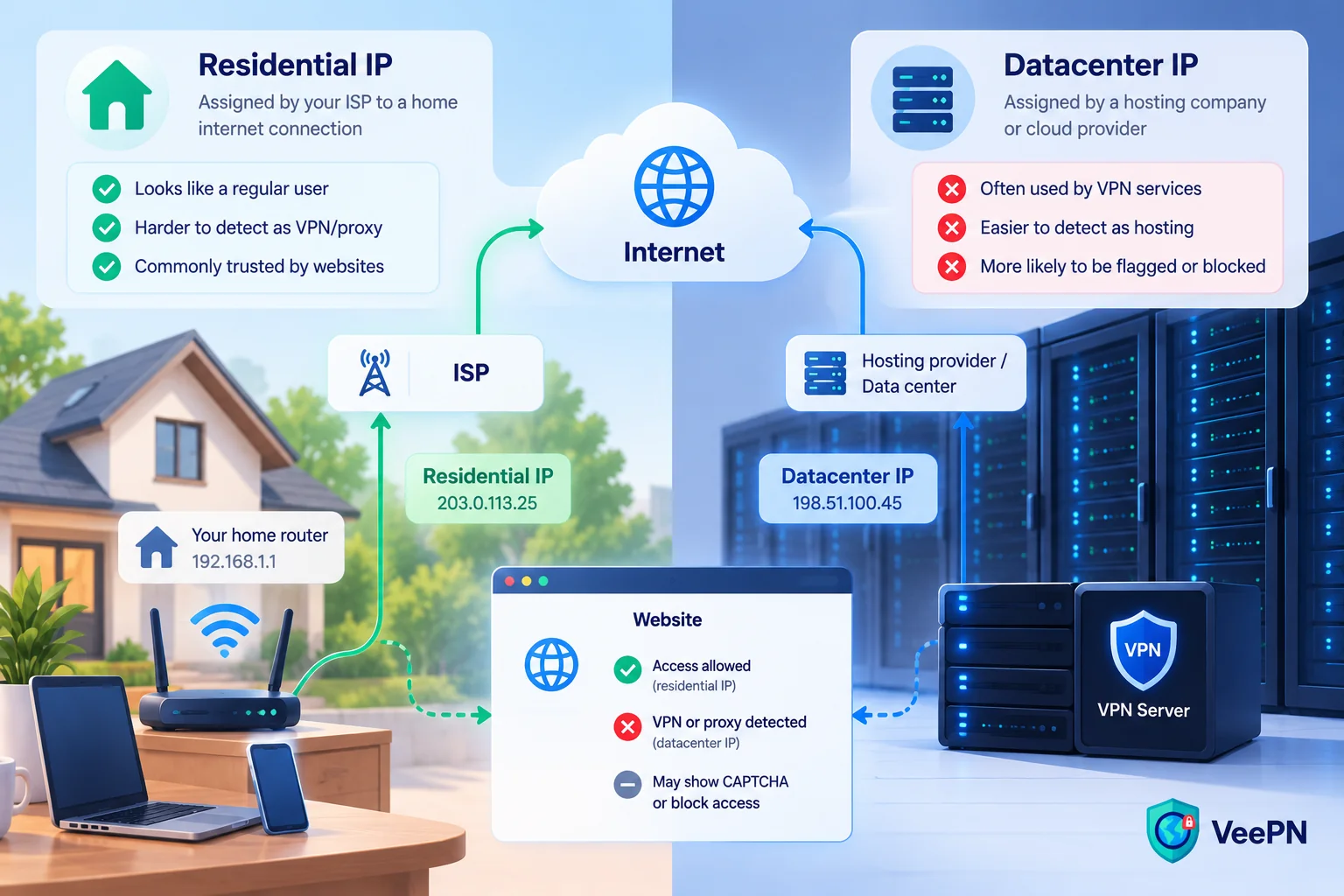
Each device connects to the Internet through an IP address that mainly belongs to one of two categories:
Residential IP is an IP address assigned by your Internet service provider (ISP) to your home Internet connection. In other words, your router gets a residential IP address from your ISP by default, and IP intelligence services may classify the source IP as belonging to a consumer ISP rather than a hosting provider.
Datacenter IP, on the other hand, is an address assigned by a hosting company, cloud provider, or data center operator. These IP addresses are commonly used for servers, cloud infrastructure, and VPN services.
Here’s a quick comparison of residential and datacenter IP addresses:
| Datacenter IP | Residential IP | |
| Assigned by | Hosting or cloud provider | Consumer ISP |
| Use by VPN services | Common | Less common |
| Ease of detection | Easier to classify as hosting | Harder to classify |
| Can have reputation issues | Yes | Yes |
| Speed | Generally faster | Varies, often slower |
| Guarantees access | No | No |
| Cost | Lower | Higher |
| Makes you anonymous | No | No |
| Availability | Wide | Limited |
Most VPN services rely on datacenter IPs because datacenters are designed for this kind of workload. They are fast, reliable, and scalable, so they can handle large amounts of traffic. That’s exactly what VPN providers need to ensure a strong infrastructure of remote servers across many locations worldwide. Sourcing addresses through residential connections instead would generally be more expensive and harder to scale.
None of this makes datacenter IPs inherently suspicious. However, some websites and online services use security systems that might treat such an IP as a red flag. Stay tuned to find out why.
Why websites are suspicious of some datacenter IPs
Here are the key reasons why many websites may deny access if you’re using a datacenter IP provided by a VPN.
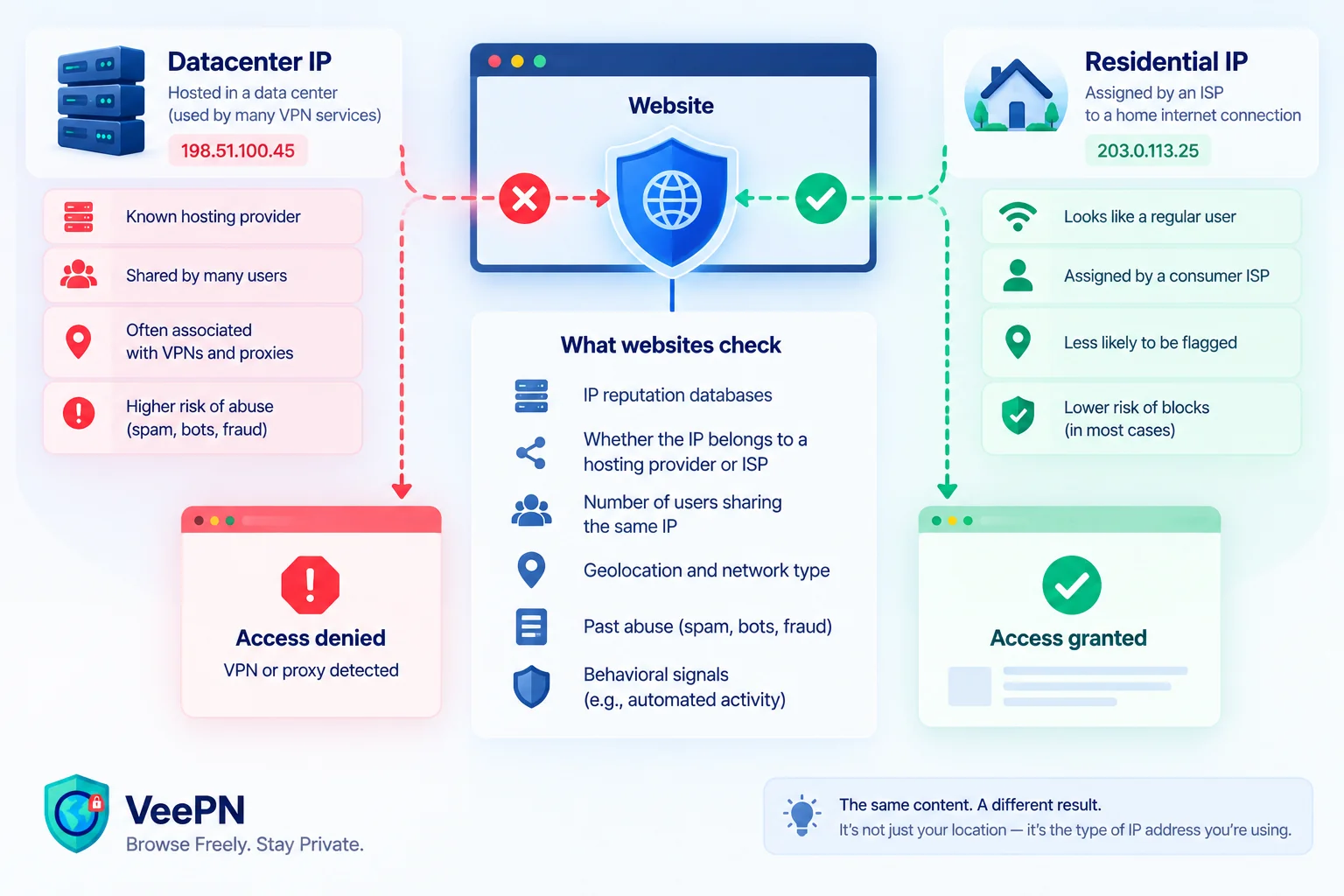
Websites can tell where an IP comes from
It’s not necessary for a website to break your VPN encryption to understand what kind of IP address you’re using. Many services rely on IP intelligence databases that use information such as ASN and network registration data to classify IP addresses. This can indicate whether your connection comes from an ISP-based residential network, a hosting provider, a cloud platform, or a range associated with a VPN or proxy server. Based on this classification, a website may add verification steps or refuse the connection.
Too many users share the same IP
It’s not a secret that a VPN exit IP may generate traffic from many unrelated users. Although shared public IPs are also common outside VPNs due to NAT and CGNAT, unusually high or abusive activity from one IP can be harmful to its reputation.
Reputation follows the IP, not you
While somewhat unfair, this part is equally important. A website or online service doesn’t know anything about your individual browsing habits. But it may trace the activity related to the IP address you’re currently using. And, if it’s been engaged in spam, suspicious transactions, account abuse, or phishing attempts, the IP may accumulate a poor reputation or appear on threat/reputation lists, increasing the likelihood of challenges or blocks.
Thus, a perfectly legit online session can be interrupted if the datacenter IP address you’re using has earned a poor reputation earlier.
Some industries are more cautious than others
Some sectors have more reasons to be strictly selective about datacenter traffic. Most commonly, these are online banks (Chime, SoFi), payment systems (PayPal, Stripe), ticketing platforms (Ticketmaster, Eventbrite), e-commerce websites (Amazon, eBay), and streaming services (Netflix, Disney Plus). Their reasons may vary, from preventing fraud, abuse, and bot attacks to enforcing licensing and geographic restrictions.
Such security measures could go far beyond checking the nature of your IP address. That’s a risk-management decision, not necessarily aimed against VPN or proxy users. Most likely, a website or service wants to protect itself against potentially malicious traffic, which often originates from hosting or data center infrastructure. However, using a residential IP address doesn’t guarantee frictionless browsing.
What actually changes when you switch to a residential IP?
Simply put, a residential IP is typically associated with a consumer ISP network rather than hosting or datacenter infrastructure. This may remove one potential risk signal: datacenter or hosting classification.
In practice, this can mean fewer “VPN or proxy detected” warnings, CAPTCHA loops, and IP-based blocks. But it doesn’t guarantee a clean pass. Anti-fraud systems can still flag the session based on other indicators.
What a residential IP doesn’t hide
Switching to a residential IP address doesn’t make your traffic invisible. Neither does it convince a website of anything except the origin of your traffic. Here are several of the most important things a residential IP cannot hide from modern sites:
- Your account history and past behavior on a web page
- Cookies and session data (if not removed previously)
- Browser and device specifics (also known as browser fingerprinting)
- Location permissions given through your apps or browser
- Your timezone and language settings
- Payment info tied to your account
- Your login pattern (and whether it looks unusual compared to your common habits)
The IP is just one input among many others. It doesn’t eliminate the importance of the rest of them.
Residential IP, residential proxy, residential VPN: What’s the difference?
These terms sound alike and get used interchangeably, but they describe different things:
- A residential IP is an address assigned by a consumer ISP to a home connection.
- A residential proxy is a service that routes your traffic through residential IP addresses provided by devices on consumer ISP networks.
- A residential VPN, or residential server, is a VPN service that uses residential-type IPs for its exit nodes instead of datacenter IPs.
- A dedicated IP is reserved for one customer or account, while a static IP remains the same over time. That said, an IP can be static without being dedicated.
None of these is safer, more private, or trustworthy by default. What matters is who runs the service and how the addresses were obtained, not the label on it.
Do you actually need a residential IP?
For many VPN users, a residential IP isn’t necessary. It may reduce blocks triggered by hosting or datacenter classification, but it doesn’t guarantee access or prevent other reputation and risk checks.
Residential IPs can also be harder to come by. They’re less available, can be slower depending on the infrastructure, and are usually more expensive than datacenter IPs.
There are also privacy-related challenges to consider. Residential proxy networks may route traffic through other people’s devices or connections, so it’s important to understand how the provider sources its IP addresses and handles your data.
Free proxy and VPN services may collect user data or share it with third parties, so check how a provider handles your information before using it. Look for a service with a transparent No Logs policy and clear information about its privacy practices.
What you can try before switching
Before switching to a residential IP, try these simpler steps:
- Check whether you’ve been assigned a hosting or datacenter IP. An online IP checking tool like this one will do the job in no time.
- Disconnect and reconnect. Depending on how your provider manages its server pool, you may get a different VPN exit IP.
- Try a different server in the same country. Another server may give you a different exit IP and help if the problem is tied to the one you’re currently using.
- Try a nearby location. For instance, if you’re using a German server located in Frankfurt, try connecting to Berlin instead. A different location may put you on a different IP range.
- Check whether the site allows VPNs. If one service fails while others work, the issue may be specific to that service or the IP you’re using.
- Contact your VPN provider. If you’re struggling to access a specific service, contact the provider’s support team. They may be able to suggest another server or help identify the issue.
Final thoughts
Getting blocked while using a VPN usually isn’t personal, and often isn’t about your location. It may have more to do with the type of IP address you’re using and the reputation it carries. VPNs often use datacenter IPs because they provide reliable, scalable infrastructure. However, these addresses can be easier to classify as hosting or datacenter traffic, which may lead some sites to apply additional checks.
Residential IPs, in turn, are associated with standard consumer ISP connections, which may reduce some IP-based access issues. But they aren’t invisible and don’t guarantee access.
Looking for a trustworthy VPN with plenty of server locations to choose from? Consider VeePN. Its network spans more than 196 locations worldwide, giving you options when you need to switch servers. Try VeePN today with a 30-day money-back guarantee and explore its additional privacy and security features.
FAQs
Often, yes, though not by breaking your encryption. Websites can use IP intelligence and reputation data to determine whether an IP is associated with a hosting provider, VPN, proxy, or consumer ISP. But IP classification is only one of the signals a site may use to identify VPN traffic.
Not necessarily. A residential IP may reduce flags associated with hosting or datacenter classification. But other signals, such as IP reputation, account history, device fingerprinting, and payment details, can still trigger additional checks or a block.
No. A datacenter origin may trigger extra security checks on some websites, particularly banking, streaming, and e-commerce websites. But datacenter traffic is not inherently malicious or suspicious.
A residential proxy routes traffic through residential IP addresses, while a residential VPN uses a VPN connection with residential IPs as exit addresses. The technologies and implementations differ, even though both can make your traffic appear to originate from a residential network.
One possible reason is the reputation attached to that particular IP address. If other users sharing the address triggered abuse detection, or the site updated its detection rules, the same exit IP may work one day and be blocked the next.


VeePN is freedom
Download VeePN Client for All Platforms
Enjoy a smooth VPN experience anywhere, anytime. No matter the device you have — phone or laptop, tablet or router — VeePN’s next-gen data protection and ultra-fast speeds will cover all of them.
Download for PC Download for Mac IOS and Android App
Want secure browsing while reading this?
See the difference for yourself - Try VeePN PRO for 3-days for $1, no risk, no pressure.
Start My $1 TrialThen VeePN PRO 1-year plan