Deutsch
  Español
  Français
  العربية
  Indonesia
  Italiano
  한국어
한국어  Nederlands
  Polski
  Português
  Türkçe
  简体中文
简体中文  ไทย
ไทย  Tiếng Việt
  Čeština
  فارسی
فارسی  Română
  Filipino
  日本語
日本語 


You Logged Into Your Exchange With a VPN. Now What?
If your crypto exchange just flagged your VPN, the first thing to know is that a flag is not necessarily a ban. A VPN connection can trigger additional security or risk checks, which may result in anything from a login alert or identity verification request to temporary restrictions on withdrawals. What happens next depends on the exchange and the other signals it detects alongside your VPN connection. Read on to find out why exchanges may flag VPN use, what different restrictions mean, and what you can do if it happens to you.
 Fawad Ali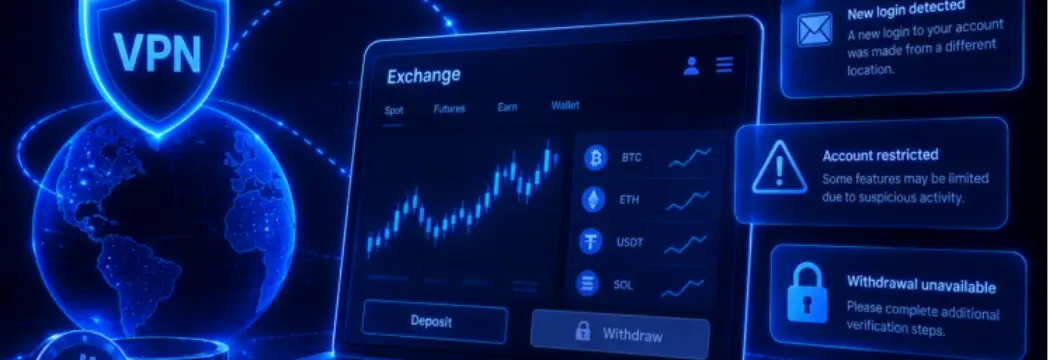


 Quick Navigation
2. What Happens When a Crypto Exchange Flags Your VPN
3. Why a Location Mismatch Raises Eyebrows
4. What to Do if Your Account Gets Flagged
5. What Not to Do While Your Account Is Under Review
6. Can You Safely Use a VPN With a Crypto Exchange at All?
7. Final Thoughts
FAQ
Can a Crypto Exchange Tell You’re Using a VPN?
In most cases, yes. Most crypto exchange platforms can detect the use of a virtual private network (VPN). Here’s how it works, exactly.
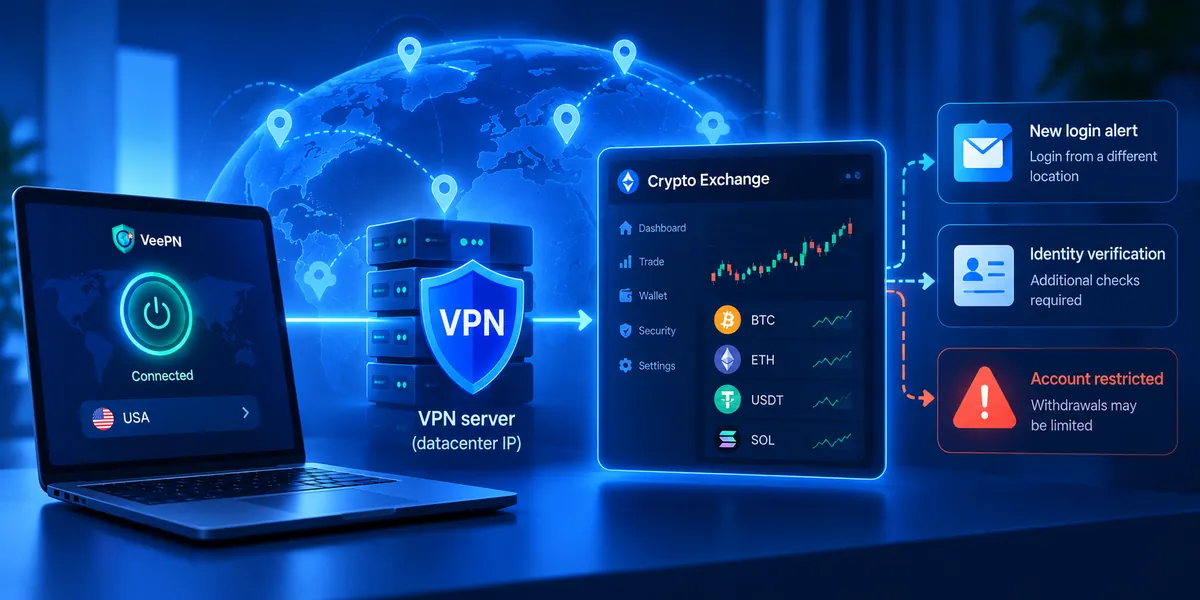
When you’re connected to a VPN, your traffic likely comes from a datacenter IP address rather than the ordinary residential or mobile ranges commonly assigned by Internet service providers (ISPs). Such traffic doesn’t look like a normal connection from a typical household. Fraud-detection databases and security systems often catalog datacenter IPs, because that helps websites and online services stay away from bot attacks and other threats.
So, when your traffic comes from a blacklisted datacenter IP, it’s a signal for the crypto exchange platform to take a closer look.
In 2024, one of Coinbase’s product designers publicly acknowledged that the exchange’s risk models can treat VPN usage as a negative signal. And the reason is not the VPN itself. The thing is that many attackers use VPNs to hide their tracks. So, while a VPN alone may not get an account flagged, it can contribute to a higher risk assessment when combined with other unusual behavior, like logging in from an unfamiliar device or trying to send a large amount of crypto to a new address. Therefore, it’s safe to say that the use of a VPN is a data point, not a verdict.
Your IP address isn’t the only signal exchange platforms may consider. Other factors can include:
- Whether your IP belongs to a known VPN or hosting provider
- How quickly your virtual location changes
- Your device and browser fingerprints
- Your account history
Platforms generally don’t disclose exactly how their risk systems work, since revealing those details could make their anti-fraud measures easier to circumvent.
What Happens When a Crypto Exchange Flags Your VPN
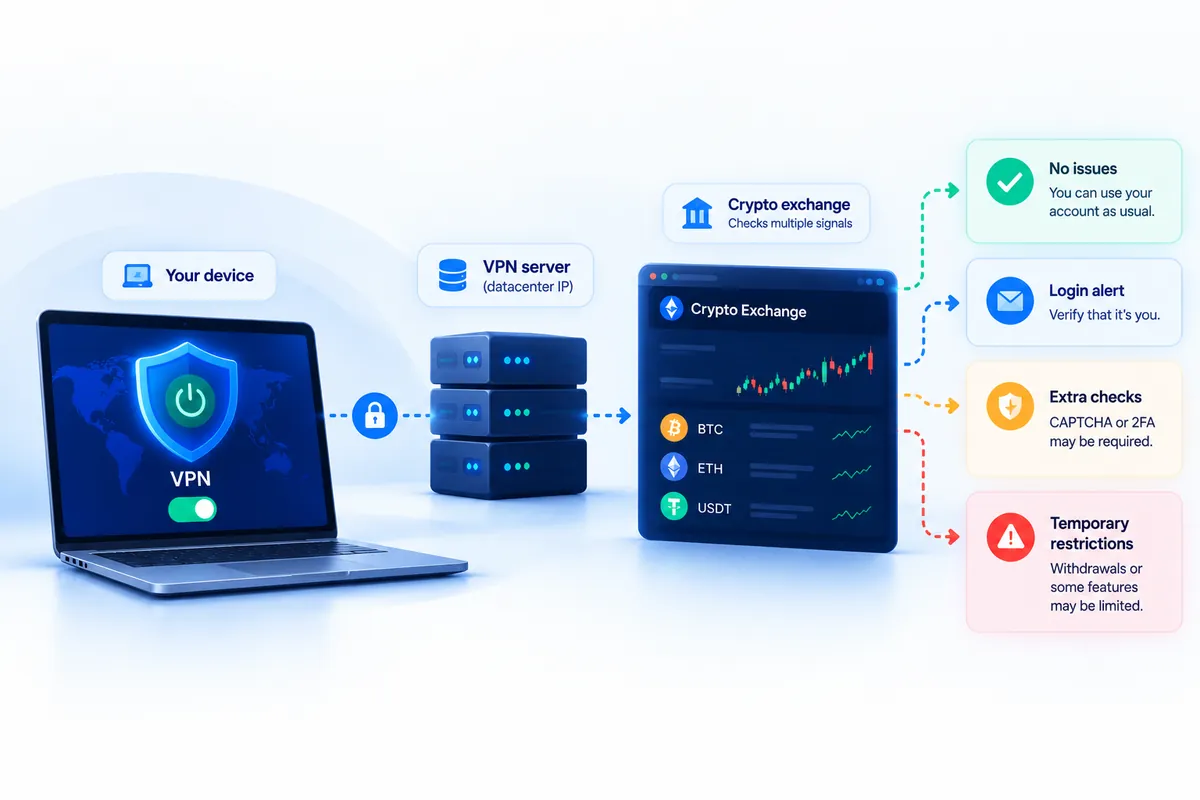
What happens next depends on the exchange, its security systems, and the other signals associated with your connection or account. You may encounter one of the following scenarios:
Sometimes, Nothing Happens
A common VPN session that doesn’t look unusual (especially if an IP address you’re using wasn’t flagged by security systems earlier) may pass through unnoticed.
A Notification or New Login Alert
One possible outcome is a simple security check. The exchange may detect a new or unfamiliar IP address and send you an email or notification asking you to verify that it was really you. This doesn’t necessarily mean there’s a problem with your account. It may simply be an additional check to make sure your account hasn’t fallen into the wrong hands.
A CAPTCHA or Extra Authentication Step
More unusual login patterns may prompt the system to request additional verification that the user is legit. It commonly comes in the form of a code sent to your phone or email, a request to enter your two-factor authentication code, or a CAPTCHA security test. All these precautions are simple protection measures, not a punishment.
A Temporary Session Lock
Some exchange platforms may end your session and ask you to re-verify your identity before you do anything else. This measure is usually taken to prevent account theft and other fraud.
Re-KYC, or a Request to Verify Your Identity Again
“Re-KYC” (re-Know Your Customer) means that an exchange needs to update or re-verify your identity information. It could ask for a fresh copy of your ID, a photo, proof of address, confirmation of residency, or other documentation. While this might sound a bit alarming at first, re-KYC can happen for reasons unrelated to VPN use.
A Withdrawal Hold
This is probably the most worrying outcome on the list, so let’s be clear about what it usually means. A withdrawal hold on a crypto exchange doesn’t mean that your balance is disappearing or being taken over. More likely, it means the platform has paused your outbound transfers while it completes a security or compliance review, usually for 24 to 72 hours. The important positive signal here is that your crypto or fiat balance is still visible in your account. In most cases, you can withdraw your funds once you complete the required verification.
A Regional Restriction
Here’s where it gets more serious. If you’re connected to a VPN and use a server located in a country where a particular exchange doesn’t operate, you risk facing a restriction based on your apparent location. It’s not that the exchange finds your identity or activity suspicious. In some countries or states, a certain service is simply unavailable.
It’s worth noting here that a VPN doesn’t change your actual legal residency, your KYC info, or the exchange’s obligations to local regulations. For example, Kraken’s support page on licensing states that it welcomes clients worldwide, with several specific exceptions due to international and local regulations. The verified residency determines which restrictions apply to your account, not your IP address or browser settings. And using a VPN doesn’t change those rules.
For more details, check out our detailed blog post on using a VPN for crypto transactions.
Suspension or Closure
In the worst-case scenario, your crypto exchange account could be suspended or closed. This may happen when VPN use is combined with activity that violates the platform’s Terms of Service, such as repeated attempts to access the service from a restricted region, operating multiple accounts where prohibited, or activity that resembles fraud.
Overall, VPN detection alone doesn’t necessarily mean an account should be blocked. However, it may be one reason for a platform to take a closer look at potentially suspicious behavior. That raises another important question: should a crypto exchange platform care about your virtual location at all?
Why a Location Mismatch Raises Eyebrows
The core problem is consistency. Say your KYC file lists you in New York. Your entire login history and account activity are associated with that location, too. Then one day, your account logs in from Paris via a VPN. And an hour later, another login appears back in New York.
From the exchange’s point of view, that can look like a suspicious pattern. The security system might assume that someone got hold of your credentials and logged in from their location, while you logged in as usual. Alternatively, it could look like two people using the same account. Or it could look like an attempt to reach the service from a restricted region.
Since the platform can’t be sure which of those scenarios is real, it treats your activity as a potential risk and acts accordingly. That’s why using a VPN on a crypto exchange platform is often approached with caution, even though you’re most likely doing nothing wrong. Security systems are built to catch fraud, such as account theft or phishing attacks, so they may apply an extra check to an ordinary VPN session.
What to Do if Your Account Gets Flagged
If you’ve just encountered a restricted withdrawal or a re-KYC request, here’s a quick guide on what you can do to go through risk-free:
- Stop repeated login/withdrawal attempts. Clicking the login button or retrying a withdrawal multiple times looks worse to a fraud system. Take a step back and use a more methodical approach instead.
- Read the notification carefully. See exactly what the exchange says is wrong with your login, as this will tell you which step below applies. Also, make sure you’re logging in through the exchange’s official app or website, not through a link in an unexpected email, which could be a phishing attempt.
- Try disconnecting the VPN. If you’re genuinely logging in from your home network, disconnect the VPN and use your regular connection. A consistent login from your usual network may help resolve the security flag.
- Complete verification through official channels. If the exchange asks you to verify your identity, do it only through the official application or website. Upload documents or reset passwords only once you’re sure the request is a legitimate security check.
- Contact official support. If the restriction stays after you’ve taken the required steps, contact official support through email or live chat. Explain what happened and ask what’s needed to restore full access to your account.
- Stay alert to phishing. A sudden security alert or “your KYC is required” email can itself be a phishing attempt, a common scam tactic. Never click on suspicious links in emails, even if the sender’s address looks exactly like your crypto exchange platform. Never upload documents or enter credentials after receiving an unexpected email. Go to the official app or website directly and log in there.
What Not to Do While Your Account Is Under Review
It’s tempting to force your way through when a withdrawal is stuck, but hasty moves can make things worse. Here are a few things to avoid:
- Don’t rush past security checks. Pay attention to the notifications you receive.
- Don’t switch VPN servers or rotate proxies. Changing your IP address repeatedly while your account is under review adds more inconsistency to your login activity and may trigger additional security checks.
- Don’t try to create another account to avoid a restriction on the first one. That’s a violation of most services’ Terms of Service, so you risk losing access to both.
- Don’t submit a different residency or address. It can turn a simple temporary review into an actual compliance issue, which is much harder to fix.
Can You Safely Use a VPN With a Crypto Exchange at All?
There are many legitimate reasons to use a VPN. You might use one to protect your traffic on public Wi-Fi or strengthen your online privacy. A VPN routes your traffic through an encrypted tunnel, helping protect data in transit between your device and the VPN server.
The catch is that a VPN might route your traffic through a country where a certain crypto exchange doesn’t operate. And some VPNs, especially free ones, use overcrowded IP addresses with a poor reputation. For example, some of these IP addresses may have been associated with past fraudulent activity, potentially making future connections through them appear more suspicious.
Using a VPN doesn’t change your legal residency, KYC details on file, or the products an exchange is licensed to offer. You should also make sure that your VPN use doesn’t violate the exchange’s Terms of Service or attempt to circumvent its geographic restrictions. Here are a few things to keep in mind in this regard:
- Using a VPN is generally legal in most countries. Encrypting your connection to protect your privacy is not a crime. What gets people in trouble is using it to change their location to access geo-restricted platforms or services.
- Some exchanges don’t allow VPNs at all. For instance, it’s forbidden to access Binance from the US using a VPN. Coinbase also states that using a VPN to change your location violates its Terms of Service. Bybit may ban an account for using a VPN to access the platform from excluded jurisdictions, including the US and Mainland China.
- Some other platforms limit VPN use in certain cases. Kraken, for example, doesn’t limit the use of a VPN for general privacy. But you can’t use it to get around any geographic limitations mentioned in its Terms of Service.
Disclaimer: VeePN is not intended for bypassing geographic restrictions or engaging in illegal activity. Always follow applicable laws and regulations, as well as the Terms of Service of the platform you use. For more details, see the VeePN Terms of Service.
Final Thoughts
A VPN flag or warning notification is a signal, not necessarily a crisis. In many cases, you may simply need to verify your identity or complete an additional security check. While inconvenient, withdrawal holds and re-KYC requests aren’t necessarily targeted at VPN users. They are security measures crypto exchanges may use to prevent account theft and other threats.
The real line to watch is jurisdiction. Using a VPN, proxy, or similar tool to reach a service from a geo-restricted region may violate the platform’s Terms of Service. Such an attempt can lead to more serious consequences, including account restrictions or, depending on the platform’s rules, a permanent ban.
If you’re using a VPN as an online privacy tool, pay attention to any security notifications you receive. Never click on suspicious links, verify your identity only through the exchange’s official app or website, and make sure your VPN use complies with the platform’s rules.
FAQ
Using a VPN doesn’t automatically mean your account will be banned. But a VPN session might be one signal among many. It may trigger additional scrutiny when combined with unusual activity, such as a new device, a large withdrawal, or a location that conflicts with your KYC information. Some exchanges also restrict VPN use in certain circumstances, so always check the platform’s Terms of Service.
A change in IP or country can make your login appear inconsistent with the identity data in your KYC file. Re-verifying KYC is the standard way exchanges deal with that issue. It’s a common compliance step many users go through, even those who never use a VPN.
No. A withdrawal hold, which usually takes 24-72 hours, means your transfers are paused while the exchange finishes a security or compliance review. You can still see your balance in your account. Only the ability to move funds out is temporarily limited until you complete the required verification.
In most countries, yes, using a VPN for privacy is perfectly legal. The line is using it to get around geographic restrictions, which breaks most exchanges’ Terms of Service even where the VPN itself is legal. Legality and platform rules are two different things.
No, it’s not recommended. Switching servers adds more inconsistency to an account that’s already under review. You may only slow things down, not speed them up. Instead, try turning off your VPN (if possible) and log in to your account once again.


VeePN is freedom
Download VeePN Client for All Platforms
Enjoy a smooth VPN experience anywhere, anytime. No matter the device you have — phone or laptop, tablet or router — VeePN’s next-gen data protection and ultra-fast speeds will cover all of them.
Download for PC Download for Mac IOS and Android App
Want secure browsing while reading this?
See the difference for yourself - Try VeePN PRO for 3-days for $1, no risk, no pressure.
Start My $1 TrialThen VeePN PRO 1-year plan