Deutsch
  Español
  Français
  العربية
  Indonesia
  Italiano
  한국어
한국어  Nederlands
  Polski
  Português
  Türkçe
  简体中文
简体中文  ไทย
ไทย  Tiếng Việt
  Čeština
  فارسی
فارسی  Română
  Filipino
  日本語
日本語 


Remote Access Trojan: How RAT Malware Works and What To Do
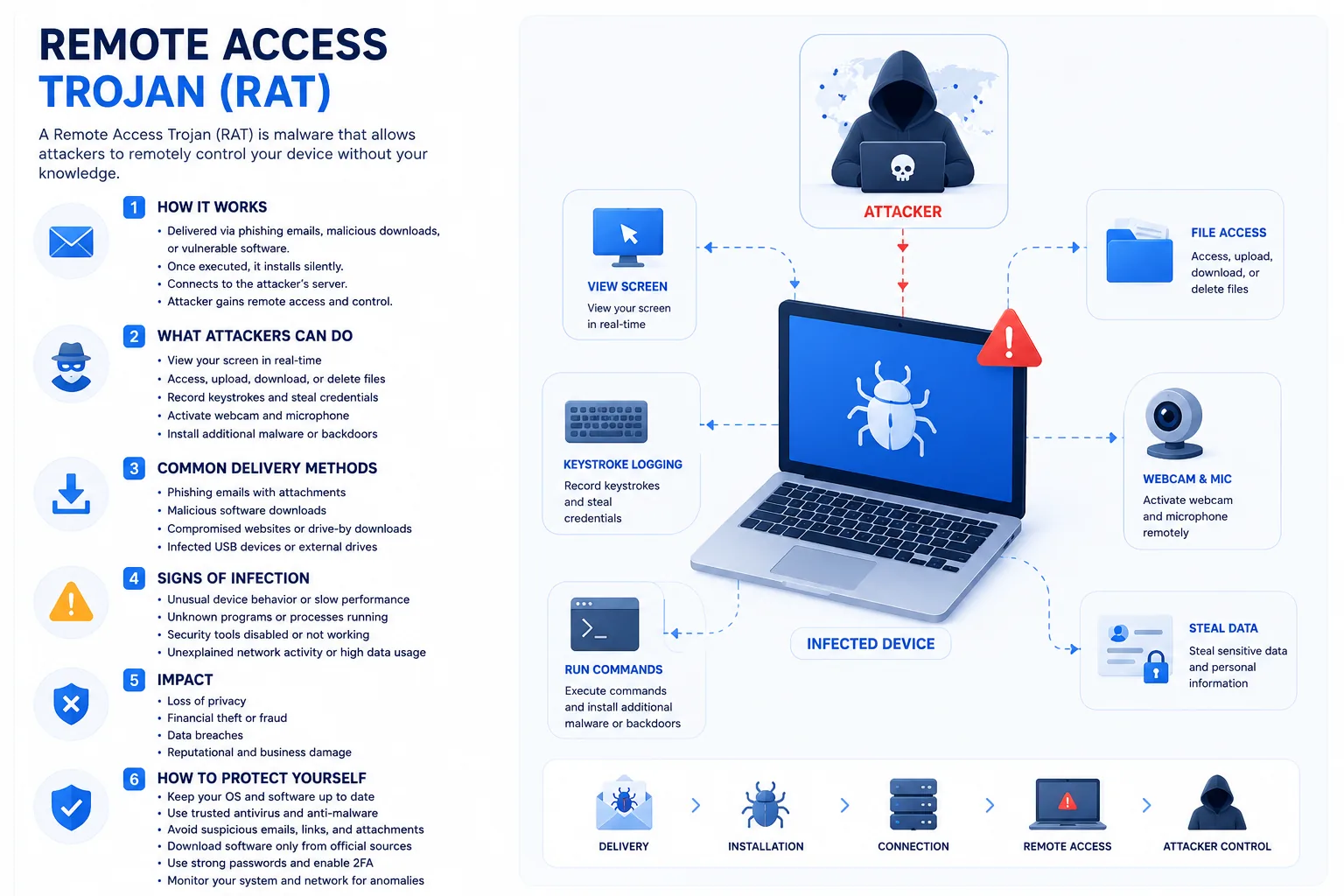
A Remote Access Trojan is a type of malware that gives attackers hidden remote access to your device. Once it lands on an infected computer or infected machine, it can remotely control files, apps, accounts, and even connected hardware.
That is what makes a Remote Access Trojan RAT so dangerous. It can help criminals steal passwords, spy on user behavior, access sensitive data, and use a compromised system for further attacks. In some cases, RATs are also used to launch Distributed Denial of Service attacks or spread to other infected devices.
In this guide, we’ll explain how this threat works, what signs to watch for, and what to do if you suspect one. We’ll also show how VeePN can help reduce the risk.
 VeePN Research Lab


 Quick Navigation
2. Common Infection Paths
3. Warning Signs
4. What To Do If You Suspect a RAT
5. RAT Cleanup vs Account Cleanup
6. Where VeePN Fits
7. The First Hour: A Practical Response Plan
8. Places RATs Hide on Windows and macOS
9. Account Cleanup Checklist
10. When a Scan Is Not Enough
11. How RATs Lead to Bigger Incidents
12. Prevention That Actually Reduces RAT Risk
13. Personal Device vs Business Device
14. Why Camera Lights Are Not Enough
15. The response rule
FAQ
A remote access trojan, or RAT, is malware that lets an attacker control a device from a distance. The dangerous part is not only spying. A RAT can capture keystrokes, steal files, take screenshots, turn on a camera or microphone, install more malware, and use the device as a foothold into other accounts.
This article is for users and small teams who suspect a device may be compromised and need practical next steps.
What a RAT Does
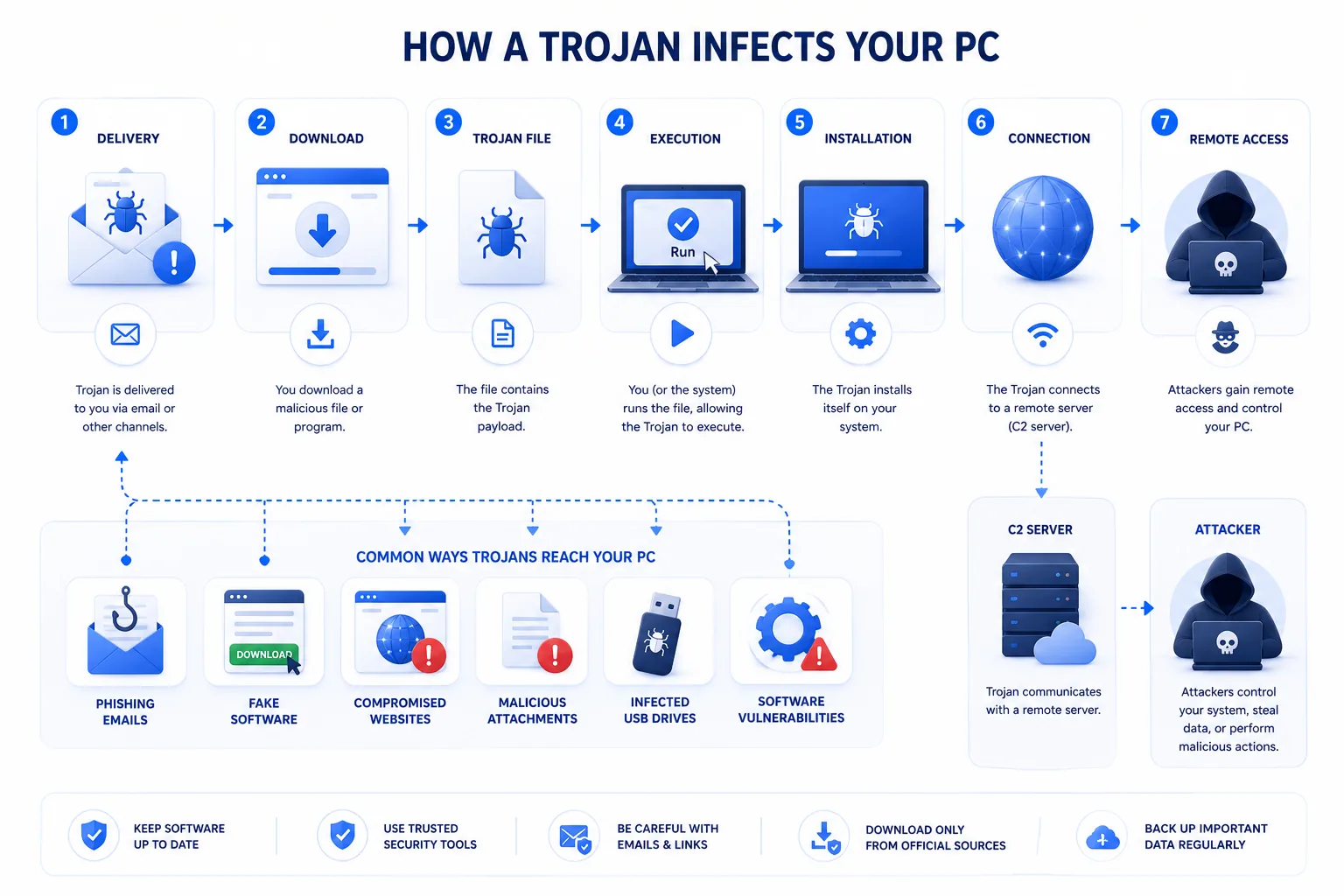
A RAT usually tries to stay quiet. Once installed, it connects to an attacker-controlled server and waits for commands. The attacker may browse files, steal browser data, record input, or install ransomware later.
The exact features vary by malware family, but the risk is the same: the attacker gets remote control that the device owner never approved.
Common Infection Paths
| Entry point | Example | Practical defense |
|---|---|---|
| Phishing attachment | Fake invoice, resume, shipping file | Open documents from known senders only |
| Pirated software | Cracked apps, game cheats, keygens | Avoid cracked software entirely |
| Fake update | Browser or video player update prompt | Update from the vendor site or app store |
| Remote access abuse | Exposed RDP or reused password | Use MFA and restrict remote access |
| Malicious link | Download from a compromised page | Use browser warnings and reputation checks |
RATs often arrive through social engineering. The attacker does not always need an exploit if they can persuade someone to run the file.
Warning Signs
Look for unexpected mouse movement, unknown remote access tools, webcam or microphone indicators lighting up, new startup items, accounts logging in from unfamiliar locations, disabled security software, unusual outbound traffic, or files appearing and disappearing without explanation.
One sign alone does not prove a RAT. Several signs together should be treated seriously.
What To Do If You Suspect a RAT
- Disconnect the device from the internet. Unplug Ethernet and turn off Wi-Fi.
- Do not log in to sensitive accounts from that device.
- From a clean device, change passwords for email, banking, work, cloud storage, and password manager accounts.
- Enable MFA, especially on email.
- Run a full scan with trusted security software.
- Check installed programs, browser extensions, startup apps, and scheduled tasks.
- If this is a work device, report it to IT before wiping anything.
- For high-risk cases, back up only personal files and reinstall the operating system from trusted media.
The uncomfortable truth: if a RAT had admin access, a clean reinstall is often safer than trying to surgically remove every trace.
RAT Cleanup vs Account Cleanup
| Task | Removes malware? | Protects accounts? | Notes |
|---|---|---|---|
| Antivirus scan | Often | No | Good first step, not the whole job |
| Password changes | No | Yes | Must be done from a clean device |
| MFA setup | No | Yes | Reduces damage from stolen passwords |
| OS reinstall | Yes | No | Best for high-confidence cleanup |
| Router password review | No | Sometimes | Useful if home network devices were touched |
Where VeePN Fits
A VPN does not remove a RAT. It also cannot make a malicious attachment safe.
VeePN can help reduce some surrounding exposure. A VPN protects traffic on public Wi-Fi, which is useful if you work from hotels, airports, or shared networks. VeePN Antivirus can help detect suspicious files on supported devices before they run. Data Breach Alert can warn if credentials tied to your email appear in known breaches, which matters because stolen passwords are often used before or after malware infections.
Treat it as prevention and monitoring, not a guaranteed RAT removal tool.
The First Hour: A Practical Response Plan
The first hour matters because a RAT is not only a file on disk. It is a live access problem. If the attacker is still connected, every password typed into the device can be captured and every cleanup attempt may be observed.
Start by separating response into three tracks: contain the device, protect accounts, and preserve enough information to understand what happened.
| Time | Action | Why it matters |
|---|---|---|
| 0-5 minutes | Disconnect from Wi-Fi and Ethernet | Cuts off active remote control |
| 5-15 minutes | Photograph alerts, filenames, and suspicious windows | Preserves clues without typing on the device |
| 15-30 minutes | Change important passwords from a clean device | Assumes the RAT may have captured credentials |
| 30-45 minutes | Enable MFA and revoke active sessions | Stops reuse of stolen sessions where possible |
| 45-60 minutes | Decide scan vs reinstall | High-risk devices usually deserve a rebuild |
Do not use the suspected device to search for removal tools, log in to email, or reset passwords. That feels convenient, but it gives the attacker a front-row seat if the RAT is still running.
Places RATs Hide on Windows and macOS
On Windows, check installed apps, startup entries, browser extensions, scheduled tasks, services, and remote access tools. Task Manager is a start, but it is not enough. Microsoft’s Autoruns is more complete for advanced users because it shows many persistence locations in one place.
On macOS, review System Settings > General > Login Items, browser extensions, configuration profiles, and apps with Accessibility, Screen Recording, Full Disk Access, or Input Monitoring permissions. A RAT that can capture screen or keyboard input may rely on those permissions.
The presence of a remote tool does not always mean malware. TeamViewer, AnyDesk, Chrome Remote Desktop, Microsoft Remote Desktop, and similar products are legitimate when installed intentionally. The red flag is unexpected installation, unknown accounts, unattended access enabled, or a tool protected by a password you did not set.
Account Cleanup Checklist
Treat email as the master account. If an attacker controls your email, they can reset passwords elsewhere. Start there, then move to password managers, banking, cloud storage, work accounts, social accounts, and shopping accounts.
For each important account:
- Change the password from a clean device.
- Turn on MFA, preferably an authenticator app or security key.
- Sign out of all sessions.
- Review recovery email and phone.
- Remove unknown OAuth apps or connected services.
- Check forwarding rules, filters, and auto-replies in email.
That last item is easy to miss. Attackers sometimes add mailbox rules to hide password-reset emails or forward copies of incoming mail.
When a Scan Is Not Enough
A full malware scan is reasonable for low-confidence cases: a suspicious download, an adware-like pop-up, or a tool that was blocked before it ran. A scan is less reassuring when you saw remote control, webcam activity, password theft, disabled security tools, or unknown admin accounts.
If the RAT ran with administrator privileges, reinstalling the operating system is often the safer call. Back up documents, photos, and other personal files only. Do not back up applications, cracked installers, unknown scripts, or anything that might be the original infection source.
For a business laptop, involve IT before wiping. They may need endpoint logs, firewall logs, Microsoft Defender alerts, EDR telemetry, or the original phishing email. CISA’s general malware response guidance is clear on the importance of containment and reporting in organizational incidents.
How RATs Lead to Bigger Incidents
RATs are often used as a bridge. The first compromise may be a personal laptop. The next step may be stolen VPN credentials, cloud storage access, payroll fraud, business email compromise, or ransomware. That is why password and session cleanup is not optional.
Common follow-on actions include:
- Stealing browser-saved passwords and cookies.
- Searching files for tax documents, IDs, invoices, and seed phrases.
- Capturing screenshots of banking or admin panels.
- Installing additional malware.
- Using the device to send phishing messages to contacts.
- Testing access to work systems while the user is asleep.
MITRE ATT&CK documents Remote Access Software as a technique because legitimate tools can be abused in intrusions. That detail matters: security teams should not only search for “malware.exe.” They should also look for normal tools used in abnormal ways.
Prevention That Actually Reduces RAT Risk
Use a standard user account for daily work. Keep admin rights separate. Block macros from the internet where possible. Avoid pirated software and game cheats. Keep browsers and document readers updated. Use MFA on email and remote access. Make sure remote desktop is disabled unless you truly need it.
For small businesses, add application control or allowlisting for high-risk departments. Finance, HR, recruiting, and support teams open attachments from strangers as part of their job. They need extra guardrails, not just reminders to be careful.
VeePN’s Data Breach Alert is especially relevant after a RAT scare because reused credentials are a common second act. For unsafe downloads, the File Checker can help, but the main rule still stands: do not run files you do not trust.
Personal Device vs Business Device
On a personal device, the owner can decide to disconnect, back up important files, reinstall the OS, and reset accounts. On a business device, the user should not improvise. The device may contain evidence, regulated data, customer information, or access tokens that matter to the wider organization.
If the device belongs to an employer, report what happened, when it happened, what was clicked or installed, and whether passwords were entered afterward. Do not hide the incident out of embarrassment. RAT cases get worse when attackers have more time.
Why Camera Lights Are Not Enough
People often watch for a webcam light, but many RAT cases never touch the camera. File theft, password capture, session cookie theft, and screen capture can be more valuable. A device can be seriously compromised without a dramatic sign.
Quiet indicators matter: unknown startup entries, disabled security tools, suspicious sign-ins, unfamiliar remote access apps, and accounts behaving strangely.
The response rule
A RAT is a remote-control problem, not just a malware-file problem. Disconnect first, stop using the device for passwords, reset important accounts from a clean device, and decide whether a full reinstall is safer than a scan.
If it is a work device, report it before wiping evidence. If you typed a password after the suspected infection, treat that password as exposed.
That one assumption prevents a lot of second-stage account damage.
FAQ
Can a RAT use my webcam?
Some RATs can access webcams or microphones if they gain the right permissions. Covering a webcam helps with privacy, but it does not remove the malware.
Is remote desktop software a RAT?
Legitimate remote desktop tools are not malware by themselves. They become a risk when installed without consent, left exposed, or protected by weak passwords.
Should I wipe the computer?
If you believe an attacker had remote control and admin rights, wiping and reinstalling is often the safer route. For work devices, involve IT first.


VeePN is freedom
Download VeePN Client for All Platforms
Enjoy a smooth VPN experience anywhere, anytime. No matter the device you have — phone or laptop, tablet or router — VeePN’s next-gen data protection and ultra-fast speeds will cover all of them.
Download for PC Download for Mac IOS and Android App
Want secure browsing while reading this?
See the difference for yourself - Try VeePN PRO for 3-days for $1, no risk, no pressure.
Start My $1 TrialThen VeePN PRO 1-year plan