Deutsch
  Español
  Français
  العربية
  Indonesia
  Italiano
  한국어
한국어  Nederlands
  Polski
  Português
  Türkçe
  简体中文
简体中文  ไทย
ไทย  Tiếng Việt
  Čeština
  فارسی
فارسی  Română
  Filipino
  日本語
日本語 


Your VPN Isn’t Hiding You: 10 Ways Websites Know Your Real Country Anyway
You’ve just turned on your VPN, picked a server located in another country, and expected to browse from somewhere else. Your IP has changed, so the websites you visit should think you’re now in Amsterdam, Tokyo, or Sydney. But the page you open still shows prices in your home currency, suggests content based on your actual location and language, or says it isn’t available in your region.
 Fawad Ali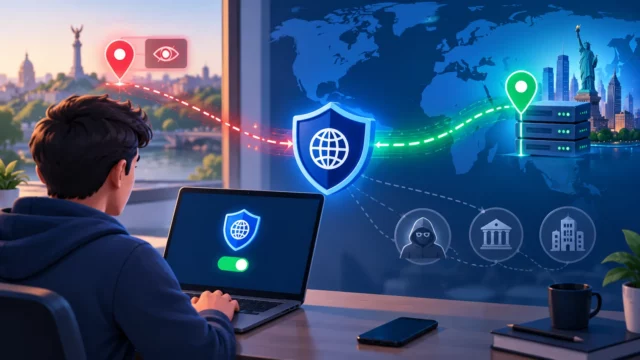


 Quick Navigation
2. WebRTC, DNS, and IPv6 leaks
3. GPS and location permissions
4. Wi-Fi-based browser geolocation
5. Cookies, accounts, and browsing history
6. Payment and billing information
7. Mobile network and app-level signals
8. Browser fingerprinting
9. ASN and datacenter-IP detection
10. VPN detection and inconsistent signals
What a VPN hides, and what it doesn’t
How to reduce location leaks
FAQ
So is your VPN broken? Probably not. A VPN does what it’s designed to do. It reroutes your traffic and masks your real IP address. However, your location isn’t reflected by your IP alone. Websites can use other data and signals to determine your location. And if those signals don’t match your VPN location, a website may notice the discrepancy.
That said, this location guessing doesn’t mean you’re exposed or your privacy is threatened. Read this article to find out how websites can spot your true location even if your VPN is on and discover whether it should bother you.
1. Your browser and device settings
Suppose you’ve connected to a VPN server located in California, meaning you now have a California-based IP address. However, your browser might still report that your language is set to France, your timezone is GMT+2, and your device’s regional settings use a 24-hour clock and metric units. None of these preferences would change automatically when you connect to a VPN. Why? Because they are based on your operating system and browser configuration, not your network.
Of course, all these settings aren’t treated as red flags for the websites you visit. People often keep their browser settings unchanged when traveling. Even your home-timezone configurations may stay the same during a visit to another country.
However, a US-based IP address, Paris timezone, and French-language browser could make websites suspicious. Sites that care about the use of VPNs or proxies often consider device and browser settings more important than your IP address.
2. WebRTC, DNS, and IPv6 leaks
Even when it seems that your VPN connection is effective, several technical leaks can keep exposing your real IP address without you knowing. And it’s not fearsome malware or hacking attempts but default browser and network behavior.
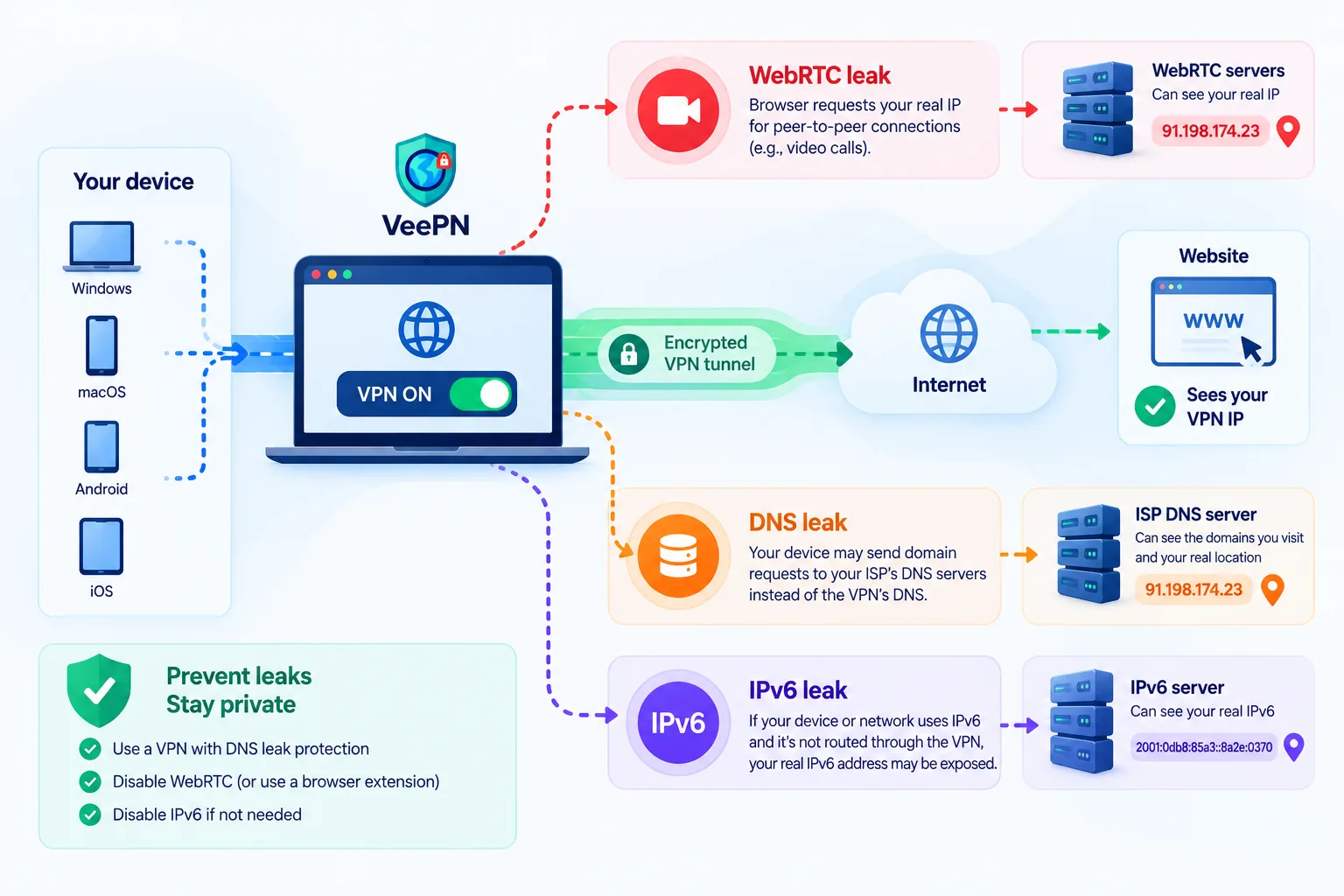
WebRTC leaks occur when WebRTC (the technology behind browser-based video calls and voice chats) establishes direct connections between users. To make this possible, your browser requests the device for its local and public IP addresses. And in some cases, this exchange happens outside the encrypted VPN tunnel, making your real IP visible to websites.
DNS leaks take place when a device sends domain lookup requests to default DNS servers of your Internet service provider (ISP) instead of running them through your VPN’s DNS. Since your ISP knows your location, it may be revealed even though your traffic remains encrypted. You can run a DNS leak test and figure out how to avoid it here.
IPv6 leaks have a similar effect, but the reason behind them is different. Many VPNs secure IPv4 traffic only. That said, if your device or network also supports IPv6, that traffic can travel outside the VPN tunnel. Naturally, it exposes your address and location through your ISP.
It’s a good idea to run several free leak tests to check whether your data is secure and select a VPN with strong DNS leak protection. Besides, you can handle or disable IPv6 traffic to prevent your IP and location exposure outside of the VPN tunnel.
3. GPS and location permissions
While this one has nothing to do with your VPN, many still underestimate the impact of their device’s GPS on the browsing experience and online privacy. If a particular app has permission to access your location, it can track your GPS coordinates no matter what city or country your IP address is attached to. Remember, a VPN only reroutes and secures your network traffic. It doesn’t affect your device’s GPS chip in any way.
Weather apps, food delivery, maps, ride-sharing applications, and other specific location-based services need this information to function as expected. But many apps ask for this info for no good reason. Most of them, including popular marketplaces and social media apps, have your browsing interests and habits in mind. They use your location and other details for ad targeting. The EFF found four advertising SDKs that collect users’ location by default for ad targeting when embedded in apps with location permissions, with one claiming a reach of 1.5 billion users.
So, what can you do here to protect your privacy? Apart from using a VPN to mask your IP address and secure your web traffic, check which apps have your permission to track your GPS location (whether “always” or “while using”). While turning it off entirely will likely cause friction when using specific location-based applications, you can safely disable apps that don’t need to know your whereabouts to function properly.
4. Wi-Fi-based browser geolocation
GPS isn’t the only thing that can disclose your location. Your browser has its own geolocation trick, which works even on devices without a GPS chip, including laptops and desktops.
Most browsers support a Geolocation API that can detect your whereabouts by scanning nearby Wi-Fi networks. It compares their names and hardware addresses against massive global databases maintained by corporations like Google and Apple. Such databases map Wi-Fi access points around the world. So, when a website asks whether you allow it to know your location and you click yes, it instantly learns where you are (and quite precisely, sometimes even down to the building).
What’s more, a VPN has no effect on this location tracking technique, because it doesn’t rely on your network route or IP address. Your browser simply sends Wi-Fi signal data to the geolocation provider. Just like with apps that ask for permission to access your location through GPS, websites may or may not need this information to function. So, to protect your privacy, it’s worth denying this access when it’s unnecessary.
5. Cookies, accounts, and browsing history
Websites consider more than your IP address location. They can also draw on data from your previous activity. When you visit a web page or online service, you may leave behind pieces of data that websites can use to recognize or learn more about you.
So, if you switch on a VPN and return to the same page, it may still recognize you. That’s especially true if you saved your home address, currency, language settings, purchase history, or simply accepted cookies when the VPN was off.
A masked IP can’t hide your previous activity on websites. It helps to erase your browsing history, cookies, and other data from time to time.
6. Payment and billing information
When making an online transaction, it’s much harder to hide information associated with your location. Credit and debit cards are issued by banks tied to a certain country, and that information may be available to the merchant regardless of what your IP address suggests. Your billing address, currency preference, and payment method can therefore provide additional clues about your location.
As a result, when shopping online with a VPN on, you can see foreign product listings and prices. But that may not be the case at the checkout, as your financial data discloses the country where the card was issued and the registered address.
7. Mobile network and app-level signals
Your phone applications usually have more access to your location info than a web browser. The reason for this is simple: your SIM card is tied to a country code provided by your mobile carrier. While a VPN is rerouting your traffic through an encrypted tunnel, it doesn’t hide details reported by carrier-level settings. So, if certain apps have permission to track this info, they will learn your location, no matter whether your VPN is turned on or not.
8. Browser fingerprinting
Fingerprinting is a technique that lets websites combine small details about your device and browser version and settings into a unique signature. It’s less harmful than it sounds, mostly used to prevent fraud and detect bots. Fingerprinting can link your separate browsing sessions (the ones with your home IP address and the ones with an IP provided by a VPN) and reveal your whereabouts.
9. ASN and datacenter-IP detection
Every IP address on the Internet belongs to an ASN (Autonomous System Number). It’s a registration tag that identifies which organization owns a particular block of addresses. It can be a residential Internet provider, a mobile carrier, or a hosting/cloud service.
Websites and anti-fraud services don’t just check where an IP is geographically located. They also learn who it belongs to. If your VPN’s IP falls under an ASN registered to a known hosting provider or data center, it can be treated as VPN or proxy traffic, regardless of the location’s accuracy. This way, many streaming platforms, banks, and online marketplaces spot VPN usage even when everything else about the connection looks normal.
Services that rely on IP reputation databases (such as MaxMind, IP2Location, or IPQualityScore) cross-reference ASN data. That’s why VPN providers using residential or ISP-associated IP pools face fewer blocks than those relying on datacenter IPs only.
10. VPN detection and inconsistent signals
Finally, websites have real reasons to learn more about your activity. Those range from preventing suspicious activity and fighting harmful bots to learning your browsing habits for advertising purposes. At the same time, security systems may look for inconsistencies and other risk signals in your activity rather than treating VPN use alone as suspicious.
For example, imagine that an IP claims that a user is in the US, while timezone and account history are linked to Australia, and billing details come from Germany. This inconsistency might trigger security systems to double-check this activity or even block access to a web page.
However, this behavioral mismatch isn’t the main reason a VPN gets blocked. Streaming platforms and banks usually don’t need to compare your timezone to your billing address. They simply check whether the IP itself looks suspicious. As mentioned above, if it belongs to a known hosting or server provider, with hundreds of other users connecting from that same address at once, a block may be triggered instantly. This is why switching servers within the same VPN app often “fixes” the issue right away. It means that the new IP isn’t flagged.
In most cases, online services detect VPNs and proxies to prevent users from accessing geo-limited content (meaning that certain movies, series, or online games are only available in specific countries due to copyright agreements). This explains why a VPN server may work perfectly for common browsing but fail during checkout, gaming, or streaming.
Disclaimer: VeePN is a VPN service not intended to be used for bypassing copyright regulations or other illegal behavior. For more details, please read the VeePN Terms of Service.
What a VPN hides, and what it doesn’t
A VPN doesn’t guarantee complete anonymity, and it isn’t designed to. To learn more about online anonymity, check out our guide on how to be anonymous online.
A VPN is an effective tool that covers the following aspects of your online presence:
- It masks your IP address. The websites will see an IP provided by your VPN service instead.
- It encrypts your Internet traffic. It enhances your privacy and protects your activity from unwanted monitoring.
- It adds an extra security layer. Combined with reliable antivirus and some other protection measures, it’s a strong measure against malicious actors and hackers.
- It ensures more browsing freedom. Changing your online location with a VPN allows you to surf the web freely and privately.
Now, here’s what a VPN doesn’t do:
- It doesn’t make you anonymous. Again, some information about you remains visible to the websites and apps you’re using.
- It doesn’t prevent WebRTC, DNS, and IPv6 leaks automatically. For that, you need specific client functions and additional settings.
- It doesn’t change your GPS or SIM info. That’s all in your phone’s settings and app permissions.
- It doesn’t touch your saved cookies and browser settings. Consider clearing your data regularly to stay private online.
So even if your IP address looks entirely foreign, plenty of signals that a VPN doesn’t hide can still help websites and apps determine your location.
How to reduce location leaks
If you’re genuinely worried about your Internet privacy, there are certain things you can do to secure your online presence:
✅ Run a leak test. Check for IP, DNS, and WebRTC leaks to make sure that you’re protected.
✅ Check IPv6 protection. If your VPN doesn’t support IPv6, make sure it blocks IPv6 traffic to prevent potential leaks.
✅ Disable WebRTC in your browser. It can expose your real IP even behind a VPN.
✅ Match your timezone and browser language to your VPN location. Mismatches are an easy giveaway.
✅ Log out of accounts you don’t need active. Logged-in sessions can tie your browsing back to your identity.
✅ Clear cookies and browsing data regularly. Trackers can reveal your location and habits over time.
✅ Revoke unnecessary location and app permissions, especially on mobile. Phone apps read GPS and your SIM’s carrier country directly, and the VPN doesn’t touch either.
And finally, pick a trustworthy paid VPN service. Free VPNs are unreliable, as they may collect your data and sell it to third parties. Besides, their servers are often overwhelmed and slow. Consider VeePN, a reliable VPN that offers over 2,600 servers across 196 locations in 148 countries. Besides, it comes with necessary security and privacy features, including NetGuard, Kill Switch, Double VPN, Split Tunneling, and more.
Enjoy private browsing with VeePN. Try it out today with a 30-day money-back guarantee!
FAQs
When you log in, a streaming platform (just like many other websites) can check more than your IP address. This list may include your account history, billing details, or even your timezone. While a VPN changes your network location, your account may already be tied to another region.
Less than it does on a computer. Your phone’s GPS, SIM country code, and app permissions all report location independently of the VPN tunnel, and apps have more direct access to them than a browser does. The VPN still masks your mobile IP address.
Not entirely. Websites can learn a lot about you, and cookies are just one part of it. For instance, if a website uses the fingerprinting technique, clearing your cookies and browsing history won’t erase every trace of your previous activity.
Not really. While it’s better for your privacy to keep certain permissions blocked, many apps need to access your location or other info to function properly. For example, weather, food delivery, or ride-sharing services have to track your whereabouts by default. Consider revoking access to your private data only where it doesn’t match the app’s direct functionality.
Most websites are unlikely to know your real physical address. In most cases, they have general information about your city or region based on your IP address, timezone, preferred currency, and other details. Precise location only becomes available through browser Wi-Fi geolocation or if you provide an app or website with direct GPS access.


VeePN is freedom
Download VeePN Client for All Platforms
Enjoy a smooth VPN experience anywhere, anytime. No matter the device you have — phone or laptop, tablet or router — VeePN’s next-gen data protection and ultra-fast speeds will cover all of them.
Download for PC Download for Mac IOS and Android App
Want secure browsing while reading this?
See the difference for yourself - Try VeePN PRO free for 3 days, no risk, no pressure.
Start Free TrialThen VeePN PRO 1-year plan