Deutsch
  Español
  Français
  العربية
  Indonesia
  Italiano
  한국어
한국어  Nederlands
  Polski
  Português
  Türkçe
  简体中文
简体中文  ไทย
ไทย  Tiếng Việt
  Čeština
  فارسی
فارسی  Română
  Filipino
  日本語
日本語 


Dating Tracking Apps: Useful Tool or Privacy Risk?
A dating tracking app can mean two very different things. In the healthy version, it is a simple app that helps users remember special dates, log notes after a date, spot unhealthy patterns, and keep a better sense of what is happening in their dating life. In the bad version, it turns into stealth monitoring on someone else’s phone or device, and that is where the privacy and legal trouble starts.
That split matters now more than ever. Modern online dating already creates a lot of personal data, and that can be useful or risky depending on how the tool works, what permissions it wants, and whether the other person knows what is going on. We’ll walk through both sides, then show where VeePN fits if you want to keep your dating data a little more private.
 VeePN Research Lab


 Quick Navigation
2. When Location Sharing Is Reasonable
3. Warning Signs of Abusive Tracking
4. Safer Settings on iPhone and Android
5. Safer Alternatives for Dates
6. Where VeePN Fits
7. Consent Is a Feature, Not a Checkbox
8. The Different Kinds of Location Sharing
9. Settings To Review Before a First Date
10. If You Suspect Tracking Without Consent
11. Dating App Privacy Beyond GPS
12. What App Makers Should Do Better
13. Safer Scripts for Awkward Conversations
14. A Quick Audit for Existing Relationships
15. What To Say About Teens and Parents
16. Related privacy tools
17. Data Minimization for Dating Profiles
18. The boundary test
FAQ
Dating tracking apps can be helpful when both people clearly consent. They can also become invasive very quickly. The line is consent, control, and reversibility: both people should know what is shared, how often it updates, and how to stop it.
This guide is for people considering location sharing with a partner, parents talking to teens, and anyone worried that an app is tracking them without permission.
What Dating Tracking Apps Usually Collect
| Data type | Why an app may ask for it | Risk if misused |
|---|---|---|
| Live location | Meetups, safety check-ins | Stalking, coercive control, routine monitoring |
| Location history | Trip review, patterns | Reveals home, work, friends, medical visits |
| Contacts | Invites, social features | Exposes other people without consent |
| Photos and profile data | Identity and matching | Doxxing or impersonation |
| Device identifiers | Fraud prevention, analytics | Cross-app tracking |
The safest setup shares less data, for less time, with obvious controls.
When Location Sharing Is Reasonable
Location sharing can make sense for a first date, travel, emergencies, or a temporary check-in. The key word is temporary. A 2-hour share while meeting someone new is very different from always-on tracking that one partner pressures the other to keep enabled.
Good apps make status visible. Bad patterns hide tracking in vague permissions or make it hard to stop sharing.
Warning Signs of Abusive Tracking
Treat these as serious: a partner demands your live location at all times, gets angry when you turn it off, asks for your phone password, installs apps for you, checks battery or screen-time history, or uses location data to question where you went.
Safer Settings on iPhone and Android
On iPhone, review Settings > Privacy & Security > Location Services. Check each app and prefer “While Using” instead of “Always” unless there is a clear reason. Also review Find My > People to see who can view your location.
On Android, review Settings > Location > App location permissions. Choose “Allow only while using the app” where possible. On recent Android versions, use approximate location for apps that do not need exact GPS.
Safer Alternatives for Dates
You do not always need a dating tracking app. You can share the date plan with a trusted friend, use built-in temporary location sharing in Apple Find My or Google Maps, meet in public, arrange your own transport, and set a check-in time.
For early dating, a temporary share is usually enough.
Where VeePN Fits
A VPN cannot stop someone from tracking you if you willingly share live GPS location inside an app. GPS location and IP address are different signals.
VeePN can still help with broader privacy. The VPN reduces IP-based tracking while browsing or messaging on public Wi-Fi. Alternative ID can help you use a separate email identity for dating apps or low-trust signups. Data Breach Alert can warn if an email tied to dating accounts appears in known breaches.
Use those tools alongside app permission checks, not instead of them.
Consent Is a Feature, Not a Checkbox
Healthy location sharing has four qualities: it is specific, mutual, visible, and easy to stop. If one person can quietly monitor the other without a clear reminder or control, the app is not functioning as a relationship tool anymore. It is functioning as surveillance.
That distinction matters because many dating safety articles only ask whether an app is “useful.” A tracking app can be useful on Friday night and harmful by Monday morning if the social pressure changes. The technical setting did not change. The power dynamic did.
Use this quick test before sharing location with a partner:
| Question | Healthy answer | Warning answer |
|---|---|---|
| Who requested it? | Either person can suggest or decline | One person demands it |
| How long does it last? | Time-limited or event-based | Always on by default |
| Can it be paused? | Yes, without punishment | Pausing causes conflict |
| Is history visible? | Minimal or off | Full routine tracking |
| Is it mutual? | Both understand the setting | One person monitors the other |
If the answer falls into the warning column, do not frame it as an app-choice problem. It is a boundary problem.
The Different Kinds of Location Sharing
Not all tracking is the same. A dating app that shows approximate distance is different from a live GPS tracker. A temporary Google Maps share is different from an always-on family safety app. A safety check-in that expires is different from a partner watching location history.
Approximate distance can still reveal patterns. If an app shows that someone is “less than 1 mile away” every evening, that may expose home or work routines. Live GPS is more sensitive because it can reveal visits to clinics, religious spaces, friends, shelters, workplaces, or hotels. Location history is the most revealing because it turns moments into a pattern.
Settings To Review Before a First Date
Before meeting someone new, check the app’s location controls. Turn off precise location if the app does not need it. Use approximate location where available. Avoid linking social accounts that reveal your workplace, family, or daily routines. Remove metadata from images if you upload photos outside the app.
On iPhone, Apple’s location privacy guide explains Precise Location and the difference between “While Using” and “Always.” On Android, Google’s location settings guide explains app-level access and approximate location on supported versions.
For a first date, it is often safer to share your plan with a trusted friend than to give a dating app broad location access. Send the venue, the person’s first name or profile, and a check-in time. Keep your own transportation. Meet in a public place.
If You Suspect Tracking Without Consent
Do not immediately confront the person if you believe it could put you at risk. Use a safe device to look up help. The FTC’s guidance on stalking apps is careful about this because removing an app or changing settings can alert the person monitoring you.
Check for signs: unknown apps, location sharing you did not enable, battery drain, device admin apps, configuration profiles, shared Apple ID or Google account access, forwarded messages, and unfamiliar devices in account security pages.
If it is safe to do so, change passwords from a device the other person cannot access. Review recovery emails and phone numbers. Turn on MFA. For iPhone, check Find My sharing and Family Sharing. For Android, check Google Maps location sharing and Google account devices.
Dating App Privacy Beyond GPS
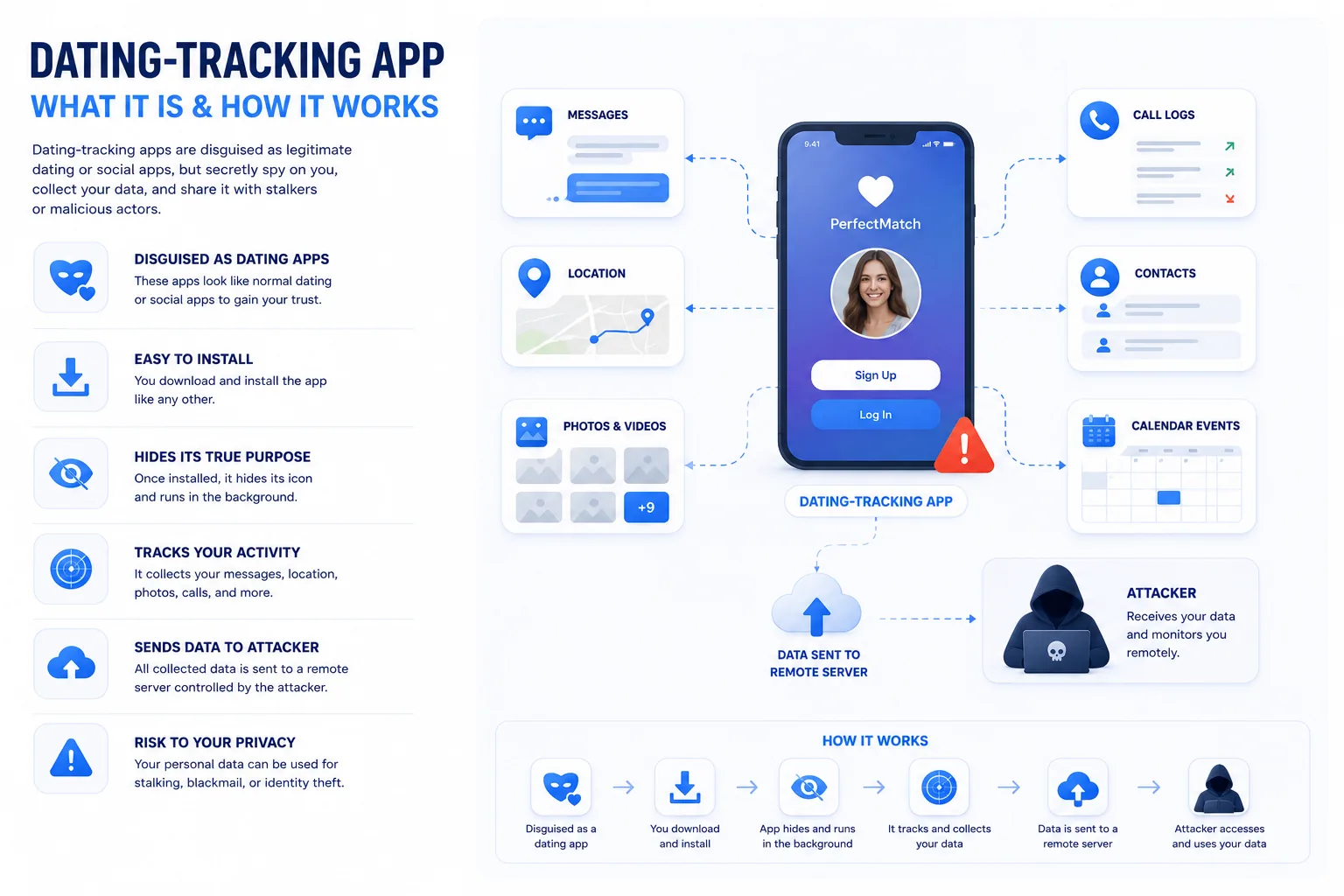
Dating privacy is not only about location. Your photos, workplace, school, Spotify links, Instagram handle, phone number, and writing style can identify you. Reverse image search can connect dating photos to public profiles. A username reused across sites can reveal old accounts.
That is where Alternative ID is more relevant than the VPN itself. A separate email identity for dating apps, newsletters, and lower-trust signups can keep your primary inbox and legal name out of casual exposure. Pair that with Data Breach Alert so you know if the email used for dating accounts appears in a known breach.
For a broader privacy primer, VeePN’s guide to preventing tracking is useful, but the honest line stays the same: no privacy tool can make an unsafe relationship safe.
What App Makers Should Do Better
Dating and safety apps should make tracking visible. They should show a persistent indicator when live location is on, send reminders for always-on sharing, offer one-tap pause, minimize history, and avoid dark patterns around “safety” features. They should also make data deletion clear.
The best design choice is expiration by default. If location sharing starts for a date, it should end after a chosen period unless both people renew it. Permanent access should require a stronger reason than convenience.
Safer Scripts for Awkward Conversations
Some readers know the privacy setting they want but struggle to say it. Give them plain language they can use.
“I do not keep live location on all the time, but I can share my trip for the next hour.”
“I am comfortable sharing the venue and check-in time with a friend. I am not comfortable with always-on tracking.”
“If either of us wants to stop sharing, that should be okay without an argument.”
“I use a separate email for dating apps. It is not personal; it is how I manage privacy.”
These scripts matter because consent is not only a settings screen. A person who feels pressured may leave tracking on even when the app technically allows them to turn it off.
A Quick Audit for Existing Relationships
If location sharing is already active, review it together when things are calm. Ask what is shared, whether history is stored, who else can see it, and whether both people still want it on. Remove old devices and old partners from Apple Find My, Google Maps, Snapchat, Life360-style apps, and shared accounts.
Also review shared passwords. Couples often share streaming, delivery, cloud, or phone accounts casually. After a breakup, those accounts can become tracking channels through order history, saved addresses, family dashboards, photo backups, and device lists.
This is where privacy advice needs to be practical instead of dramatic. Many people are not dealing with spyware. They are dealing with old access that never got cleaned up.
What To Say About Teens and Parents
Parent-child location sharing is not the same as dating tracking, even though people often compare them. Parents may use location sharing for safety, school pickup, or emergencies. Dating partners should not use parental-style monitoring as a relationship norm.
For teens who date, the safest advice is to involve a trusted adult or friend for first-date check-ins rather than relying on a new partner’s tracking request. The person you are meeting should not be the only person who knows where you are.
Related privacy tools
Alternative ID fits dating-app signups, Data Breach Alert fits exposed emails, prevent tracking covers broader privacy, and anonymous email suits people who want a cleaner split between dating and their main inbox.
Data Minimization for Dating Profiles
Use only the information needed to meet safely. Avoid posting workplace badges, apartment views, car plates, school names, or repeated locations in photos. Do not reuse a username that connects to old accounts. If you use social links, understand that they can reveal friends, routines, and family.
Location privacy is not only GPS. People can reconstruct a routine from photos, bios, usernames, and linked accounts.
The safest dating profile gives enough information to build trust without giving strangers a map of daily life. That balance is more useful than telling people to disappear from the internet.
The boundary test
Location sharing is safest when it is temporary, mutual, and easy to stop. A useful test is simple: temporary sharing for a specific safety reason is different from permanent access used to enforce trust. If turning tracking off causes fear, anger, punishment, or interrogation, the problem is no longer a privacy setting.
Technology can support boundaries. It cannot replace them.
That is why the safest setup is reversible. If location sharing cannot be paused without conflict, the app is solving the wrong problem.
FAQ
Can a dating app track me when I am not using it?
It can if you grant always-on location permission. Review app permissions and change location access to “while using” unless always-on sharing is intentional.
Does a VPN hide GPS location?
No. A VPN changes how websites see your IP address. It does not change GPS, Bluetooth, Wi-Fi positioning, or location you share inside an app.
What should I do if someone installed a tracking app on my phone?
Use a safe device to get help, especially if you are worried about retaliation. Then review installed apps, location permissions, device management profiles, and account sharing. In dangerous situations, contact a local support organization before making changes the other person might notice.


VeePN is freedom
Download VeePN Client for All Platforms
Enjoy a smooth VPN experience anywhere, anytime. No matter the device you have — phone or laptop, tablet or router — VeePN’s next-gen data protection and ultra-fast speeds will cover all of them.
Download for PC Download for Mac IOS and Android App
Want secure browsing while reading this?
See the difference for yourself - Try VeePN PRO for 3-days for $1, no risk, no pressure.
Start My $1 TrialThen VeePN PRO 1-year plan