Deutsch
  Español
  Français
  العربية
  Indonesia
  Italiano
  한국어
한국어  Nederlands
  Polski
  Português
  Türkçe
  简体中文
简体中文  ไทย
ไทย  Tiếng Việt
  Čeština
  فارسی
فارسی  Română
  Filipino
  日本語
日本語 


“VPN Detected”: Why Websites Keep Blocking Your VPN (And How to Fix It)
You’re just about to watch a massive Netflix or HBO hit. The VPN is on, and you’ve chosen a perfect server to enjoy the preferred content. Then, just as the movie is about to start, an error message appears: “You seem to be using an unblocker or proxy.” Sadly, this may happen in even more inopportune moments. For example, when you’re trying to check your balance on your banking app, buy concert tickets, or book a hotel room for your long-anticipated vacation.
 Fawad Ali


 Quick Navigation
If something like that keeps happening to you, it’s not just your impression. VPN detection is becoming more severe, even when you’re doing nothing wrong. So why does the “VPN detected” error keep appearing, and what actually clears it?
The internet is full of non-human traffic
Many don’t realize that websites and online platforms aren’t opposed to VPNs as such. In most cases, their defenses are up against any potential threats. According to the 2026 Thales Bad Bot Report based on the data from Imperva, which monitors global web traffic, automated traffic accounted for over 53% of all web activity in 2025. What’s more, 40% of that traffic is malicious bots, while the previous study showed 37%.
All in all, “bad” bots are becoming more active and dangerous.
But what do these numbers have to do with a virtual private network (VPN)? To understand that, let’s take a quick look at how VPNs work. Simply put, a VPN creates an encrypted tunnel for your internet traffic and masks your original IP. While this has a positive effect on your online privacy and security, it can accidentally trip a website’s security alarms.
That’s why everyday VPN users can sometimes end up as collateral damage.
Web security systems are tightly tuned to detect bots, malware, and cybercriminals trying to commit fraud or steal personal information. But since the source of your traffic is hidden when you use a VPN, you may just fall into the same dragnet.
How a website “knows” you’re using a VPN
Normally, websites don’t block VPN users automatically. Instead, they analyze certain signals that flag your online activity as questionable when your VPN is on. Here are some details:
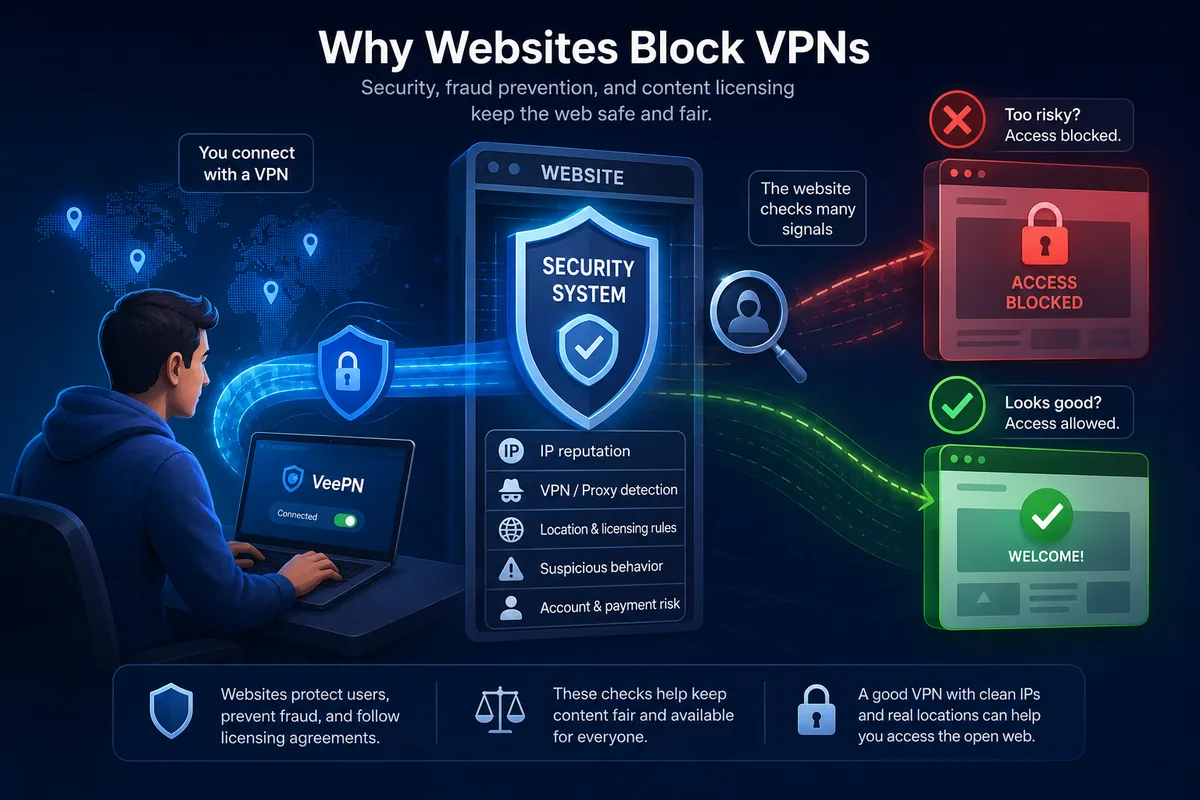
Known IP ranges
A VPN replaces your actual IP address with an alternative one. This helps protect your privacy and provides greater Internet freedom. However, that new IP address can also reveal that you’re using a VPN.
VPN providers usually rent blocks of IP addresses from data centers. A fraud-prevention vendor can identify these addresses because they don’t belong to residential Internet service providers (ISPs). In other words, your traffic appears to come from a data center rather than a typical home Internet connection. Some websites and services might associate such IPs with suspicious Internet activity and block them as a security precaution.
Many users with the same address
VPN servers are shared. That means that dozens of users can connect to the web through the same server. If a single IP address is generating logins from what looks like dozens of different accounts or is being used by thousands of people at once, that address stands out mathematically, even if every single person on it is behaving innocently.
Reputation of an IP address
Each IP address has its own history. If a certain IP is associated with spam, credential stuffing attacks, or any other suspicious activity, this reputation sticks around. Fraud-detection networks will spot and block these IPs, even if they travel to another VPN provider or customer. That’s why it’s so important to choose a VPN with high-quality servers that undergo regular checks.
Mismatched signals
When using a VPN, you change your virtual location along with your IP address. At the same time, your device’s time zone, language, or GPS signal may give away information about your actual whereabouts. While it’s not forbidden to alter your location online, fraud-detection systems of many websites, including streaming platforms, may view these inconsistencies as a threat and block your access.
Deep packet inspection
We already mentioned that certain IP addresses can be blacklisted for security reasons. But what if the IP address provided by your VPN is entirely legit? Certain networks use more advanced ways to analyze and control Internet traffic. One example is deep packet inspection (DPI), which analyzes the nature of your traffic, not only your IP address. This allows providers to spot patterns resembling VPN protocols and instantly block the connection.
However, such an approach is more common for strictly limited networks that belong to corporate or educational systems. Besides, these restrictions may take place in countries with a high level of Internet censorship, such as North Korea, China, or Iran.
Why some services care more than others
Different types of websites and Internet services have their own reasons to block VPNs and proxies. Here are the most common examples:
Streaming platforms
Popular streaming services like Netflix, HBO Max, or Disney Plus license their content based on specific locations. For instance, a show that is available to viewers in the US may not be streamed in other countries due to copyright and distribution agreements. And since a VPN alters your virtual location, streaming services may ban traffic associated with VPNs or proxy servers. On top of that, the list of blocked servers may update quite often, so a server that used to work perfectly might suddenly stop working.
VPN and proxy error codes by service
| Service | Error code and message | What it means |
|---|---|---|
| Netflix | E106: “You seem to be using a VPN or proxy. Please turn off any of these services and try again.” Older codes still in circulation: m7111-5059, m7111-1331-5059, tvq-pb-101. | Netflix matched your IP against a list of VPN, proxy and datacenter addresses. |
| Disney+ | Error 73: “This content isn’t available to watch in your current location.” | Your detected location does not match the licensing region for that title. |
| Hulu | P-EDU101: Hulu is not available in your region. | Hulu flagged the connection as an anonymous proxy and stopped playback. |
| Amazon Prime Video | HTTP proxy error: your device appears to be using a proxy or VPN. | Prime Video sees a datacenter IP instead of a home broadband connection. |
| BBC iPlayer | No code: “BBC iPlayer only works in the UK.” | iPlayer blocks non-UK addresses and known VPN ranges, with no error number. |
If you see any of these, the fix is usually the same: reconnect to a different server in the same country, then clear the site’s cookies before you reload.
Banks and payment providers
Online banks and payment services deal with more serious issues, such as account takeover fraud, credential stuffing attempts, and other online threats. In most cases, they use fraud-detection systems, allowing them to spot and block questionable traffic. As mentioned previously, VPNs provide alternative IPs, which may trigger a security system and cause certain friction (more CAPTCHAs, two-factor authentication prompts, or even a complete block).
Online stores and ticketing sites
Similar to banking services, online stores, marketplaces, and ticketing platforms strive to detect dangerous bots designed to steal accounts and compromise sensitive customer data. Even a legitimate VPN user can get caught in a trap set for such malicious activity.
Other websites
If you are using a VPN and a website is blocking you even though you have done nothing wrong, you may be dealing with additional security measures from a generic third-party protection service like Cloudflare.
These services use automated anti-bot and threat-detection measures to protect websites from malicious traffic.
Disclaimer: VeePN is a VPN service not intended to be used for bypassing copyright regulations or other illegal behavior. For more details, please read the VeePN Terms of Service.
What you can do to avoid VPN blockers
Sadly, there is no single magic workaround that will let you beat all VPN blocks whatsoever. That’s because detection methods vary, as well as the reasons for applying them. But there are several effective approaches that might actually work. Let’s take a look at each:
- Change your VPN server. Simple as that: open your VPN app or browser extension and connect to another VPN server. If you‘re dealing with common IP blacklisting, gaining a new address will help you get through.
- Clear your browser cookies and website data. A website may remember your previous activity or flag your behavior as suspicious when you try to enter with a new IP address. Erasing your digital footprint will let you start fresh.
- Avoid location conflicts. If you share your GPS location with the browser or app, a website can detect inconsistencies in your digital whereabouts. Make sure your system time zone, language settings, and other details don’t contradict your VPN location.
- Try another VPN protocol. Trustworthy VPN apps allow you to change VPN protocols (some examples include OpenVPN, WireGuard, and IKEv2/IPSec). It’s a set of rules that defines how your Internet traffic moves from your device to a VPN server. This method is especially suitable if you face strict censorship limitations, such as DPI.
- Switch to mobile data. The reason behind a VPN block might be triggered not by a website but by a network provider. Simply turn off your Wi-Fi connection and try to reach the site using mobile data.
- Turn to a reliable VPN provider. If you are using a free or questionable VPN service, it might simply be ineffective and get blocked by websites more often. Such VPNs tend to have overcrowded IPs that are easier to detect and blacklist. In contrast, a powerful service with many virtual locations to choose from lets you switch between servers and protocols, enhancing your Internet freedom.
Looking for a solid VPN service that will allow you to browse freely without compromising your online privacy and security? Give VeePN a shot! Our solution comes with over 2,600 servers across 196 locations in 148 countries, reliable data encryption, and a transparent No Logs policy.
Try it out today with a 30-day money-back guarantee!
FAQs
CAPTCHAs allow websites and online platforms to tell real people from bots. When you’re using a VPN, your traffic comes from an alternative location. If a server is unreliable (plus consider possible location mismatches), certain websites, or rather security providers behind them, think that you’re not human. That’s why the CAPTCHA might be loading for too long. Instead of just letting you in, an anti-bot service will keep looping as it doesn’t understand whether your traffic is legit.
Your VPN IP address can be flagged simply because it appears on a list of banned IPs, prompting the website’s security system to block it. Switching to another VPN server could do the trick by giving you a new IP address that hasn’t been flagged. However, keep in mind that if the problem is something else (like more advanced Internet censorship or location inconsistency in your account history), this method won’t be effective.
Free VPN services get blocked more often than paid ones primarily because they rely on a limited pool of shared IP addresses. When lots of users connect through the same IP, especially in high-demand locations like the US or the UK, websites can detect unusual traffic patterns and block or blacklist those addresses.
In contrast, reliable paid VPNs like VeePN typically have larger server networks and more IP addresses to choose from, reducing the chances of running into a blocked address.


VeePN is freedom
Download VeePN Client for All Platforms
Enjoy a smooth VPN experience anywhere, anytime. No matter the device you have — phone or laptop, tablet or router — VeePN’s next-gen data protection and ultra-fast speeds will cover all of them.
Download for PC Download for Mac IOS and Android App
Want secure browsing while reading this?
See the difference for yourself - Try VeePN PRO for 3-days for $1, no risk, no pressure.
Start My $1 TrialThen VeePN PRO 1-year plan