Deutsch
  Español
  Français
  العربية
  Indonesia
  Italiano
  한국어
한국어  Nederlands
  Polski
  Português
  Türkçe
  简体中文
简体中文  ไทย
ไทย  Tiếng Việt
  Čeština
  فارسی
فارسی  Română
  Filipino
  日本語
日本語 


VPN With Static IP: When a Stable Address is Actually Worth It
For most people, a regular VPN is enough. You connect, get protected, and move on. But some users run into a different problem. Their IP address keeps changing, and certain sites or work tools do not like that.
That is where a VPN with static IP starts to make sense. It gives you a more stable connection identity, which can help with secure remote access, repeat logins, whitelisting, and services that get suspicious when your VPN IP address changes too often. We’ll also show how VeePN helps with getting static IP.
 VeePN Research Lab


 Quick Navigation
What a VPN with static IP really means
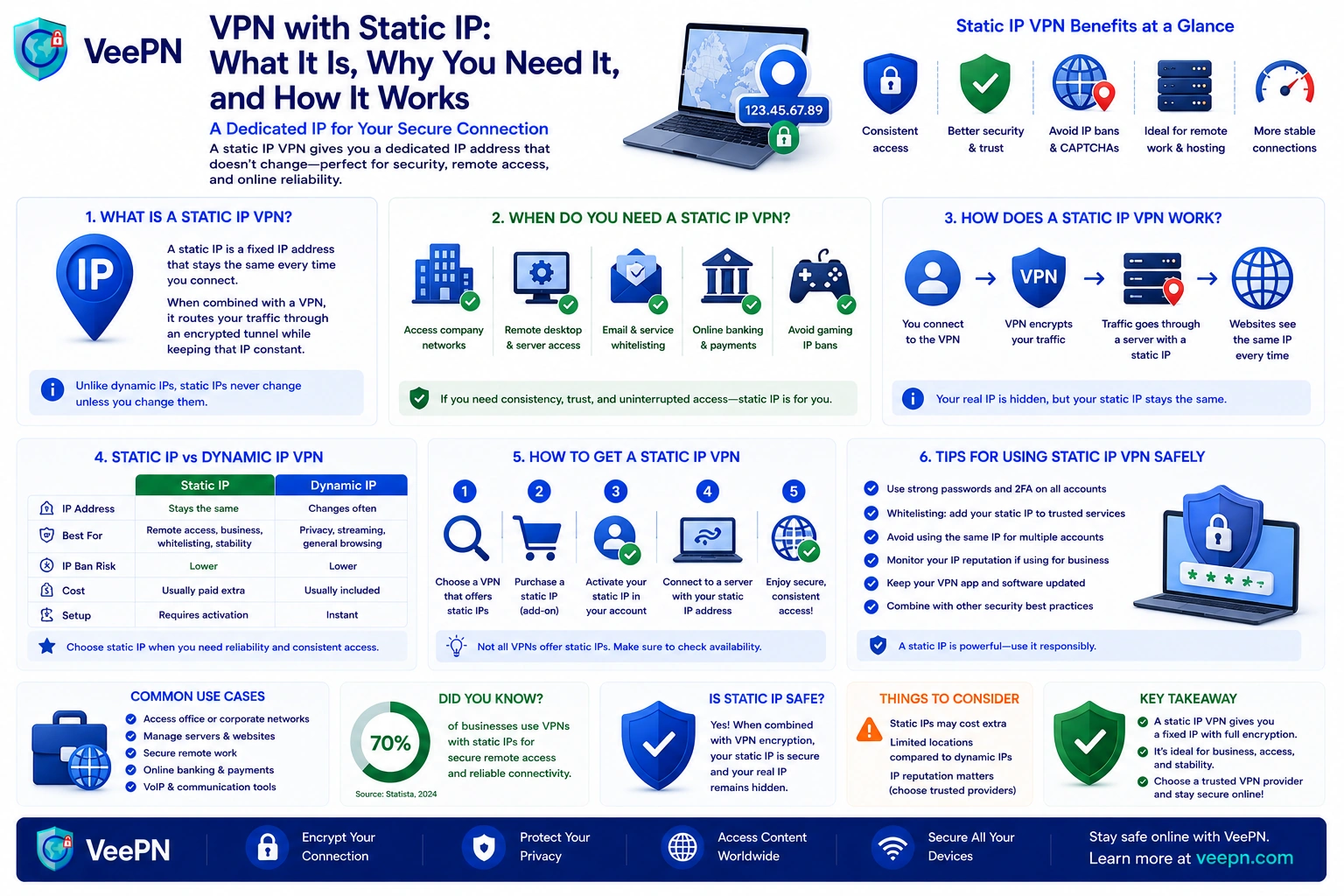
A static IP address is one that stays the same every time you connect. A dynamic IP, by contrast, can change whenever your provider or network reassigns it. One stays put, the other keeps shifting, and that single difference is what most of these decisions come down to.
A typical VPN hands you a shared address from a pool on the server, so plenty of people appear to come from the same place at once. That is great for blending in, but it gets in the way when a service expects to see you arrive from the same address each time.
A static IP VPN tends to help when you want:
- More predictable access. Work dashboards, admin panels, and internal tools often trust repeat logins from a familiar place, which can mean fewer warnings and fewer blocks.
- Smoother remote work. If your team relies on IP allowlisting, a steady source is far easier to manage for remote access and restricted systems that only open up to approved addresses.
- Less friction with sensitive services. Banks and payment tools sometimes react badly to an address that keeps changing, so a stable endpoint can spare you the extra security checks.
- More control for hosting or admin tasks. Managing a web server, connecting remotely, or using port forwarding is simply easier from a fixed point.
Static IP and dedicated IP address: close, but not the same
These two terms get mixed up constantly, and the difference is worth a moment.
A static IP just means the address does not change. A dedicated IP means the address is reserved for you alone. So a dedicated IP can also be static, but a static one is not automatically yours and yours only.
- Static means stable. The address stays the same, which helps with repeat access and trusted logins.
- Dedicated means personal. It is assigned to a single account rather than shared with strangers.
- Shared means group use. Many people leave through the same endpoint, which is usually better for privacy but less ideal when a service wants to recognize you each time.
So when people weigh static against dedicated, the real question is not which label sounds better. It is whether they need a stable address or one that belongs to them exclusively.
When shared IP addresses still make more sense
Not everyone needs a personal address. Most people do perfectly well on a shared one.
A shared setup is often the better pick when your main goal is privacy, casual browsing, streaming, and everyday apps. Because you blend in with other users, it is harder for a site to tie all that activity back to you, which is exactly why many providers use shared pools by default. It also keeps your real IP address out of view.
A shared address is usually enough if you mostly:
- read, browse, and shop
- stream on the usual platforms
- check email and social apps
- want basic privacy on public Wi-Fi
It does have trade-offs:
- More CAPTCHA checks. When a lot of people hit a site from one server, that address can start to look noisy.
- More login friction. A service may see a crowded range and ask for extra verification.
- Less consistency. If you need the same address for repeated access, a rotating pool can feel unreliable.
When a dedicated IP location is worth paying for
For the right routine, a dedicated location quickly earns its cost.
It tends to pay off when your day leans on trust, consistency, or easy repeat access. Not every user needs it, but for the right setup it removes a lot of small headaches.
Common cases include:
- Business tools and whitelisting. If a company only allows one approved address, a stable source makes that simple.
- Online banking and payments. Financial platforms that dislike changing exits tend to ask for fewer checks when the address stays familiar.
- Hosting and admin panels. A dedicated setup helps when you manage dashboards or services tied to one trusted source.
- Cleaner access to picky sites. A personal address is not dragged down by what other users on a shared one happen to be doing, so you see fewer blocks and captchas.
That is why people often look for the best dedicated IP VPN. It is rarely about privacy alone. Usually they just want access that feels normal and predictable.
Which IP type fits your use case
| Use case | Best IP type |
|---|---|
| Everyday browsing, streaming, social apps | Shared dynamic IP |
| Privacy on public Wi-Fi | Shared dynamic IP |
| Repeat logins to work dashboards and admin tools | Static IP |
| IP allowlisting for company systems | Dedicated static IP |
| Online banking and payment platforms | Static IP |
| Hosting, servers, and remote desktop | Dedicated static IP |
| Maximum anonymity and blending in | Shared dynamic IP |
How VeePN makes a VPN with static IP more practical
A stable address smooths out logins, remote access, and services that dislike constant changes. VeePN keeps that convenience but wraps protection around it, so you are not trading privacy for stability.
- Static IP option. Handy for repeat logins, work tools, and approved access lists where a familiar identity makes things easier.
- AES-256 encryption. Keeps your traffic protected, especially on public Wi-Fi you do not fully trust.
- IP masking. Lets you keep a consistent identity without exposing your real address.
- Kill Switch. Cuts traffic if the VPN drops, so nothing leaks mid-session.
How to keep the same IP address with VeePN
VeePN does not sell a separate dedicated IP add-on. Instead, it keeps your address stable within a session: once you connect to a server, your IP stays the same until you disconnect or reconnect. Here is how to use that:
- Download the VeePN app and log in to your account.
- Pick a specific server location instead of Optimal and add it to your favorites.
- Connect. From this moment your visible IP address stays the same until the session ends.
- Turn on Kill Switch so a dropped connection cannot quietly swap your address mid-session.
- When you need to reconnect, choose the same location again to keep your access patterns consistent.
Try VeePN without any risk, since every plan comes with a 30-day money-back guarantee.
FAQ
It depends on what you need. A dedicated IP address is better for stable logins, work dashboards, and services that trust one familiar source. A shared IP is usually better for everyday privacy because your traffic blends in with other users. Discover more in this article.
A VPN with static IP makes the most sense for people who need repeat access to work tools, admin panels, or sites that react badly to frequent IP address changes. If you mostly browse, stream, and use apps normally, a shared VPN setup is often enough. Discover more in this article.


VeePN is freedom
Download VeePN Client for All Platforms
Enjoy a smooth VPN experience anywhere, anytime. No matter the device you have — phone or laptop, tablet or router — VeePN’s next-gen data protection and ultra-fast speeds will cover all of them.
Download for PC Download for Mac IOS and Android App
Want secure browsing while reading this?
See the difference for yourself - Try VeePN PRO for 3-days for $1, no risk, no pressure.
Start My $1 TrialThen VeePN PRO 1-year plan