Deutsch
  Español
  Français
  العربية
  Indonesia
  Italiano
  한국어
한국어  Nederlands
  Polski
  Português
  Türkçe
  简体中文
简体中文  ไทย
ไทย  Tiếng Việt
  Čeština
  فارسی
فارسی  Română
  Filipino
  日本語
日本語 


What is Unified Threat Management and Why it Still Beats Juggling Tools
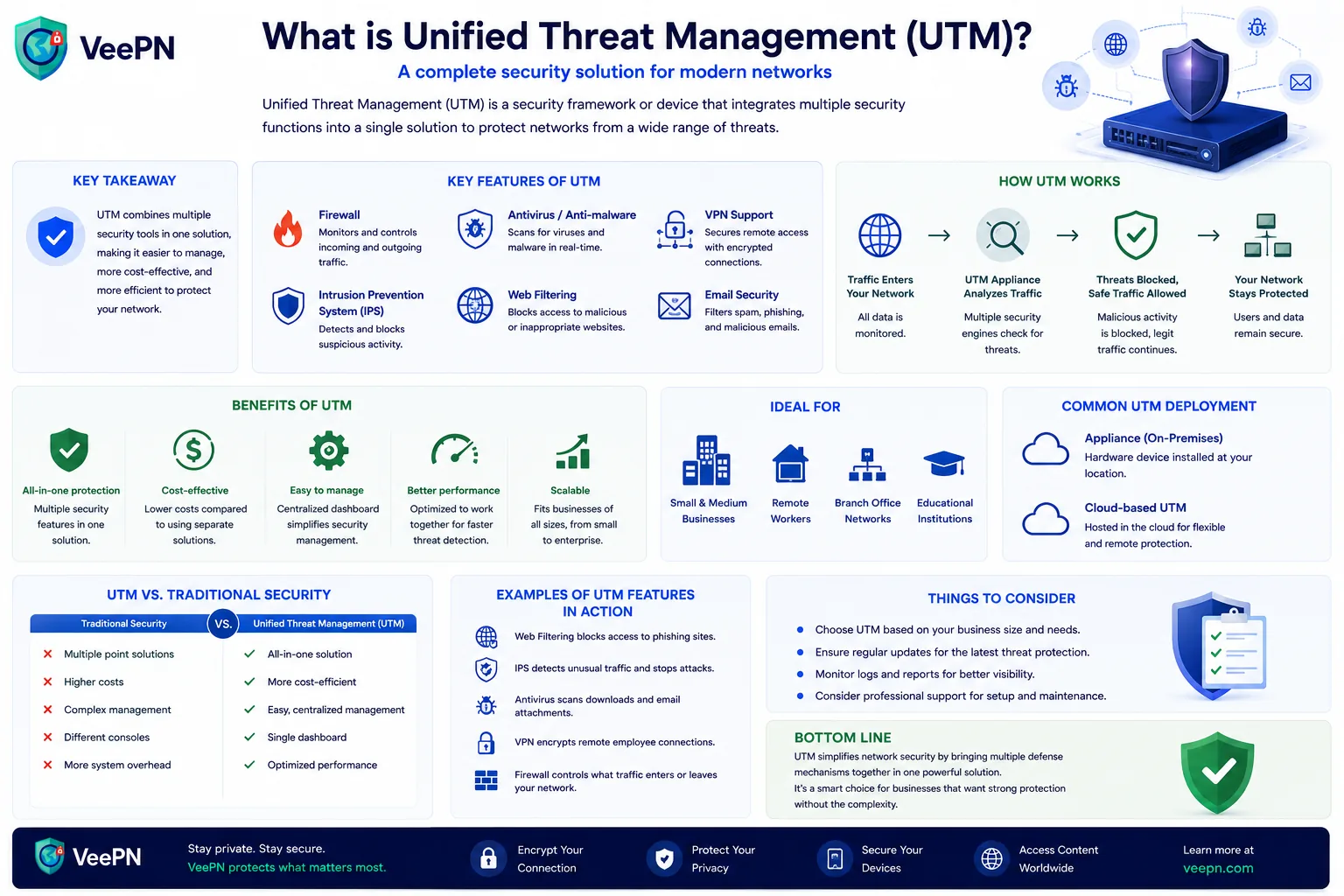
If you’ve ever asked what Unified Threat Management is, you’re probably trying to make security feel less like duct-taping ten different apps together. In plain terms, Unified Threat Management is a “many defenses in one box” approach. Instead of buying and managing multiple security tools separately, you run one stack that covers the basics from a single place.
In this article, we’ll break down how a Unified Threat Management solution works, what it usually includes, where it fits next to cloud options, and how to avoid common mistakes. You’ll also know how a VPN like VeePN can help users protect their connection and reduce everyday risks.
 VeePN Research Lab


 Quick Navigation
2. How UTM actually protects network traffic
3. What else is usually bundled inside UTM
4. UTM vs next generation firewalls and security service edge
5. Real-world examples that show why “basic controls” still matter
6. A quick, practical checklist for choosing UTM solutions
7. Where VeePN helps when UTM is not in your hands
FAQ
If you’ve ever asked what Unified Threat Management (UTM) is, you’re probably trying to make security feel less like duct-taping ten apps together. In plain terms, UTM is a “many defenses in one box” approach: instead of buying and managing separate tools, you run one stack that covers the basics from a single place.
Below: how a UTM solution works, what it usually includes, where it fits next to cloud options, and the mistakes worth avoiding, plus where a VPN like VeePN fits in for people who don’t control the corporate appliance.
What is Unified Threat Management in real life
A UTM is typically a security appliance or service that combines several protections into one platform. Think of it as a checkpoint at the edge of a network: traffic passes through, and it applies different security functions based on the rules you set.
The point is to reduce chaos. Separate tools tend to drift into mismatched settings, coverage gaps, and alerts no one owns. A UTM aims for simpler management, fewer gaps, and a central place that small security teams can actually run day to day.
The “one console” idea
Most UTMs are built around a single management console, one place to set policies, update signatures, and review what got blocked. The win isn’t magic protection; it’s fewer moving parts, fewer missed settings, and a clearer view of what’s happening.
How UTM actually protects network traffic
A UTM sits between your internal network and the internet and watches traffic in both directions, applying scanning and filtering to cut exposure. Many rely on deep packet inspection (DPI) to look past simple port-and-IP checks into the packet contents, spotting risky behavior or unwanted payloads. Here are the core pieces people usually mean.
Intrusion detection that spots danger early
Intrusion detection is the “something looks off” alarm. It watches for known attack patterns, odd connection behavior, or suspicious payloads as traffic flows, and shows what triggered an alert and where it came from.
- When attackers reuse old tricks, scanning, brute-force, known exploits, detection signatures can catch them fast.
- Even for a new attack, flagging weird behavior lets a team investigate before damage spreads.
- It’s how you raise your security posture without a huge staff staring at dashboards.
Intrusion prevention that blocks unauthorized access
Detection sees it; prevention stops it. An intrusion prevention system actively drops traffic that matches malicious patterns.
- It can block unauthorized-access attempts by dropping traffic that matches exploit behavior.
- It stops many “drive-by” attacks before they reach an internal service.
- It’s especially useful against attackers who probe a network repeatedly for one weak spot. You still need patching and good access control, but prevention shrinks the blast radius.
Data loss prevention that watches what leaves the building
Some UTMs add data loss prevention (DLP) to reduce quiet leaks, sensitive info slipping out through email, uploads, or misconfigured apps.
- DLP can flag patterns like customer identifiers, internal docs, or credential-like content leaving the network.
- It can enforce policy when someone tries to upload sensitive files to personal cloud storage.
- It cuts the risk of accidental leaks, not just deliberate theft, which is often where companies actually get hurt.
What else is usually bundled inside UTM
UTM is sold as broad coverage. The exact mix varies, but common modules include a firewall, content and web filtering, spam filtering, and antivirus scanning to reduce malware exposure.
That’s where the bundle pays off: recreating the same coverage with separate products usually means more licenses, more maintenance, and more chances to misconfigure something. A UTM delivers those functions as one managed stack instead of a pile of tools you stitch together yourself.
UTM vs next generation firewalls and security service edge
This trips people up, so keep it simple. A UTM is the traditional “do many things at the perimeter” category. It overlaps with next-generation firewalls (NGFW), but often without the same depth, NGFW comparisons usually come down to simplicity versus deep, granular tuning. Security service edge (SSE), meanwhile, is cloud-focused: it delivers security from a cloud platform and typically includes pieces like a secure web gateway and zero-trust access, a different architecture, especially for distributed companies.
| Feature | UTM | NGFW | SSE |
|---|---|---|---|
| Main approach | All-in-one security appliance | Advanced firewall with deeper traffic control | Cloud-delivered security platform |
| Typical deployment | Office networks, small and mid-size businesses | Larger organizations with complex networks | Remote teams and cloud-first companies |
| Main focus | Simplified protection in one platform | Granular inspection and application control | Security policies for users anywhere |
| Common features | Firewall, IPS, antivirus, web filtering, spam filtering | Advanced firewall rules, application awareness, threat prevention | Secure web gateway, zero trust access, cloud security controls |
| Management | Usually one local console | More detailed configuration and monitoring | Central cloud-based management |
| Best fit | Teams that want simpler security management | Organizations needing maximum control | Companies with distributed employees and cloud apps |
So where does that leave you?
- UTM fits when you want one box, one console, and solid baseline controls.
- NGFW fits when you need granular app control and deeper customization.
- SSE fits when users are everywhere and you want policy enforced from the cloud.
It’s also why you’ll see more cloud-based UTM options and hybrids that push controls into the cloud while keeping an on-prem gateway for local needs.
Real-world examples that show why “basic controls” still matter
Security feels like theory until you see how real incidents start. Two recent ones show a human truth: many major hits don’t begin with movie-grade hacking. They begin with access mistakes and overlooked basics.
A missing MFA step can turn into a national-scale disruption
In the Change Healthcare incident, reporting described attackers using stolen credentials to reach a remote portal that lacked multi-factor authentication. The fallout was enormous and became a public lesson in how fragile remote access is when basics are missing. A UTM isn’t a full identity solution, but it can enforce perimeter rules, VPN-access standards, and visibility around unusual traffic.
Social engineering plus password resets can cripple operations
A lawsuit described how attackers allegedly got Clorox credentials by calling an IT help desk and simply asking. Tools are only half the equation, people still get pressured and tricked, which is why good security pairs tech controls with training and stricter verification for password resets.
A quick, practical checklist for choosing UTM solutions
If you’re comparing UTMs, these are the questions that prevent regret. It’s not about the fanciest product. It’s about matching your needs and avoiding blind spots.
- Does it cover the basics without gaps? Look for clear firewall, IPS, filtering, and malware defense, and make sure the vendor explains how updates work. The worst pain comes from “we assumed it did that” moments.
- Can it report cleanly? You want traffic analysis your team can actually use. Confusing reporting turns alerts into noise, and noise into ignored risk.
- Does it support your remote-access model? If you need VPN support, make sure it’s stable and easy to manage for remote users, contractors, or branch sites.
- Will it fit your broader setup? A UTM should slot into your existing security tools and improve your posture over time, not fight them.
Where VeePN helps when UTM is not in your hands
UTM protects organizations, but many readers aren’t the ones buying appliances. If you’re a remote employee, a freelancer on public Wi-Fi, or just after safer browsing, VeePN works as a personal layer.
- AES-256 encryption. Wraps your traffic so Wi-Fi snoops can’t read it, useful in airports, hotels, and coworking spaces where shared networks are easy to spy on.
- NetGuard. Blocks trackers and known malicious sites, so landing on a sketchy page through an ad or typo is less likely to turn into “one bad click.”
- Breach Alert. When passwords leak, attackers move fast, alerts help you react sooner, especially if you’ve reused a login you shouldn’t have.
- Antivirus. On supported devices, an extra layer against malicious files and fake installers.
Want a simple way to protect your traffic on untrusted networks? Try VeePN with a 30-day money-back guarantee.
FAQ
A Unified Threat Management system is a single security platform that bundles several protections in one place, like firewall controls, filtering, and threat blocking. The goal is simplified security management so fewer settings fall through the cracks. Many setups use a single management console so the same team can manage policies and updates. Discover more in this article.
A basic network firewall mainly controls traffic rules, like who can talk to what. A UTM goes wider by adding multiple layers such as intrusion detection, intrusion prevention, and filtering tools in the same stack. In short, a firewall is a gatekeeper, while UTM is the gatekeeper plus extra guards and scanners. Discover more in this article.
The purpose of UTM is to reduce security risks by covering common controls together and lowering security gaps caused by mismatched tools. It also helps teams improve their overall security posture with consistent policies and clearer visibility. The point is not perfection, it is stronger baseline protection that is easier to run.
UTM focuses on prevention at the network edge, like blocking threats and filtering traffic. SIEM is more about collecting and correlating security data from many sources to help teams detect and investigate incidents. SIEM helps you see patterns across tools, while UTM helps you stop a lot of common threats before they spread.


VeePN is freedom
Download VeePN Client for All Platforms
Enjoy a smooth VPN experience anywhere, anytime. No matter the device you have — phone or laptop, tablet or router — VeePN’s next-gen data protection and ultra-fast speeds will cover all of them.
Download for PC Download for Mac IOS and Android App
Want secure browsing while reading this?
See the difference for yourself - Try VeePN PRO for 3-days for $1, no risk, no pressure.
Start My $1 TrialThen VeePN PRO 1-year plan