Deutsch
  Español
  Français
  العربية
  Indonesia
  Italiano
  한국어
한국어  Nederlands
  Polski
  Português
  Türkçe
  简体中文
简体中文  ไทย
ไทย  Tiếng Việt
  Čeština
  فارسی
فارسی  Română
  Filipino
  日本語
日本語 


DocuSign Email Scam: How To Spot Fake Requests
A DocuSign email scam works because the brand feels normal. People use DocuSign every day to sign contracts, approve documents, and move business faster. The real company even promotes AI powered tools inside eSignatureand says those powered tools inside eSignature and tools inside eSignature automate workflows that automate and accelerate business. That trust is exactly what scammers borrow when they send a fake DocuSign email.
The good news is that these scams still leave clues. In this guide, we’ll walk through the common patterns, the biggest red flags, and the safest way to verify a message without handing attackers your credentials. We’ll also show where a VPN like VeePN can help.
 VeePN Research Lab


 Quick Navigation
2. Red Flags
3. Safer Way To Verify
4. What To Do If You Clicked
5. Where VeePN Fits
6. The Fastest Safe Verification Method
7. What Fake DocuSign Emails Usually Borrow
8. Why QR Codes Make This Worse
9. Response Depends on What You Did
10. Company Mailbox Rules To Check
11. Related security tools
12. Examples of Subject Lines That Deserve a Pause
13. What Security Teams Can Add
14. What To Preserve When Reporting
15. Why This Scam Often Targets Busy Teams
16. The reminder worth keeping
17. The Best Habit for Repeat Users
18. The verification rule
FAQ
A DocuSign email scam imitates a document-signing request to steal credentials, payment details, or personal information. It works because DocuSign is normal in business life. People expect contracts, invoices, HR forms, and approvals to arrive by email.
The safest habit is simple: if a DocuSign message feels unexpected, do not use the button. Go to DocuSign directly and verify the envelope.
Why These Scams Work
The attacker borrows trust from a familiar brand. The email may mention a contract, invoice, tax form, policy update, or completed document. Some campaigns use urgency. Others look boring on purpose.
DocuSign’s own trust guidance warns that attackers may impersonate DocuSign through email and texts, spoof domains, and use fake links to capture login details.
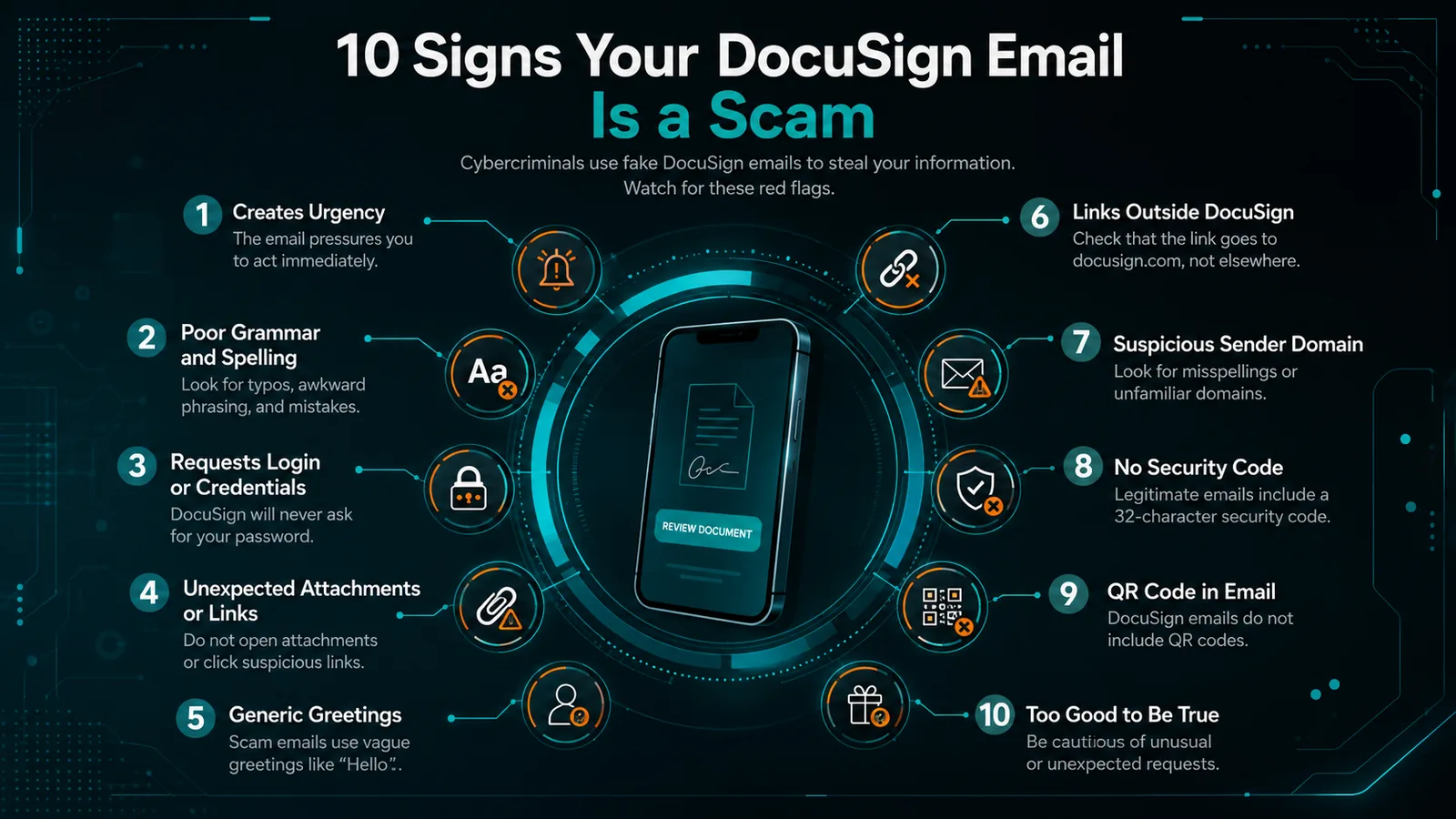
Red Flags
| Clue | What to look for | Why it matters |
|---|---|---|
| Sender mismatch | Display name says DocuSign, address does not | Display names are easy to fake |
| Button URL | Hover shows a non-DocuSign domain | The button may lead to a fake login page |
| Attachment | Email includes a file to open | DocuSign signing emails typically route through the service |
| Generic greeting | “Dear customer” or vague wording | Real business requests are often specific |
| Urgency | “Sign in 10 minutes or lose access” | Pressure reduces careful checking |
| Odd security code | Code requested by a page you did not open yourself | Could be credential theft |
Safer Way To Verify
Do not click the email button if you are unsure. Open DocuSign by typing the address yourself or using a saved bookmark. Use the security code from the message only through DocuSign’s official access flow.
If it is a work document, confirm through another channel: Slack, Teams, phone, or the known sender’s official email address.
What To Do If You Clicked
If you only opened the page and entered nothing, close it and report the message. If you entered credentials, change the password from a clean device immediately and enable MFA. If you entered payment details, contact the bank or card issuer. If this involved a work account, report it to IT.
Run a scan if you downloaded or opened anything. Watch for follow-up phishing because attackers often reuse the same contact details.
Where VeePN Fits
A VPN cannot tell whether a DocuSign email is real. Verification habits matter most.
VeePN can help with surrounding risks. The VPN protects traffic on public Wi-Fi while you access email or business apps. Protective browsing features can help block some malicious domains. Data Breach Alert can warn if an email appears in known breaches, and VeePN Antivirus can help scan suspicious downloads on supported devices.
The Fastest Safe Verification Method
The safest way to handle an unexpected DocuSign email is not to become a forensic analyst. It is to avoid the link and verify through a trusted path.
Use this sequence:
- Do not click the button in the email.
- Open a browser yourself.
- Type
docusign.comor use a saved bookmark. - Sign in directly.
- Check whether the envelope or document request exists.
- If the message includes a security code, use DocuSign’s official access flow rather than a link from the email.
DocuSign’s own support content on reporting suspicious activity tells users to treat impersonation emails and suspicious links carefully. That advice is more practical than trying to judge the email design by eye.
What Fake DocuSign Emails Usually Borrow
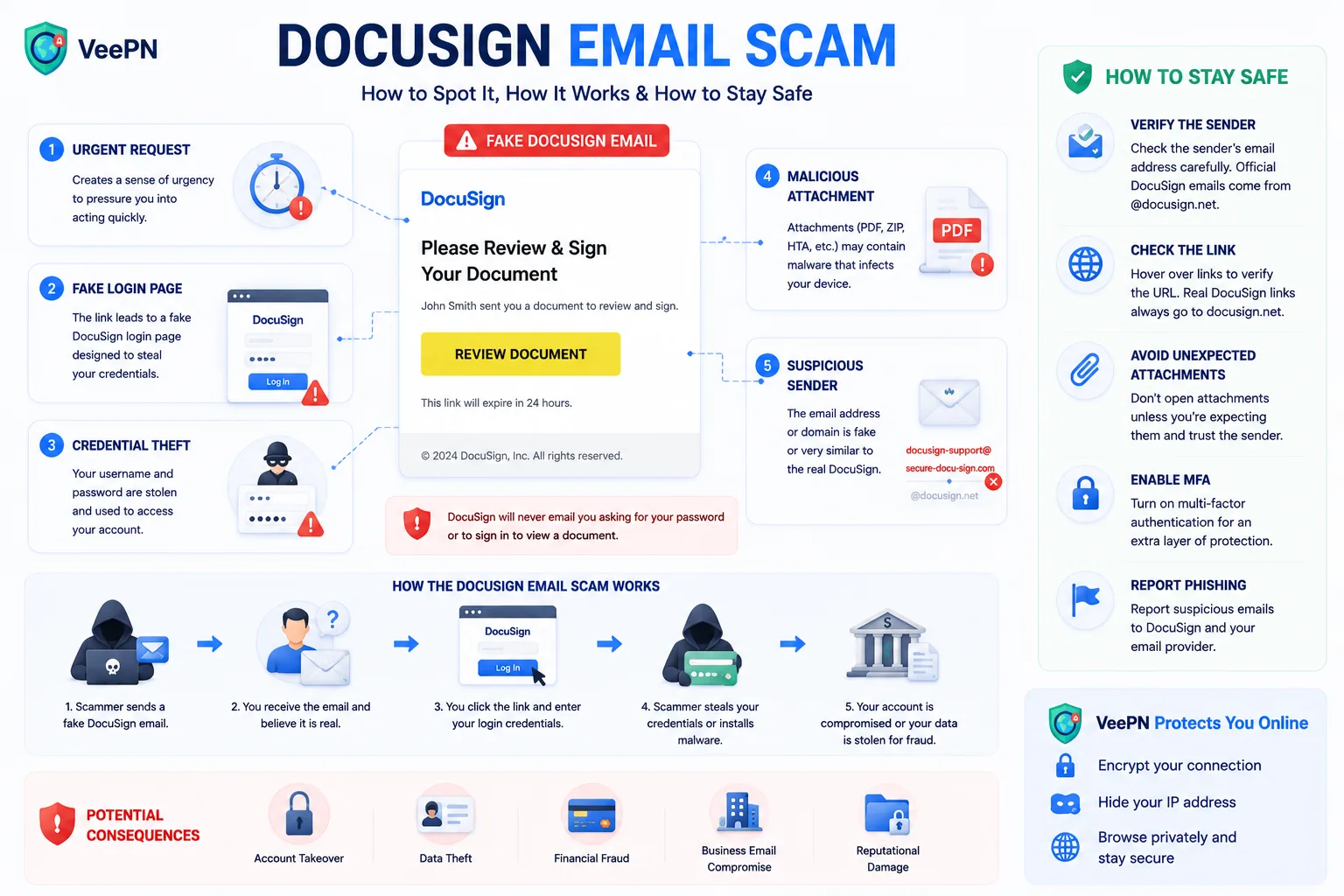
Scammers borrow the parts of DocuSign that feel routine: the yellow or blue button, a document title, a sender name, and a short deadline. The text may mention a contract, invoice, tax document, HR form, vendor update, or completed agreement.
The better scams do not look ridiculous. They look slightly boring. That is why the best checks are structural:
| Check | Why it works |
|---|---|
| Sender address | Display names can lie, domains are harder to fake perfectly |
| Hovered link | Reveals whether the button goes to DocuSign or elsewhere |
| Expected context | Real documents usually match an active conversation |
| Security code path | Lets you verify without trusting the email button |
| Login behavior | Fake pages often ask for extra credentials or payment data |
If the email asks you to open an attachment, enter a password after a redirect, scan a QR code, or call a phone number to stop a charge, slow down. Those are common phishing moves.
Why QR Codes Make This Worse
Some document scams use QR codes because they move the victim from a protected work computer to a personal phone. The company email gateway may scan links in the message, but it may not see the final page opened on the phone. The user also loses the habit of hovering over links.
If a DocuSign-themed email asks you to scan a QR code, verify it through the official site instead. Do not scan just because the message looks corporate.
Response Depends on What You Did
Not every click has the same risk. Use the outcome to choose the response.
| What happened | Risk | What to do |
|---|---|---|
| You opened the email only | Low | Report and delete |
| You clicked but entered nothing | Medium | Close page, report, watch for follow-up |
| You entered a password | High | Change password, revoke sessions, enable MFA |
| You entered payment data | High | Contact bank/card issuer |
| You downloaded/opened a file | High | Run security scan, report to IT |
| You used work credentials | High | Notify IT immediately |
If you entered a password, do not change it from the same browser session that visited the fake page. Use a clean device or at least a fresh browser session after closing the suspicious page.
Company Mailbox Rules To Check
After credential theft, attackers often add mailbox rules. They may forward incoming messages, hide security alerts, delete replies from a real vendor, or move invoices into obscure folders. That keeps the victim unaware while the attacker continues fraud.
For Microsoft 365 or Google Workspace accounts, check forwarding, filters, delegates, connected apps, and recent sign-ins. Security teams should also review OAuth app consent because attackers sometimes use malicious or abused apps to keep access even after the password changes.
This is where Data Breach Alert fits as a supporting product link. It helps when exposed emails or passwords are part of the broader risk. It does not verify a DocuSign envelope.
Related security tools
Phishing sites, what to do if you clicked a phishing link, Link Checker, Data Breach Alert, and VeePN Antivirus all match the actual threat path: fake links, credential exposure, and unsafe downloads.
Avoid pushing VPN features as if they identify fake DocuSign emails. A VPN may protect traffic on public Wi-Fi and reduce exposure to some malicious domains through protective features, but the core defense is verification.
Examples of Subject Lines That Deserve a Pause
Scam emails often use ordinary subject lines because ordinary works. Watch for versions such as “Action required: review document,” “Completed: invoice attached,” “Signature requested,” “Final notice,” “Updated contract,” “Payment authorization,” or “Secure document shared with you.”
None of those phrases proves fraud. Real businesses use them too. The point is to pause when the message is unexpected, urgent, or disconnected from a conversation you recognize.
If the email claims to be from a colleague, message that person in the channel you normally use. Do not reply to the suspicious message. If the email claims to be from a vendor, use the contact information already in your records, not the phone number or link in the email.
What Security Teams Can Add
For organizations, user training is not enough. Add email authentication checks, attachment sandboxing, URL rewriting or time-of-click protection, and reporting buttons in the mail client. Monitor for newly created forwarding rules after phishing reports. Require MFA for email and document-signing platforms.
Finance and HR teams deserve extra process controls because DocuSign lures often involve invoices, contracts, tax forms, onboarding documents, and payroll changes. A second-channel approval rule for payment changes can stop fraud even if a user clicks.
What To Preserve When Reporting
If the message arrived at work, report the original email rather than a screenshot. Security teams need headers, sender details, links, attachments, and timestamps. Forwarding as an attachment is usually better than copying the text into a new email because it preserves more evidence.
If the message arrived in a personal inbox, keep the sender address, full link destination, and time received. Do not click again to gather evidence. One click was enough.
Why This Scam Often Targets Busy Teams
DocuSign-themed phishing works especially well against finance, legal, HR, real estate, sales, and procurement teams. Those teams expect document workflows. They also work under deadlines. The scam does not need perfect grammar if the request lands during a busy close, hiring round, or contract negotiation.
That is why process beats vigilance. Payment changes, bank-detail updates, and urgent signatures should have a second verification path.
The reminder worth keeping
If the document matters, it will still be there when you verify it safely. A real sender can confirm through a known channel. A real platform can show the envelope after you sign in directly. A scammer is the one who needs you to rush.
The Best Habit for Repeat Users
People who use DocuSign often should build a repeatable habit: verify unexpected envelopes outside the email, keep the official login bookmarked, and report suspicious messages quickly. The goal is not to inspect every pixel of every email. The goal is to stop trusting the button as the source of truth.
For companies, this habit can be written into finance, HR, and legal workflows. Any request involving money, payroll, tax forms, or bank details should have a second channel.
The simple rule is this: urgent document requests should become slower, not faster. The more pressure the message creates, the more important it is to verify outside the message.
That line works because it is easy to remember at the exact moment a scam tries to create panic.
Specific examples help people recognize the scam in their own inbox: invoice, HR form, tax document, contract, bank-detail update, completed envelope.
Specific examples also feel more useful than a generic warning list. They help readers remember the warning when the next fake envelope arrives during a busy workday.
The verification rule
A DocuSign-style email is safest when you verify it outside the email. Do not rely on the button, the logo, or the urgency. Open DocuSign directly, use the security code if available, and confirm unexpected requests through a known contact channel.
Real document workflows can wait a minute. Scams usually cannot.
That extra minute is often enough to spot the wrong domain, unexpected sender, or fake login page.
FAQ
What domains should real DocuSign emails use?
DocuSign tells users to inspect links and sender details carefully. Real messages commonly use DocuSign domains, but domains alone are not enough. Verify unexpected envelopes directly through DocuSign.
Does DocuSign send attachments?
Be suspicious of attachments in messages claiming to be signing requests. Use the official DocuSign workflow instead of opening files from unexpected emails.
Where can I report a fake DocuSign email?
DocuSign provides reporting instructions in its Trust Center and asks users to forward suspicious messages for investigation.


VeePN is freedom
Download VeePN Client for All Platforms
Enjoy a smooth VPN experience anywhere, anytime. No matter the device you have — phone or laptop, tablet or router — VeePN’s next-gen data protection and ultra-fast speeds will cover all of them.
Download for PC Download for Mac IOS and Android App
Want secure browsing while reading this?
See the difference for yourself - Try VeePN PRO for 3-days for $1, no risk, no pressure.
Start My $1 TrialThen VeePN PRO 1-year plan