Deutsch
  Español
  Français
  العربية
  Indonesia
  Italiano
  한국어
한국어  Nederlands
  Polski
  Português
  Türkçe
  简体中文
简体中文  ไทย
ไทย  Tiếng Việt
  Čeština
  فارسی
فارسی  Română
  Filipino
  日本語
日本語 


Do I Need Antivirus for Android, or is Built-in Protection Enough?
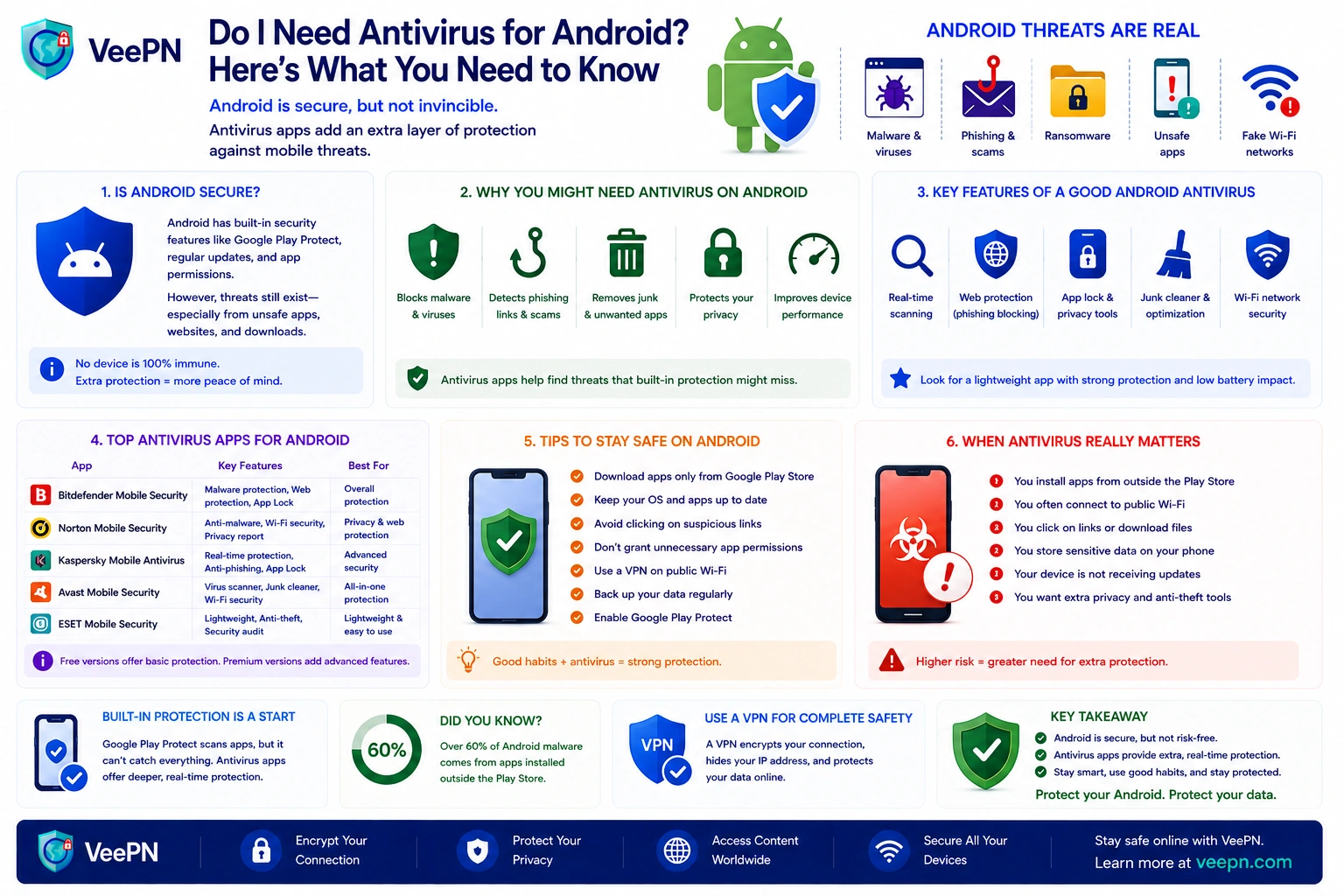
For most people, the short answer is no. Android already ships with solid built-in protection. If you stick to the official Google Play Store, install updates on time, and stay away from shady links and random APK files, your phone is safer than you probably think.
Still, not everyone fits that picture. Malicious apps keep slipping into stores, fake downloads are not going anywhere, and phishing has become one of the biggest threats Android users face. So the honest answer splits in two: some people can rely on the built-in tools, while others get real value from an extra antivirus app. This guide helps you figure out which group you are in.
 VeePN Research Lab


 Quick Navigation
2. Why antivirus software can still help on Android devices
3. When an antivirus app is a smart idea
4. Can Android phones get viruses?
5. Signs your Android phone may already have a problem
6. Simple ways to keep Android devices safe without overdoing it
7. How VeePN Antivirus can add an extra layer of Android security
FAQ
Do I need an antivirus for Android if I use my phone normally?
If you use your Android phone in a careful, and somewhat “boring” way, you may not need an antivirus at all as we said. That “careful” usually implies:
- you only download apps from the Google Play Store
- you do not sideload apps
- you install OS updates and security patches
- you avoid suspicious links in emails, texts, and ads
- you regularly review permissions
Android already offers in-built security tools like Google Play Protect, Safe Browsing in Google Chrome, app sandboxing, and permission controls. So if your usage habits are decent, the base protection is often enough for normal daily use.
That said, built-in protection is a baseline. It is not the same as full antivirus protection.
Why antivirus software can still help on Android devices
This is where people often get confused. They hear “Android is secure now” and assume extra protection is useless. That is not really true.
An effective antivirus software application can be used where default protection by Android might fail. It is able to scan files in real time, notify about deceptive links, intercept dangerous behavior and label malicious software before anything goes wrong. Other tools are also useful in anti-theft and app privacy checking and secure browsing.
This matters because many threats today are not old-school traditional viruses. They are fake apps, spyware, banking Trojans, adware, and hidden malicious behavior running in the background. So when people ask whether Android phones get viruses, the practical answer is yes, even if the technical label is sometimes different.
The numbers back this up. In the first quarter of 2026 alone, Kaspersky blocked more than 2.67 million attacks involving mobile malware, adware, or unwanted software, and banking Trojans made up over half of all malicious apps it detected. Across 2025, banker attacks on Android smartphones grew by 56% compared to the previous year. In other words, mobile threats are active, well funded, and mostly aimed at your money.
When an antivirus app is a smart idea
For some people, a third-party Android antivirus is worth it. Not because Android is broken, but because their phone use is riskier.
You should seriously think about an antivirus app if:
- You sideload apps. If you install APK files from websites, forums, or Telegram channels, your risk goes up fast. Apps from outside the Google Play ecosystem are far more likely to contain malicious code.
- Your phone is old. If your phone no longer gets security patches, it becomes easier for attackers to target known flaws. In that case, extra security software helps.
- You use public Wi-Fi all the time. If you often connect to public Wi-Fi or other open Wi-Fi networks, especially for online banking or work, one extra layer of protection is a good idea.
- You handle sensitive data. If your phone stores work files, client info, private photos, or payment details, stronger malware protection simply makes sense.
- You install lots of new apps. The more random apps you test, the more likely you are to run into shady apps, bad updates, or apps asking for unnecessary permissions.
So no, not every person needs extra security. But many do.
Can Android phones get viruses?
Yes, but usually not in the old PC sense. Let’s clear this up.
When people say Android phones get viruses, they usually mean malware in general. On Android, that is more often spyware, Trojans, fake utility apps, banking malware, or dangerous adware. It is less about the old image of a virus spreading from file to file.
Still, the result is the same. Your phone slows down, your data gets exposed, or your accounts get targeted. So whether you call it a virus or other malware, the risk is real enough for regular users. That is why good habits matter more than labels.
Signs your Android phone may already have a problem
You do not need to be technical to notice something is off. Infected phones often give pretty obvious clues. Watch out for things like:
- unusual battery drain
- sudden spikes in data usage
- slow performance
- random unexpected pop ups
- apps you do not remember installing
- strange messages sent from your phone
- weird permissions requests from simple apps
- your phone acting on its own
These signs do not always mean malware, but they are enough to take seriously. If you notice a few of them together, run an antivirus scan, remove suspicious apps, and check your security settings.
Simple ways to keep Android devices safe without overdoing it
The good news is that basic phone safety is not complicated. Most problems come from a few risky habits. Here is what we recommend:
- Enable Google Play Protect. It helps scan apps and warns about risky ones. It is not perfect, but it is still a useful first layer.
- Stick to the official Google Play Store. The Play Store is not flawless, but it is still much safer than random APK sites.
- Review permissions. A flashlight app should not need your contacts. A calculator should not need your microphone. If something feels off, trust that feeling.
- Install updates. Outdated software makes every device easier to target. Keeping Android updated is one of the simplest ways to stay safer.
- Avoid suspicious links. A lot of mobile attacks now start with fake delivery texts, login pages, or messages that push you to tap fast.
That alone will protect many Android users better than they expect.
How VeePN Antivirus can add an extra layer of Android security
Android includes built-in security features such as Google Play Protect, but some users prefer additional protection. VeePN Antivirus is designed to help detect malware, spyware, ransomware, and phishing threats that may target Android devices.
Key features include real-time monitoring, on-demand and scheduled scans, and tools for identifying and removing potentially harmful files. The app is also built to help protect against a wider range of threats, including phishing attempts and spyware that may not be caught by basic security measures alone.
While no antivirus can guarantee complete protection, combining security software with safe browsing habits, regular updates, and careful app installation can significantly reduce the risk of compromise.
FAQ
Maybe not. If you have Google Play Protect turned on and if you just use the Google Play Store, you might have a secure phone that is safe enough to use on a daily basis. However, in case you use public networks frequently, additional safeguards can be beneficial, especially if you store banking data. Find out more in this article.
It is preferable for Android phones to have an antivirus that includes real-time scans, phishing warnings, and low battery impact. Additionally, its privacy rules must be clear. It should also be possible to identify suspicious apps with good tools without necessarily slowing your phone too much.


VeePN is freedom
Download VeePN Client for All Platforms
Enjoy a smooth VPN experience anywhere, anytime. No matter the device you have — phone or laptop, tablet or router — VeePN’s next-gen data protection and ultra-fast speeds will cover all of them.
Download for PC Download for Mac IOS and Android App
Want secure browsing while reading this?
See the difference for yourself - Try VeePN PRO for 3-days for $1, no risk, no pressure.
Start My $1 TrialThen VeePN PRO 1-year plan