Deutsch
  Español
  Français
  العربية
  Indonesia
  Italiano
  한국어
한국어  Nederlands
  Polski
  Português
  Türkçe
  简体中文
简体中文  ไทย
ไทย  Tiếng Việt
  Čeština
  فارسی
فارسی  Română
  Filipino
  日本語
日本語 


CryptoLocker Ransomware: What Still Matters
CryptoLocker ransomware is one of those threats that still gets mentioned years later, and not by accident. It became one of the best-known examples of a serious ransomware attack because it showed people what modern file-locking malware could really do. Instead of just slowing down a computer or stealing a password, it went after your important files, locked them with strong encryption, and then demands payment to undo the damage.
What made it even more dangerous was how ordinary it looked at first. Many users were infected through fake shipping messages, bogus invoices, and other phishing emails dressed up like messages from legitimate businesses. Some of those lures copied UPS tracking notices or phony FedEx alerts. One wrong click on malicious attachments or unsolicited web links was enough to start the encryption process.
In this guide, we’ll explain what the original CryptoLocker ransomware did, how a CryptoLocker ransomware attack spread, how to detect CryptoLocker, and what really helps with data recovery. We’ll also show how a VPN like VeePN fits in as a useful extra layer near the end.
 VeePN Research Lab


 Quick Navigation
CryptoLocker is old malware, but it still teaches the right lesson: once strong ransomware encryption finishes, cleanup is not the same as recovery. This guide is for home users, small teams, and non-specialist IT staff who want to know what CryptoLocker actually did, what to do in the first minutes of a ransomware incident, and which defenses still matter today.
The short version: the original CryptoLocker campaign ran mainly from 2013 to 2014, targeted Windows systems, encrypted user files, and demanded payment for the private key. Today, the original campaign is no longer the everyday threat. CryptoLocker-style ransomware is.
What CryptoLocker Was
CryptoLocker was a ransomware trojan that became widely known in 2013. It infected Windows computers, looked for common personal and business file types, encrypted them, and displayed a ransom note demanding payment.
The U.S. Department of Justice said CryptoLocker began appearing around September 2013 and had infected more than 234,000 computers by April 2014. The same DOJ announcement said one estimate put ransom payments at more than $27 million in the first two months after it appeared.
CryptoLocker mattered because it showed how profitable file encryption could be. Earlier malware often stole passwords or damaged systems. CryptoLocker made the victim’s own files the leverage.
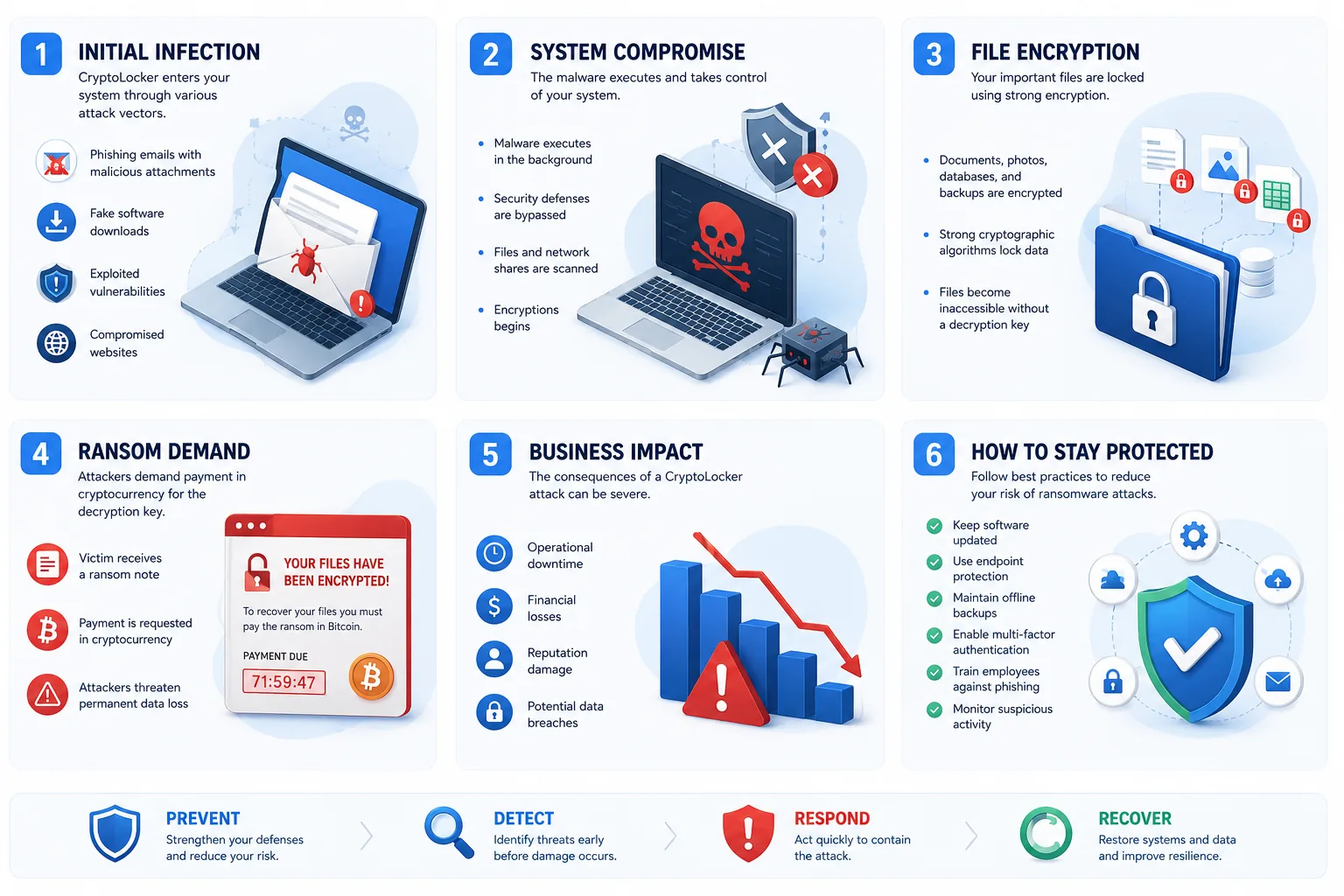
How CryptoLocker Locked Files
CryptoLocker used public-key cryptography. That means the malware could encrypt files with a public key, while the matching private key stayed under the attackers’ control.
A simplified flow looked like this:
- A user opened a malicious attachment or the system was infected through related malware infrastructure.
- CryptoLocker contacted command-and-control servers.
- The malware encrypted selected files on local and mounted drives.
- A ransom note appeared with a payment deadline.
- Removing the malware stopped the active infection, but it did not automatically decrypt the files.
This is the part many guides still get wrong. Antivirus removal is not file recovery. If ransomware has already encrypted documents, photos, spreadsheets, and databases, deleting the malicious program only prevents more damage. It does not reverse the cryptography.
How People Got Infected
CryptoLocker commonly spread through emails that looked routine: shipping notices, voicemail alerts, invoices, and business documents. The DOJ specifically mentioned unsolicited emails with infected files pretending to be voicemail or shipping confirmations.
That sounds basic, but it worked because the lure matched normal office behavior. People open invoices. People check delivery notices. People click attachments when they are busy.
The original CryptoLocker also had a relationship with the Gameover Zeus botnet. DOJ described Gameover Zeus as a common distribution mechanism for CryptoLocker. That matters because ransomware incidents are often not one neat event. A machine may already be compromised before the ransomware payload appears.
CryptoLocker vs Modern Ransomware
CryptoLocker was mostly about encrypting files for payment. Modern ransomware crews often go further: they steal data first, move through networks, disable backups, and pressure victims with leak threats.
| Area | Original CryptoLocker | Modern ransomware pattern |
|---|---|---|
| Main period | 2013-2014 | Ongoing |
| Common target | Windows users and businesses | Businesses, public sector, healthcare, schools, individuals |
| Main leverage | File encryption | Encryption plus data theft and public leak threats |
| Entry point | Malicious email attachments, botnet distribution | Phishing, stolen credentials, exposed remote access, unpatched systems |
| Recovery path | Backups, rare private-key recovery after takedown | Backups, rebuilds, incident response, sometimes decryptors |
| Product lesson | Encryption can make files unusable fast | Identity, backups, segmentation, monitoring, and patching all matter |
First 10 Minutes After a Suspected Infection
If files suddenly will not open, filenames look strange, or a ransom note appears, speed matters. Do this before experimenting.
- Disconnect the device from the network. Turn off Wi-Fi and unplug Ethernet.
- Do not connect backup drives to the machine.
- Do not delete ransom notes or suspicious files yet. They may help identify the ransomware family.
- Take photos or screenshots of the ransom message.
- Shut down shared access if a business file server is involved.
- Contact IT, your security provider, or a trusted incident response professional.
- Report the incident to the appropriate local cybercrime authority.
For a business, preserve evidence before wiping machines. Logs, ransom notes, suspicious attachments, and timestamps can help determine how the attacker got in and whether other systems are affected.
What Actually Helps Recovery
The best recovery option is a clean backup made before the infection. The backup should be offline, immutable, or otherwise protected from the infected machine.
A backup that is always mounted like a normal drive is weaker. Ransomware can encrypt anything the infected user account can write to, including shared folders and attached drives.
| Recovery option | Usefulness | Caveat |
|---|---|---|
| Offline backup | High | Must be recent and tested |
| Immutable/cloud snapshot | High | Only if attacker cannot delete or alter it |
| No More Ransom decryptor | Sometimes | Depends on the ransomware family |
| Antivirus cleanup | Medium | Stops malware, does not decrypt files |
| Paying the ransom | Risky | No guarantee, may fund further attacks |
| Random “decryptor” from search results | Dangerous | Many are scams or malware |
No More Ransom is worth checking because it provides free decryptors for some ransomware families. It also says clearly that not every ransomware type has a solution. That honesty matters.
What Not To Do
- Do not keep opening files to “see how bad it is.” That can waste time and trigger more activity.
- Do not plug in your external backup drive to the infected computer. Restore from a clean system only.
- Do not download random decryptors from forums, ads, or file-sharing sites. Use trusted sources such as No More Ransom, your endpoint security vendor, or an incident response provider.
- Do not assume one infected laptop is the whole incident. In a company, check shared folders, domain accounts, remote access logs, and backup systems.
- Do not format everything immediately if this is a business incident. You may destroy evidence needed for insurance, legal reporting, or root-cause analysis.
How To Reduce The Risk Today
Start with backups. Use the 3-2-1 idea as a baseline: three copies of important data, two storage types, one copy offline or otherwise isolated. Test restores quarterly. A backup that has never been restored is a hope, not a plan.
Use multi-factor authentication on email, cloud storage, VPN accounts, remote desktop, and admin accounts. Stolen passwords remain one of the easiest paths into a network.
Patch internet-facing systems quickly. Modern ransomware groups often exploit exposed services before users ever see a phishing email.
Limit write access to shared folders. If every employee can write to every shared drive, one compromised account can damage far more data.
On Windows, consider Controlled Folder Access in Microsoft Defender. It can restrict unauthorized apps from changing protected folders. The path is:
Windows Security > Virus & threat protection > Ransomware protection > Manage ransomware protection > Controlled folder access
For businesses, add endpoint detection, centralized logging, email filtering, least-privilege admin access, and network segmentation. Those are not glamorous controls, but they reduce blast radius.
Where VeePN Fits
A VPN does not decrypt ransomware, make a malicious attachment safe, or replace backups, patching, endpoint protection, and MFA. If ransomware has already encrypted your files, you need recovery options such as clean backups or a trusted decryptor, not a VPN.
VeePN fits earlier in the chain: reducing exposure before an incident happens. The VPN protects your traffic on public Wi-Fi and helps limit IP-based tracking. VeePN Antivirus can add file and malware scanning on supported devices, which is more relevant to ransomware prevention than the VPN tunnel itself. Data Breach Alert can warn you when your email or password appears in a breach, so you can change credentials before attackers reuse them. Alternative ID can also help keep your real email address away from low-trust signups, which may reduce spam and phishing exposure over time.
Treat these as risk-reduction tools, not recovery tools. The core ransomware defenses are still offline or immutable backups, MFA, prompt patching, least-privilege access, and security software that can stop suspicious files before they run.
FAQ
Can CryptoLocker still infect computers?
The original CryptoLocker campaign is no longer the main live threat. The name still matters because many later ransomware families copied the same basic idea: encrypt files, demand payment, pressure the victim.
Can encrypted files be recovered without paying?
Sometimes. If you have clean backups, yes. If a trusted decryptor exists for that ransomware family, maybe. If neither exists, recovery can be impossible in practical terms.
Should I pay the ransom?
Law enforcement and anti-ransomware projects generally advise against paying. Payment does not guarantee recovery and helps prove the criminal model works. In a business crisis, involve legal counsel, incident response, insurance, and law enforcement before making any decision.
Is a VPN enough to prevent ransomware?
No. A VPN protects network traffic and privacy in specific situations. Ransomware defense depends more on backups, patching, MFA, email security, endpoint protection, and access control.


VeePN is freedom
Download VeePN Client for All Platforms
Enjoy a smooth VPN experience anywhere, anytime. No matter the device you have — phone or laptop, tablet or router — VeePN’s next-gen data protection and ultra-fast speeds will cover all of them.
Download for PC Download for Mac IOS and Android App
Want secure browsing while reading this?
See the difference for yourself - Try VeePN PRO for 3-days for $1, no risk, no pressure.
Start My $1 TrialThen VeePN PRO 1-year plan