Deutsch
  Español
  Français
  العربية
  Indonesia
  Italiano
  한국어
한국어  Nederlands
  Polski
  Português
  Türkçe
  简体中文
简体中文  ไทย
ไทย  Tiếng Việt
  Čeština
  فارسی
فارسی  Română
  Filipino
  日本語
日本語 


Stremio Addons in 2026: Official Options, Third-Party Risks, and Safe Streaming Practices
Stremio is a media center application that organizes content from multiple sources into a single interface. Its add-on system is one of the main reasons people use it, allowing the app to connect with external services, catalogs, subtitles, and streaming platforms.
Not all add-ons are equal, though. Some are officially supported and relatively straightforward to evaluate. Others are created by independent developers and may introduce security, privacy, reliability, or copyright concerns.
This guide explains how Stremio add-ons work, highlights commonly used official options, and outlines the factors you should consider before installing community-developed add-ons.
 VeePN Research Lab


 Quick Navigation
2.Official vs. Community Add-ons
3.Security and Privacy Risks to Consider
4.Official Stremio Add-ons Worth Considering
5.How to Evaluate a Community Add-on
6.How to Install a Stremio Add-on
7.Practical Tips for a Better Stremio Experience
8.Do You Need a VPN for Stremio?
9.Final Thoughts
What Are Stremio Add-ons?
Add-ons are extensions that expand Stremio’s functionality.
Depending on the add-on, they can:
- Provide metadata about movies and TV shows
- Add subtitle support
- Connect Stremio to video platforms
- Organize content catalogs
- Help users discover new content
Most add-ons can be installed directly from within the application. Once installed, they become part of your Stremio library and may affect search results, recommendations, or playback options.
Official vs. Community Add-ons
Understanding the source of an add-on is more important than understanding its features.
Official Add-ons
Official add-ons are maintained or distributed through Stremio’s official ecosystem. They generally focus on legitimate content sources, metadata, subtitles, and content discovery.
Examples commonly available through Stremio include:
- YouTube
- Twitch
- OpenSubtitles
- Public Domain Movies
- Vimeo Cinemata
Official add-ons are typically the lowest-risk option because they are easier to verify and are less likely to disappear without notice.
Community Add-ons
Community add-ons are developed by independent contributors.
Some provide useful features such as:
- Alternative content catalogs
- Additional metadata sources
- Niche content discovery tools
- Integration with third-party services
However, community add-ons vary significantly in quality. Some are actively maintained, while others may be abandoned or poorly documented.
Before installing one, review:
- Who maintains it
- Whether the project is still updated
- What permissions or external services it relies on
- Feedback from other users
- Whether the content source is legitimate in your jurisdiction
Security and Privacy Risks to Consider
Some official add-ons come pre-installed with Stremio for immediate use, giving you instant access to content from all sorts of streaming platforms.
Installing a Stremio add-on is not the same as installing a browser extension, but it still involves trusting software created by someone else.
Potential risks include:
Unmaintained Projects
An add-on that has not been updated for years may stop working or create compatibility issues after platform changes.
Questionable Data Sources
Some add-ons rely on third-party services that have limited transparency about how they collect or process data.
Misleading Descriptions
Community projects sometimes advertise features without clearly explaining how content is sourced.
Legal Concerns
The legality of an add-on often depends less on the software itself and more on the content sources it connects to. Users should understand local copyright regulations before accessing content through third-party services.
Official Stremio Add-ons Worth Considering
While available add-ons may change over time, several long-standing official options continue to be useful for many users.
YouTube
Provides access to YouTube content directly within the Stremio interface.
Twitch
Useful for users who follow livestreams, esports events, and gaming creators.
OpenSubtitles
Adds subtitle support across a wide range of content and languages.
Public Domain Movies
Offers access to films that are generally available in the public domain.
Vimeo
A source for independent films, documentaries, and creator-focused video content.
Cinemata
Provides metadata, ratings, artwork, and content information that helps organize libraries and improve content discovery.
How to Evaluate a Community Add-on
Instead of searching for a specific list of unofficial add-ons, focus on evaluating them carefully before installation.
A simple checklist:
| Question | Why It Matters |
| Is the project actively maintained? | Abandoned projects often become unreliable. |
| Is the developer identifiable? | Transparency improves trustworthiness. |
| Are installation instructions clear? | Poor documentation can indicate low-quality maintenance. |
| Are users reporting problems? | Community feedback often reveals issues quickly. |
| Is the content source legitimate? | Reduces legal and security risks. |
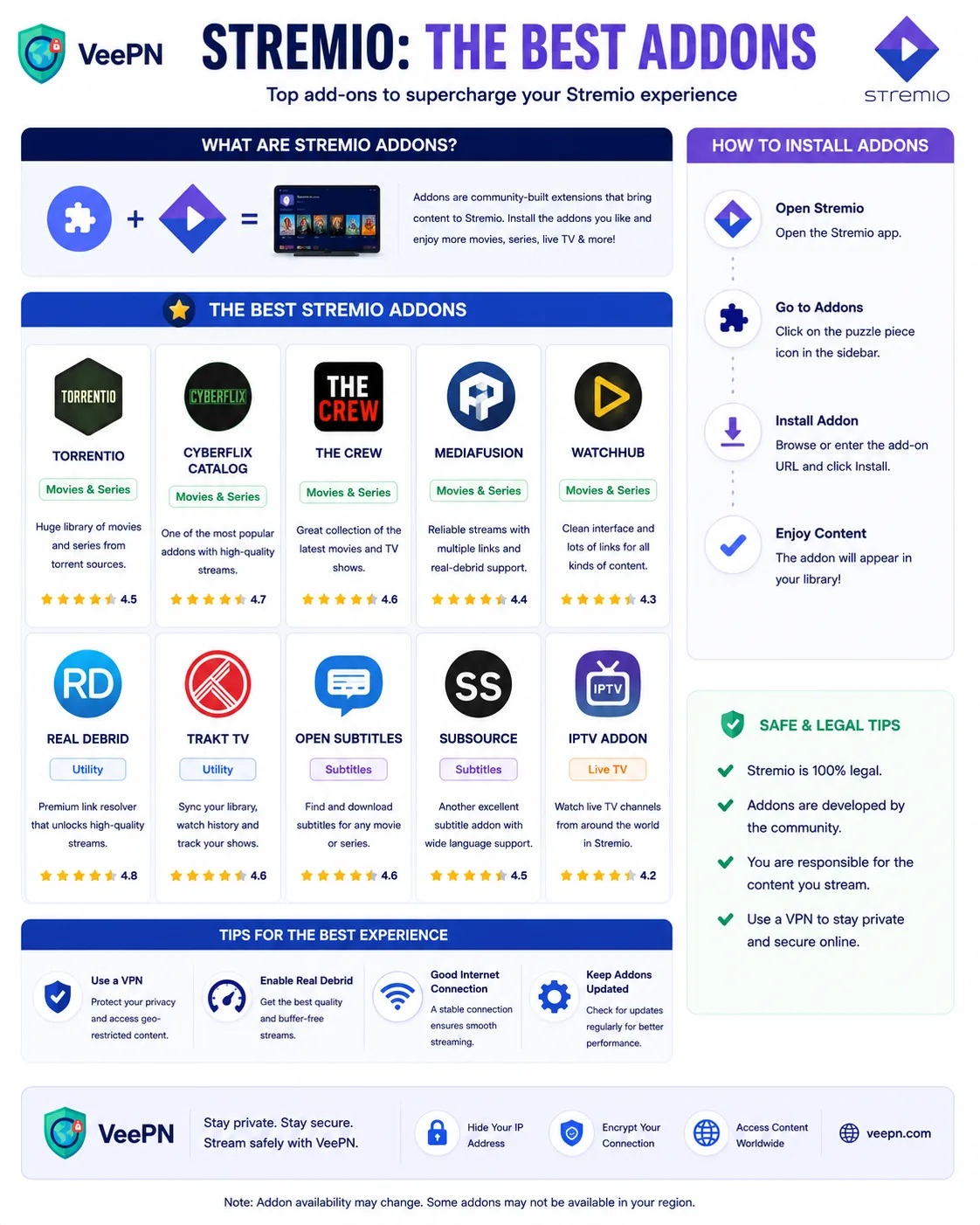
How to Install a Stremio Add-on
- Open Stremio and sign in.
- Select the Add-ons section.
- Browse available add-ons or search for a specific one.
- Review the description and publisher information.
- Click Install.
Before installing community-developed add-ons, take a few minutes to research the project rather than relying solely on the add-on description.
Practical Tips for a Better Stremio Experience
- Remove add-ons you no longer use.
- Keep Stremio updated to the latest version.
- Use reputable subtitle and metadata providers.
- Review community feedback before installing new add-ons.
- Be cautious when an add-on promises access to content without clearly explaining the source.
- Periodically review your installed add-ons and remove abandoned projects.
Do You Need a VPN for Stremio?
A VPN is not required to use Stremio.
However, some users choose to use a VPN to:
- Reduce exposure of their IP address to third-party services
- Encrypt traffic on public Wi-Fi networks
- Improve privacy from local network monitoring
A VPN does not verify whether an add-on is trustworthy, remove malware, or make copyrighted content legal to access. It should be viewed as a privacy tool rather than a solution for unsafe add-ons.
Stremio itself is legitimate, open-source software — see the official Stremio site — but many community add-ons pull from unverified sources, so a privacy layer matters. VeePN’s VPN for streaming, Kill Switch, and no-log VPN help keep your activity private and your connection stable while you stream.
Final Thoughts
Stremio’s add-on ecosystem is what makes the platform flexible, but it also requires users to make informed choices.
Official add-ons are generally the safest starting point. Community add-ons can add useful functionality, but they should be evaluated carefully before installation. Paying attention to maintenance status, transparency, content sources, and user feedback will help you avoid many of the problems commonly associated with third-party add-ons.
The best approach is simple: install only what you need, keep your software updated, and prioritize trustworthy sources over convenience.


VeePN is freedom
Download VeePN Client for All Platforms
Enjoy a smooth VPN experience anywhere, anytime. No matter the device you have — phone or laptop, tablet or router — VeePN’s next-gen data protection and ultra-fast speeds will cover all of them.
Download for PC Download for Mac IOS and Android App
Want secure browsing while reading this?
See the difference for yourself - Try VeePN PRO for 3-days for $1, no risk, no pressure.
Start My $1 TrialThen VeePN PRO 1-year plan