Deutsch
  Español
  Français
  العربية
  Indonesia
  Italiano
  한국어
한국어  Nederlands
  Polski
  Português
  Türkçe
  简体中文
简体中文  ไทย
ไทย  Tiếng Việt
  Čeština
  فارسی
فارسی  Română
  Filipino
  日本語
日本語 


SSTP VPN: How It Works, Pros, Cons, and When to Use It
SSTP (Secure Socket Tunneling Protocol) is a VPN protocol developed by Microsoft that sends VPN traffic through HTTPS connections. Because it uses the same port as secure websites (TCP 443), SSTP can often connect on networks that block other VPN protocols.
Although it is no longer the default choice for most VPN users, SSTP remains relevant in certain situations, particularly on Windows devices and restrictive networks.
This guide explains how SSTP works, where it fits among modern VPN protocols, and when it is still worth using.
 VeePN Research Lab


 Quick Navigation
What is SSTP VPN?
SSTP is a VPN protocol introduced by Microsoft with Windows Vista. It creates an encrypted tunnel between your device and a VPN server using SSL/TLS, the same technology that secures HTTPS websites.
Unlike a VPN service, SSTP is simply the method used to establish and protect the connection. To use SSTP, you still need access to a VPN provider or your own VPN server.
Its main advantage is compatibility with restrictive networks. Because SSTP traffic resembles normal HTTPS traffic, firewalls often allow it to pass where other VPN protocols may be blocked.
How SSTP works
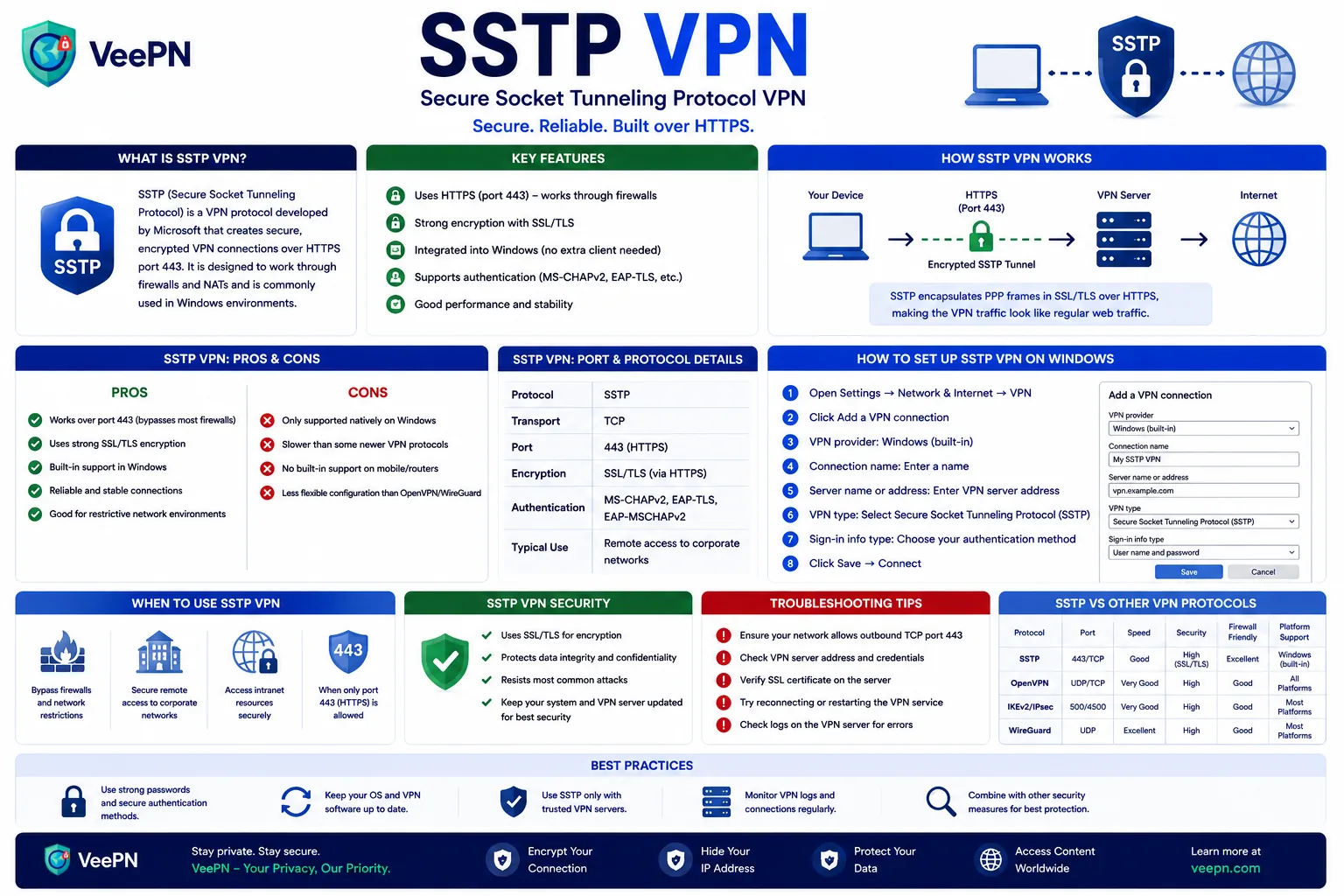
SSTP encapsulates VPN traffic inside an HTTPS session.
The process is relatively simple:
- Your device connects to the VPN server over TCP port 443.
- SSL/TLS establishes an encrypted connection and verifies the server’s certificate.
- PPP (Point-to-Point Protocol) handles user authentication and network configuration.
- All VPN traffic travels through the encrypted tunnel.
Since TCP 443 is widely used for secure web browsing, SSTP connections can blend in with regular HTTPS traffic.
Why SSTP works on restrictive networks
Many public, corporate, and educational networks restrict VPN traffic by blocking uncommon ports or identifying known VPN protocols.
SSTP often succeeds because:
- It uses TCP port 443, which is usually left open.
- Traffic appears similar to standard HTTPS traffic.
- Many firewalls are configured to allow secure web browsing by default.
This does not mean SSTP can bypass every restriction. Some organizations use advanced traffic inspection, authenticated proxies, or VPN-specific filtering that may still block SSTP connections.
For the technical specification, see Microsoft’s MS-SSTP documentation and this protocol overview.
Advantages of SSTP
Strong integration with Windows
SSTP is built directly into Windows, making setup relatively straightforward without installing additional protocol components.
Good performance in restrictive environments
If a hotel, workplace, or campus network blocks other VPN protocols, SSTP is often one of the most reliable alternatives.
Mature encryption
SSTP relies on SSL/TLS for encryption, benefiting from technologies that are widely used and continuously maintained across the internet.
Simple deployment for Windows environments
Organizations that primarily use Windows devices can deploy SSTP without introducing additional protocol support requirements.
Limitations of SSTP
Limited cross-platform support
While SSTP is fully supported on Windows, support on Linux, macOS, Android, and other platforms is less consistent than with protocols such as OpenVPN, WireGuard, or IKEv2.
TCP-only operation
SSTP runs over TCP rather than UDP.
For everyday browsing this may not matter, but TCP-based VPN connections can sometimes feel slower during gaming, video calls, or other latency-sensitive activities.
Proprietary design
Because SSTP is a Microsoft protocol, it does not have the same level of openness and independent scrutiny as fully open-source alternatives.
Less common in modern VPN services
Many VPN providers now prioritize WireGuard and IKEv2 because they generally offer better performance, simpler codebases, and broader device support.
SSTP vs other VPN protocols
| Protocol | Best Use Case | Strengths | Limitations |
|---|---|---|---|
| SSTP | Restrictive networks and Windows deployments | Uses HTTPS, often works behind firewalls, built into Windows | Limited platform support, TCP-only |
| WireGuard | Everyday VPN use | Fast, lightweight, modern design | May be blocked on some restrictive networks |
| OpenVPN | Compatibility and flexibility | Widely supported, highly configurable | More complex than newer protocols |
| IKEv2/IPsec | Mobile devices | Fast reconnection after network changes | Can be blocked more easily than SSTP |
When should you use SSTP?
SSTP is a good option when:
- You primarily use Windows.
- Other VPN protocols are blocked by network restrictions.
- You need a protocol that works over standard HTTPS traffic.
- Compatibility with older Windows infrastructure is important.
You may want to choose another protocol when:
- You need support across many device types.
- Performance is a priority.
- You frequently switch between Wi-Fi and mobile networks.
- Your VPN provider offers WireGuard or IKEv2 with better results.
For most users today, WireGuard or IKEv2 will be the preferred choice. SSTP remains useful as a fallback when network conditions make other protocols difficult to use.
Security considerations
SSTP itself is generally considered secure when properly configured. However, security depends on more than the protocol alone.
A few factors worth considering:
- Certificate validation must be configured correctly.
- VPN traffic protection depends on the client and server configuration, not just the protocol.
- Routing and DNS settings should be checked to ensure traffic is actually passing through the VPN tunnel.
- Outdated operating systems may introduce security risks unrelated to SSTP itself.
As with any VPN protocol, the quality of the implementation matters as much as the protocol design.
How to set up SSTP on Windows
Before starting, you’ll usually need:
- VPN server address
- Username and password
- Any required certificates or authentication details
Basic setup steps:
- Open Settings > Network & Internet > VPN.
- Select Add VPN.
- Enter the VPN server information provided by your administrator or VPN service.
- Choose SSTP as the VPN type if prompted.
- Enter your credentials.
- Save the profile and connect.
If the connection fails, certificate issues and network restrictions are usually the first things to investigate.
Common SSTP troubleshooting issues
Certificate errors
Because SSTP relies on TLS certificates, an invalid or untrusted certificate can prevent the connection from being established.
Proxy servers
Some authenticated proxy environments interfere with SSTP connections even though the protocol uses HTTPS.
Network filtering
While TCP 443 is usually available, some organizations inspect traffic patterns and may still block VPN tunnels.
DNS or routing issues
A successful connection does not automatically guarantee that all traffic is passing through the VPN. Verifying your IP address and DNS behavior can help confirm the tunnel is functioning correctly.
How VeePN supports users who need SSTP
Some users still rely on SSTP because of network restrictions or Windows-specific environments. However, protocol flexibility is often more important than relying on a single option.
VeePN supports multiple VPN protocols, including SSTP, WireGuard, OpenVPN, and IKEv2, allowing users to switch protocols based on their device, network conditions, and performance needs.
Additional features such as Kill Switch, DNS leak protection, and AES-256 encryption help secure VPN connections regardless of the protocol being used.
Whatever protocol you use, the fundamentals matter most: VeePN pairs strong VPN encryption with a Kill Switch and a no-log policy to keep your traffic private.
FAQ
SSTP (Secure Socket Tunneling Protocol) is a VPN protocol developed by Microsoft that transports VPN traffic through HTTPS connections over TCP port 443.
When implemented correctly, SSTP is generally considered secure because it uses SSL/TLS encryption. However, overall security also depends on certificate validation, client configuration, and server security.
The main drawbacks are limited support outside Windows, TCP-only operation, and lower popularity compared with modern protocols such as WireGuard and IKEv2.
In most cases, no. WireGuard typically delivers better performance and lower latency. SSTP’s main advantage is compatibility with restrictive networks rather than raw speed.
SSTP is most useful when other VPN protocols are blocked by network restrictions or when you need a VPN protocol that integrates well with Windows environments.


VeePN is freedom
Download VeePN Client for All Platforms
Enjoy a smooth VPN experience anywhere, anytime. No matter the device you have — phone or laptop, tablet or router — VeePN’s next-gen data protection and ultra-fast speeds will cover all of them.
Download for PC Download for Mac IOS and Android App
Want secure browsing while reading this?
See the difference for yourself - Try VeePN PRO for 3-days for $1, no risk, no pressure.
Start My $1 TrialThen VeePN PRO 1-year plan