Deutsch
  Español
  Français
  العربية
  Indonesia
  Italiano
  한국어
한국어  Nederlands
  Polski
  Português
  Türkçe
  简体中文
简体中文  ไทย
ไทย  Tiếng Việt
  Čeština
  فارسی
فارسی  Română
  Filipino
  日本語
日本語 


Is BeReal Safe for Kids? What Parents Should Check Before Saying Yes
BeReal became popular because it promised something different from traditional social media: one photo per day, taken when a random notification arrives, with fewer filters and less emphasis on perfect content.
For many parents, that raises an obvious question: Is BeReal actually safer for kids than other social media apps?
The short answer is that BeReal may feel less intense than some platforms, but it still comes with familiar risks. Privacy settings, location sharing, online interactions, and oversharing can all become issues if teens use the app without guidance.
 VeePN Research Lab


 Quick Navigation
2. How BeReal works
3. Is BeReal safer than other social media apps?
4. The biggest privacy concern: location sharing
5. Common risks parents should discuss
6. A simple safety checklist for parents
7. Can parental controls help?
8. Where a VPN fits in
9. Final verdict
10. FAQ
What parents should know before allowing BeReal
BeReal is primarily designed for teens and adults, not young children. While the app focuses on sharing with friends rather than building a large public audience, it still encourages users to post personal moments from everyday life.
That creates several concerns:
- Photos can reveal more information than users realize.
- Location settings may expose where someone spends time.
- Friend requests can come from people a child does not know well.
- Posts can be captured and shared through screenshots.
- Social pressure can still develop around daily posting and staying active.
None of these risks are unique to BeReal, but they are important to understand before a child starts using the app.
How BeReal works
Once a day, users receive a notification prompting them to take a photo. The app captures images from both the front and rear cameras, showing the user and their surroundings at the same time.
The goal is to encourage spontaneous sharing rather than carefully edited content.
While that approach can reduce some of the pressure associated with highly curated social media feeds, it also increases the chance of accidentally revealing information in the background of a photo.
For example, a picture might unintentionally show:
- A school logo
- A street sign
- A home address
- Sports schedules or team information
- Family members who did not expect to be photographed
For younger users, these details often matter more than the photo itself.
Is BeReal safer than other social media apps?
In some respects, yes.
BeReal generally offers:
- Less emphasis on followers and viral content
- Fewer opportunities for public self-promotion
- A simpler experience than many major social platforms
However, those differences do not eliminate the core challenges that come with social media use.
Children and teens can still experience:
- Peer pressure
- Bullying
- Privacy mistakes
- Unwanted contact
- Exposure to inappropriate content through their social circles
The app’s culture may be different, but the underlying online safety principles remain the same.
The biggest privacy concern: location sharing
Location settings deserve special attention.
Depending on how the app is configured, posts may include location information. Even when exact coordinates are not visible, repeated posts from the same places can reveal patterns about where a child spends time.
Parents should consider:
- Disabling location access unless it is genuinely needed
- Reviewing privacy settings together
- Explaining why routine locations such as schools, sports facilities, and homes should remain private
Teaching kids to think about what appears in the background of a photo is often just as important as adjusting app settings.
Because BeReal posts can reveal where a child is, it helps to review how to limit location tracking on their phone and set up an Alternative ID for app signups.
Common risks parents should discuss
Adding people they do not know
Many online safety problems begin with accepting requests from strangers or acquaintances.
A simple family rule helps: only connect with people you know in real life.
Oversharing personal information
Because BeReal encourages spontaneous posting, users may not stop to consider what appears in a photo.
Encourage children to quickly check images before posting and ask themselves whether they are revealing information they would not share publicly.
Private conversations
As with any social platform that allows interaction between users, private conversations can become uncomfortable or inappropriate.
Children should know how to block users, report concerns, and talk to a trusted adult if something feels wrong.
Screenshots and sharing
A common misconception among young users is that content stays within a friend group.
In reality, screenshots can be taken and shared elsewhere. Kids should assume that anything posted online could potentially be seen by a wider audience.
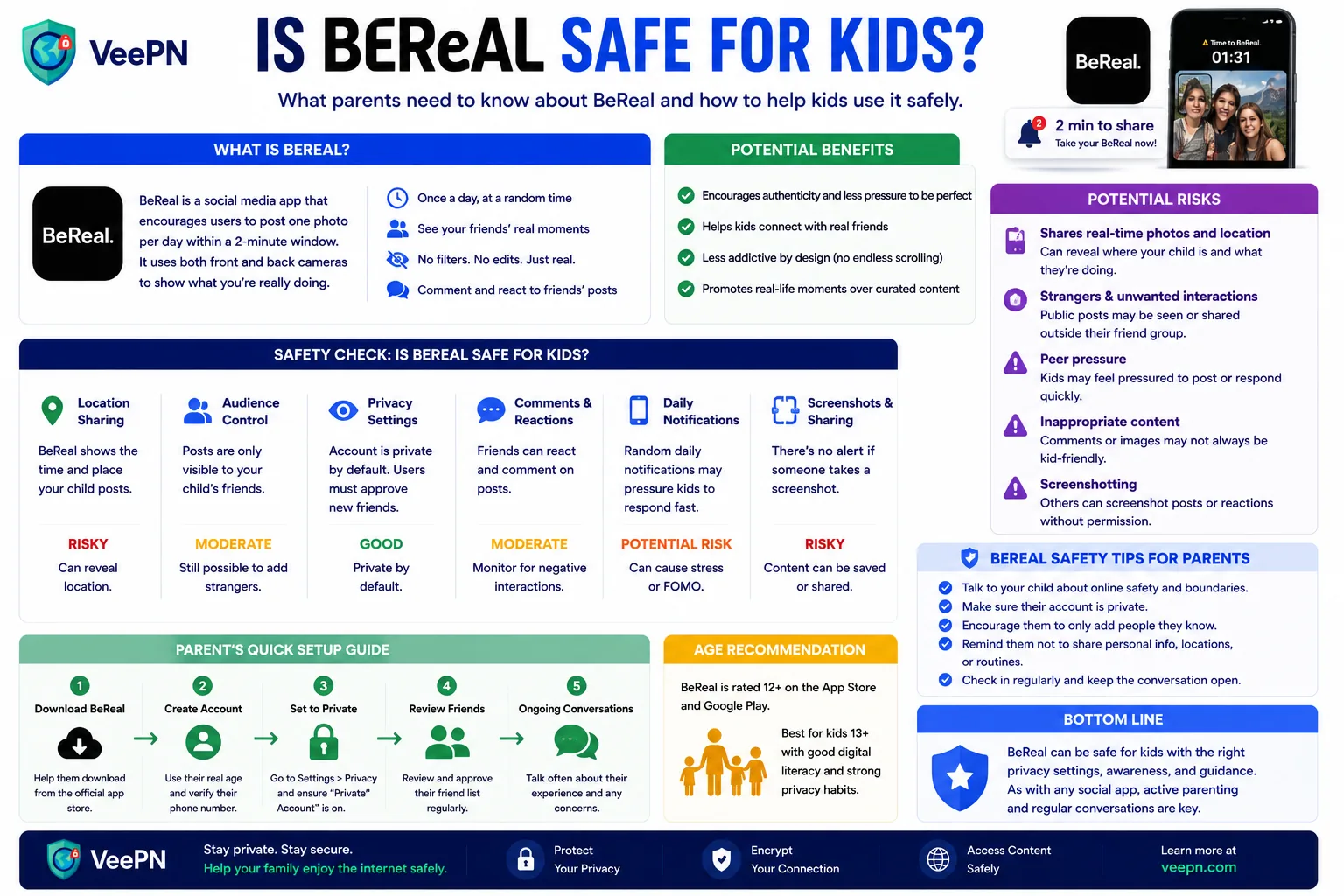
A simple safety checklist for parents
Before allowing a child to use BeReal, consider the following:
- Review the app’s privacy settings together.
- Turn off location sharing if it is not necessary.
- Limit connections to real-life friends.
- Discuss what should never appear in photos.
- Set expectations for respectful online behavior.
- Encourage children to report uncomfortable interactions.
- Use device-level parental controls if additional supervision is needed.
These steps will generally have a greater impact on safety than any single app feature.
Can parental controls help?
BeReal does not offer the extensive parental-control systems found on some child-focused platforms.
For that reason, most families rely on:
- Apple Screen Time or Android Family Link
- App usage limits
- Device restrictions
- Regular conversations about online behavior
Ongoing communication is usually more effective than occasional account inspections. Kids are far more likely to report problems when they know they can discuss them without immediately losing access to their devices.
Where a VPN fits in
A VPN is not a parental-control tool and cannot prevent cyberbullying, oversharing, or poor privacy decisions.
However, it can provide an additional layer of network security when a child uses social apps on public Wi-Fi networks such as those found in cafés, airports, hotels, or other public spaces.
Services like VeePN encrypt internet traffic between the device and the VPN server, helping protect data from interception on unsecured networks. Some VPN services also include optional features such as ad or malicious-domain blocking.
These tools can support online safety, but they should be viewed as a supplement to good privacy habits rather than a replacement for them.
For independent perspectives, parents can read Common Sense Media’s BeReal review and Internet Matters’ parent guide. Pairing sensible settings with VeePN’s Data Breach Alert also helps if your child’s data ever leaks.
Final verdict
For most teenagers, BeReal is not inherently more dangerous than other mainstream social media platforms. Its smaller focus on popularity and content performance may even feel less stressful than some alternatives.
The biggest concerns are privacy, location sharing, and the tendency to post personal moments without thinking about what is visible in the image.
Parents who review settings, discuss online safety, and establish clear expectations can significantly reduce those risks.
The app itself is only part of the equation. A child’s online habits and understanding of privacy matter far more.
FAQ
That depends on your child’s age, maturity, and ability to follow online safety rules. For many teens, BeReal can be used responsibly when privacy settings are configured properly and parents remain involved.
The most common concerns include location sharing, oversharing personal information in photos, accepting requests from unfamiliar people, and the possibility of screenshots being shared outside a trusted friend group.
Parents should follow the age guidance provided by the app store and review whether their child is mature enough to understand online privacy and social media risks.
BeReal generally places less emphasis on followers, algorithms, and highly polished content. However, it still involves sharing personal information online, so many of the same safety considerations apply.


VeePN is freedom
Download VeePN Client for All Platforms
Enjoy a smooth VPN experience anywhere, anytime. No matter the device you have — phone or laptop, tablet or router — VeePN’s next-gen data protection and ultra-fast speeds will cover all of them.
Download for PC Download for Mac IOS and Android App
Want secure browsing while reading this?
See the difference for yourself - Try VeePN PRO for 3-days for $1, no risk, no pressure.
Start My $1 TrialThen VeePN PRO 1-year plan