Deutsch
  Español
  Français
  العربية
  Indonesia
  Italiano
  한국어
한국어  Nederlands
  Polski
  Português
  Türkçe
  简体中文
简体中文  ไทย
ไทย  Tiếng Việt
  Čeština
  فارسی
فارسی  Română
  Filipino
  日本語
日本語 


Baby Monitor Hacked: The Real Signs and What to Do Right Now?
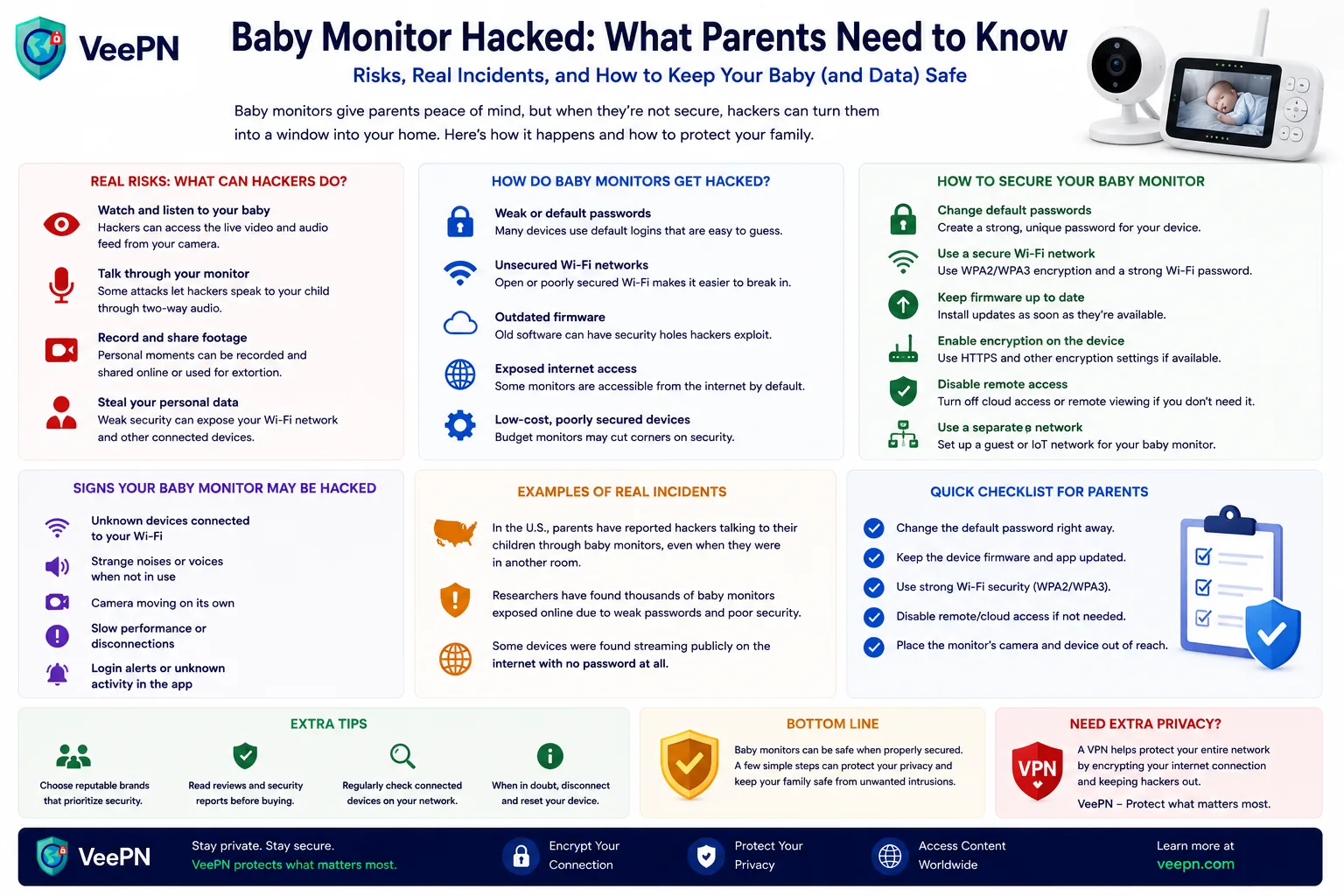
A hacked baby monitor is one of the scariest smart home security problems because it can expose private video, audio, and even allow strangers to communicate through the device.
Most incidents happen because of weak passwords, unsecured Wi-Fi networks, outdated firmware, or poorly configured remote access.
This guide explains how baby monitors get hacked, the warning signs to watch for, and the security steps that reduce the risk.
 VeePN Research Lab


 Quick Navigation
2. Signs your baby monitor hacked might be more than a glitch
3. Wi-Fi monitors vs non Wi-Fi baby monitors: what’s actually safer
4. First-aid checklist if you think your monitor is hacked
5. Baby monitor security setup that actually works
6. Real incidents that show this problem is not imaginary
7. How VeePN can help protect your home network
FAQ
How Wi-Fi baby monitors get hacked
Most baby monitor hacks do not involve advanced techniques. Attackers usually exploit simple weaknesses:
- Weak or reused passwords: leaked credentials from other services can give attackers access to the monitor app.
- Default router settings: outdated firmware, weak Wi-Fi encryption, or default admin passwords can expose your home network.
- Unsafe remote access: cloud features, two-way audio, and mobile apps increase convenience but also create more entry points.
A secure setup starts with protecting both the monitor account and your home network.
Signs your baby monitor hacked might be more than a glitch
Sometimes a monitor acts weird because of interference. Sometimes it’s a real intrusion. The goal is to spot unusual behavior early, while keeping a cool head.
Stranger talking, strange voices, and two way audio surprises
This is the one that freaks people out, and honestly, it should.
- If you ever hear a stranger talking through two way audio, treat it as a real incident, not a “maybe.” Even if it stops quickly, it’s a signal that someone may have access.
- Parents often describe hearing random phrases, music, or a voice that doesn’t match anyone in the house. If you’re not actively using two way communication, there’s no good reason it should activate on its own.
- One of the most unsettling parts is psychological. You start doubting your senses. A tired mom might think, “Did I imagine that?” Even if it feels like this, it’s crucial to check.
Audio is scary, but video can also show clues.
Red flags in the video feed
Your video feed is supposed to be boring. Boring is good.
- Watch for sudden changes in angle, zoom, or night vision switching when nobody touched anything. That can signal someone else is controlling the view.
- If you see loading events at odd times or repeated reconnects, it might be a sign the device is being accessed or probed.
- Pay attention to any “new login” emails from the app provider, or alerts that your account was opened from a new place. That can indicate someone is trying to gain access.
Even if the feed looks normal, your network can still show hints.
Unusual behavior on your router and other devices
A monitor is just one node on a bigger web.
- If your router shows unknown clients, or you see repeated connection attempts, it’s a signal your home network might be under pressure.
- Sometimes the first clue is a spike in traffic or the router rebooting. People often blame the ISP, but it can also happen when devices are being scanned.
- If other smart devices start acting odd at the same time, treat it as a system problem, not a single camera problem.
Wi-Fi monitors vs non Wi-Fi baby monitors: what’s actually safer
| Feature | Wi-Fi Baby Monitor | RF / Non-Wi-Fi Baby Monitor |
|---|---|---|
| Internet access | Yes. Connects through home Wi-Fi and cloud services | No. Usually works through a local radio connection |
| Remote viewing | Yes. View camera from anywhere using an app | No. Limited to the parent unit range |
| Security risks | Higher risk if passwords, apps, or routers are poorly secured | Lower online exposure because there is usually no cloud account |
| Features | Smart alerts, recordings, mobile apps, two-way audio | Basic monitoring, fewer connected features |
| Best for | Parents who need access while away from home | Parents who prefer simplicity and fewer online risks |
Not everyone needs a cloud-connected monitor. Some families prefer simplicity, and that preference can reduce exposure.
Non Wi-Fi baby monitors and local video monitor setups
A local video monitor usually sends video directly to a parent unit instead of routing everything through the Internet.
- This category includes many non Wi-Fi baby monitors and monitors that work without an app login. That means there’s no online account for attackers to guess.
- Many of these use short-range connections, which limits who can reach them. It doesn’t make them invincible, but it often cuts out the biggest Internet-based risks.
- If your main goal is nursery monitoring and not remote viewing, this can be the simplest path to more peace at night.
Some non-Wi-Fi models still use radio signals, so let’s talk about that.
Radio frequency and frequency hopping spread spectrum
Many non-Wi-Fi monitors use radio frequency (RF) technology. Higher-end models may use frequency hopping spread spectrum (FHSS), which changes channels automatically to reduce interference and make casual interception harder.
FHSS does not make a monitor impossible to hack, but it removes many Internet-based risks because there is no cloud account or remote login.
The real tradeoff: convenience, control, and risk
Choosing between Wi-Fi and local monitors depends on your needs.
Wi-Fi models are better if you need remote access, smart alerts, or cloud recordings. Local RF models are better if you want fewer Internet-connected devices in your home.
The safest option is the one you configure properly: strong passwords, updates, secure Wi-Fi, and limited access.
First-aid checklist if you think your monitor is hacked
If something feels off, don’t freeze. Do a few practical steps in order. These steps help you regain control fast, and they also reduce damage if an attacker really did get in
- Switch it off and disconnect it from the network. This sounds basic, but it works. If you suspect someone has access, cutting connection immediately stops live viewing and two way audio abuse. It also buys time so you can think clearly.
- Reset the device and the account. Factory reset the monitor, then rebuild the account from scratch if possible. This matters because some intrusions persist through simple reboots. It may feel annoying, but it’s often the cleanest fix.
- Change every related login, starting with the app and email. Create a new, unique password for the monitor app and your email. If you reuse passwords anywhere else, change those too. One compromised login can spread across services fast.
- Lock down the router. Update router admin credentials, enable modern encryption, and remove unknown devices. This step protects not only the monitor but also your data and other connected gadgets.
- Install updates before reconnecting. Run software updates and check for regular firmware updates inside the app or the vendor site. Updates are not just new features, they often patch security vulnerabilities.
Once the immediate danger is handled, we can prevent the same thing from happening again.
Baby monitor security setup that actually works
Good security is mostly boring habits. The win has fewer surprises.
Tighten security settings on the Wi-Fi baby monitor and router
Start with the basics that most people skip.
- Review your security settings inside the app. Turn off features you don’t use, especially anything that enables public sharing or overly broad device permissions. The fewer doors, the fewer doors to lock.
- Separate smart gadgets if you can. If your router supports a guest network, put smart devices there. This helps limit what happens if one device gets compromised.
- Check what’s exposed. If the app offers remote viewing toggles, use them intentionally instead of leaving everything “on.”
Keep firmware and software updated
Updates feel like a chore, but they’re a big deal.
- Vendors patch known issues over time. When you delay updates, you keep old flaws alive. That’s exactly what attackers hope for.
- Set a reminder to check monthly. It’s quick, and it’s a habit that protects your whole setup.
- If a brand stops supporting a device, consider replacing it. Unsupported devices can become permanent weak points.
Add an additional layer for logins
This is where you make life harder for attackers.
- Use two-factor authentication when the app supports it. This adds a second step even if someone guesses a password. It’s the simplest “extra lock” you can add.
- Avoid predictable passwords like baby names, birthdays, or address-related words. Attackers try those first.
- If your provider supports it, consider a dedicated email alias for smart home accounts. It reduces exposure if your main email is in a leak.
Real incidents that show this problem is not imaginary
This topic feels scary because it’s real.
- In Spokane, a family reported a stranger speaking through their Nanit monitor after they noticed odd behavior. The case made the rounds because it hit the nightmare scenario parents think about but hope never happens.
- In early 2024, Wyze disclosed a security issue where some users could briefly see thumbnails or video feeds from other customers’ cameras after an incident involving caching. It’s a reminder that cloud-connected camera systems can fail in ways that look like “hacking” from the user side.
- In December 2025, South Korean reporting highlighted illegal sites streaming hacked camera feeds, with law enforcement action tied to the problem. Even when your own device is safe, the broader ecosystem shows why “online cameras” are heavily targeted.
News stories can feel distant, but the fixes are usually close and practical.
How VeePN can help protect your home network
A VPN will not stop someone from accessing a poorly secured camera, but it can help protect your traffic when viewing feeds remotely or using public Wi-Fi.
- Encrypted connections for safer remote access.
- Kill Switch to prevent traffic leaks if the connection drops.
- NetGuard to block known malicious websites and trackers.
- Breach Alert to help detect exposed credentials linked to your accounts.
These features can complement other security measures such as strong passwords, two-factor authentication, and regular software updates.
FAQ
So, it is true that a baby monitor can be hacked, in particular, in case it is Wi-Fi connected and has vulnerable passwords. Default passwords or reused credentials are the most frequently used access ways that allow one to gain access.Start by changing passwords, reviewing security settings, and updating firmware. Discover more in this article.
Look for a sudden red flag like stranger talking, odd camera movement, or new logins you don’t recognize. Also watch for a changed video feed, unexplained reconnects, or strange app alerts. If you see signs, disconnect the device and reset accounts first. Then check your router for unknown devices.
No device is “never hackable,” but non Wi-Fi baby monitors and a local video monitor setup usually reduce online exposure a lot. Many use closed connections rather than Internet accounts, so remote attackers have fewer options. Still, keep whatever you buy updated and avoid sloppy passwords where accounts exist.
A device may be hacked on any connected device, in case of accounts compromise or in case there are unpatched vulnerabilities. The more reasonable course of action is to handle it as any other smart camera: 2-factors authentication should be enabled when available, unique passwords should be used, and software updates should remain on. In case something is wrong, reformat the device and your account.


VeePN is freedom
Download VeePN Client for All Platforms
Enjoy a smooth VPN experience anywhere, anytime. No matter the device you have — phone or laptop, tablet or router — VeePN’s next-gen data protection and ultra-fast speeds will cover all of them.
Download for PC Download for Mac IOS and Android App
Want secure browsing while reading this?
See the difference for yourself - Try VeePN PRO for 3-days for $1, no risk, no pressure.
Start My $1 TrialThen VeePN PRO 1-year plan