
Download VPN for Android
Best VPN client for Android 16, 15, 14, 13, 12, 11, 10, 9 Pie.


How to Install VPN on Android
It takes three simple steps to set up VPN for Android and get the ultimate Internet security.

Download VeePN
Get our VPN and install it on Android for 100% security.

Subscribe
Choose a suitable subscription plan and sign up.

Connect to VPN
Pick from 2,600+ servers in 109 locations and go into the wild wild web protected.
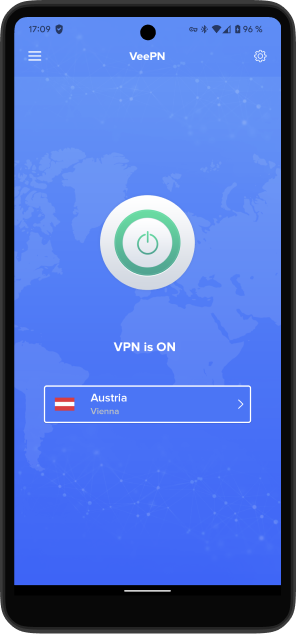
Give us a shot with a 7-day trial
Use VeePN on your Android device risk-free for 7 days.
Why use a VPN on Android

Works with any device
Set up a VPN on Android and get easy access to the fully protected Internet from your smartphone or tablet. Anywhere, anytime.

Top-level security
With the advanced AES-256 encryption, VeePN provides maximum protection, blazing speed, and total privacy online.

Safety on public Wi-Fi
VeePN always shields your data, even when you are on a public hotspot. You just need to install the app, and we'll do all the work for you!

VPN Kill Switch
Our app cuts Internet access altogether if the VPN connection drops. We take extra precautions to protect your data.

Easy-to-use app
Just tap "Connect" and VeePN will find you the best server out there. Our Android VPN app is user-friendly and intuitive, with 24/7 support.

Seamless connection
Connect to any location you want from a phone or tablet. Stream, browse, and enjoy unlimited content on the Internet without speed caps.
Ultimate Security at Top Speed with a VPN for Android
Instantly go private
Our app automatically detects the best configuration for your device and operating system. No manual setting and googling “How to use VPN for Android” required.
Customize the app for your needs
Get the security you need. Choose from top-notch VPN protocols, including OpenVPN, IKEv2, WireGuard®, and Shadowsocks.
The Best Deal for the Best Experience
authentication




Experience Free Internet with VeePN
Enjoy the pros of top-grade encryption, user-friendly interface, and global network of VPN servers.
 Over 2,600 VPN servers
  AES 256-bit encryption
  DNS and IP leak protection
  Automatic kill switch
  Multiple security protocols
  Strict No Logs policy
  Split tunneling
  Highest speeds
  Double VPN
  Unlimited bandwidth
  24/7 live chat support
  10 devices per subscription
How VeePN Works on Android
VeePN uses Android’s native VPN framework to create a secure, system-level VPN tunnel that protects all apps and network traffic on your Android device.
The Android app supports modern VPN technologies and runs as a foreground VPN service to maintain a stable encrypted connection even when the app is running in the background.
All VPN traffic is protected at the protocol level, ensuring authentication, encryption, and data integrity across Wi-Fi and mobile data networks
Android Kill Switch Protection
VeePN implements a Kill Switch using the Always-on VPN mechanism.

Blocks traffic if the VPN connection drops

Works on Android 9 to Android 16

Protects traffic during reconnections
This prevents accidental data exposure if the VPN connection is interrupted.
Smart Wi-Fi & Network Protection on Android
VeePN protects your Android device across Wi-Fi and mobile data networks.

Secures traffic on public Wi-Fi hotspots

Works on Wi-Fi, LTE, and 5G

Automatically restores the VPN connection after network changes

Designed to maintain protection when switching between networks
Android App Permissions & Security
To provide stable VPN protection, VeePN for Android uses the following system permissions:

VPN service - to create an encrypted VPN tunnel

Notification access - to show VPN connection status

Ignore battery optimizations - to prevent Android from stopping the VPN service

Network access - to establish secure connections
The app runs as a foreground VPN service to maintain connection stability and help prevent unexpected disconnections.
Supported VPN Protocols on Android
VeePN for Android supports multiple VPN and proxy technologies to balance speed, stability, and resistance to censorship.
- Protocol Best for Strengths
- WireGuard® (Go) Everyday use, gaming, streaming High speed, low overhead
- OpenVPN UDP Fast connections Better performance
- OpenVPN TCP Restricted networks Higher reliability
- IKEv2 Mobile data networks Fast reconnection
- Shadowsocks + V2Ray Censorship environments Resistance to DPI and blocking
Automatic protocol selection is supported. When enabled, the app dynamically switches between configurations and protocols for better connectivity.
Android System Requirements

Android version
Android 9 (Pie) or later

Architecture
arm64-v8a, armeabi-v7a, x86_64, x86

RAM
No enforced minimum

Storage
37 MB download size, ~82 MB after installation, ~112 MB with full resources

Form factors
Smartphones and tablets

Google services
Not required (works on AOSP/Huawei-type systems)

Distribution
Google Play and standalone APK
Frequently Asked Questions
How do I use a VPN on Android phone?
Using VeePN on your Android phone is a piece of cake:
- Sign up for our VPN service
- Download VeePN as a VPN APK or as a VPN app from Google Play
- Connect!
By default, VeePN will connect you to the optimal VPN server to ensure the fastest connection. However, if you need a specific browsing location, just pick one from the drop-down menu.
Will VeePN work on my Android TV?
Is a VPN APK file harmful to Android?
What is the safest VPN for Android phones?
Paid VPN services are much more secure than free options that may collect your data and sell it to third parties. That is why a reliable paid solution like VeePN is your best bet. Our app will take your Android device’s security to the next level, enhance your online privacy, and eliminate the risk of getting hacked.
Note that it’s important to download VeePN’s APK file from the official website. Don’t use unverified stores and marketplaces, as they can spread malware-infected apps that only pretend to be legit.