Deutsch
  Español
  Français
  العربية
  Indonesia
  Italiano
  한국어
한국어  Nederlands
  Polski
  Português
  Türkçe
  简体中文
简体中文  ไทย
ไทย  Tiếng Việt
  Čeština
  فارسی
فارسی  Română
  Filipino
  日本語
日本語 


Watering Hole Attack: How Trusted Sites Become Traps
A watering hole attack works because it does not look scary at first. You open a site you know, maybe one you use all the time, and that is exactly where the problem starts. No fake email. No obvious scam page. Just a normal website that has been quietly turned into a trap.
The term watering hole attack comes from the idea of a predator waiting at a place where others naturally gather. Online, that “place” is usually one of the legitimate websites a specific group tends to visit. It could be a news page, an industry blog, a forum, or a portal tied to work.
In this guide, we’ll break down how a watering hole attack works, why it is still a significant threat, what real cases showed, and how to protect against watering hole risks without making your life harder. Near the end, we’ll also show where VeePN fits in.
 VeePN Research Lab


 Quick Navigation
2. Watering Hole vs Phishing
3. Warning Signs
4. What Users Should Do
5. What Site Owners Should Do
6. Where VeePN Fits
7. Why Watering Hole Attacks Are Hard To Notice
8. A Realistic Attack Story
9. User-Side Defenses That Actually Help
10. Organization-Side Defenses
11. Website Owner Checklist
12. How To Respond If a Trusted Site Was Compromised
13. Why Industry Communities Are Attractive Targets
14. Practical closing point
15. The defense rule
FAQ
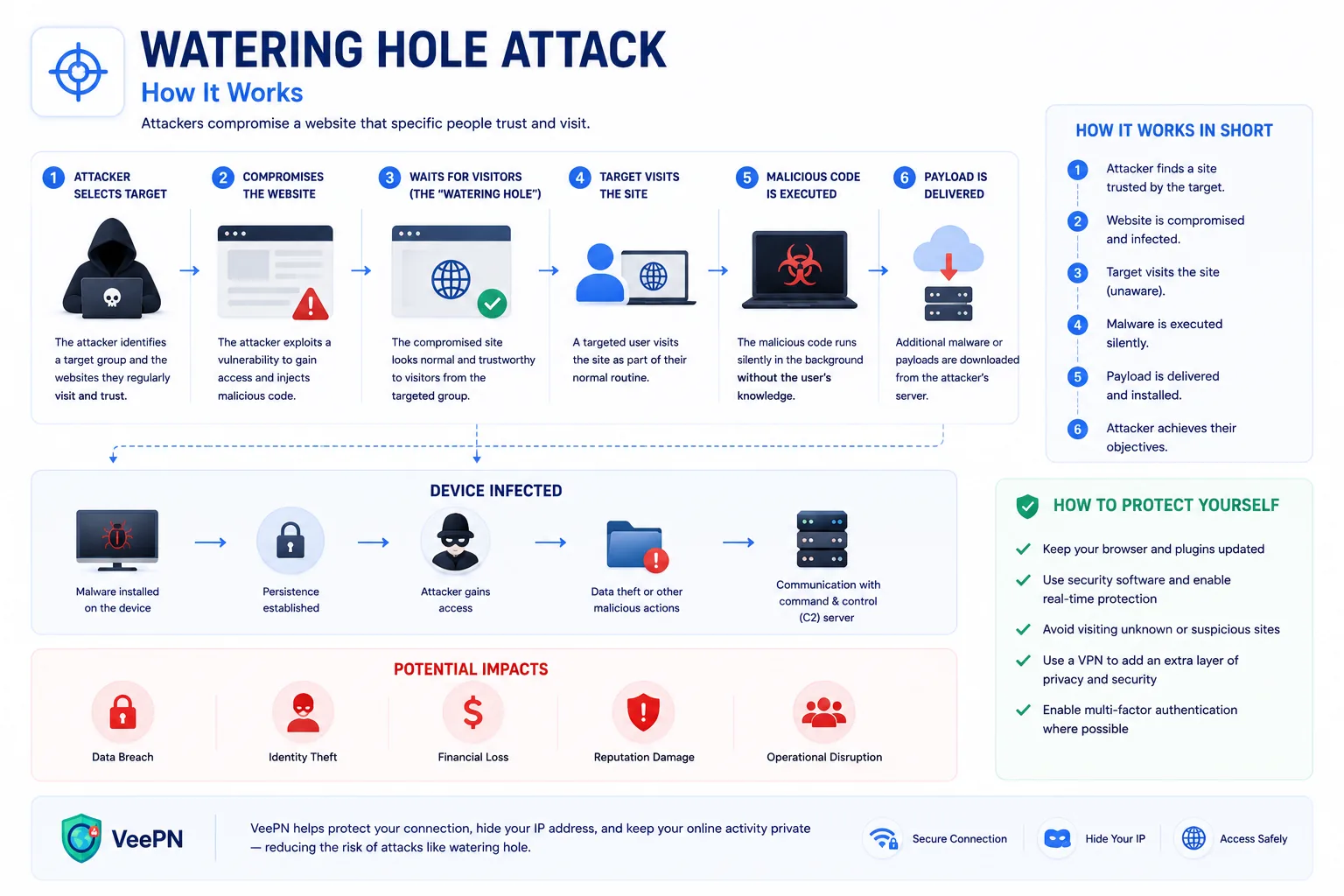
A watering hole attack compromises a website that a specific group already visits, then uses that site to infect or profile the victims. The target may be a company, industry, government group, developer community, or local organization.
The attacker does not need to lure each victim one by one. They poison a place the victims already trust.
How the Attack Works
- The attacker studies the target group.
- They identify websites the group uses often.
- They compromise one of those sites or a third-party script used by the site.
- They add malicious code, redirects, exploit content, or credential-harvesting forms.
- Victims visit normally and may be infected or phished without realizing anything changed.
Watering hole attacks are often selective. The malicious code may trigger only for certain browsers, locations, IP ranges, or user agents.
Watering Hole vs Phishing
| Feature | Phishing | Watering hole |
|---|---|---|
| User lure | Email, text, direct message | Trusted website |
| Targeting | Individual or broad list | Group or community |
| User action | Click link or open file | Visit normal site |
| Detection | Suspicious message clues | Website integrity and endpoint alerts |
| Main defense | User training and email controls | Patch management, web filtering, monitoring |
Phishing teaches users to distrust unexpected messages. Watering hole attacks are harder because the site may be expected and familiar.
Warning Signs
For users, the signs may be subtle: unusual login prompts, redirects, forced downloads, browser warnings, certificate errors, or antivirus alerts after visiting a normal site.
For website owners, look for unknown JavaScript, modified templates, suspicious admin logins, new users, unfamiliar plugins, outbound connections, or integrity-monitoring alerts.
What Users Should Do
Keep the browser and operating system updated. Do not ignore browser security warnings. Use separate browser profiles for high-risk work. Avoid installing random plugins or extensions. If a trusted site suddenly asks for credentials in an unusual way, go directly to the service login page instead.
If a security tool warns after visiting a site, stop using that session, close the browser, run a scan, and report the site to the owner if possible.
What Site Owners Should Do
Use MFA for admin accounts. Patch CMS core, themes, plugins, and server software. Remove unused plugins. Use file integrity monitoring. Restrict admin access where possible. Set a Content Security Policy. Monitor third-party scripts and tags. Keep clean backups.
Where VeePN Fits
A VPN does not make a compromised website safe. If a trusted site serves malicious code, the real defenses are browser updates, endpoint protection, web filtering, and site integrity controls.
VeePN can reduce surrounding risk. The VPN protects traffic on public Wi-Fi and masks your home IP from sites you visit. VeePN Antivirus can help detect malicious downloads on supported devices. Protective browsing features can also help block known malicious domains, though no blocklist catches every fresh compromise.
Why Watering Hole Attacks Are Hard To Notice
The victim’s behavior looks normal. They did not open a strange attachment. They did not click an unexpected email from a stranger. They visited a website they already trusted. That is exactly why the technique works.
The compromised site may be a trade association, vendor portal, regional news site, developer forum, school resource, local government page, or niche community blog. Attackers pick the site because the target group already goes there. Sometimes they compromise the site directly. Sometimes they compromise an ad network, analytics tag, chat widget, JavaScript library, or plugin used by the site.
MITRE tracks this pattern under Drive-by Compromise, which includes attackers exploiting normal browsing behavior to gain access. The term “watering hole” describes the targeting strategy: poison the place the herd already visits.
A Realistic Attack Story
Picture a small manufacturer whose engineers regularly visit a supplier’s documentation portal. The supplier runs an outdated CMS plugin. An attacker compromises the plugin and adds a script that only triggers for visitors using corporate IP ranges from the manufacturing sector.
Most visitors see nothing. Search engines may see nothing. The site owner may see normal traffic. But the targeted engineers are redirected to a page that tests browser version, language, and plugins. If the device is vulnerable, the attacker attempts exploitation. If not, the script quietly exits.
That selectivity is what makes watering hole investigations frustrating. A security team may hear “the site looks fine on my phone” while the attack only triggers on a patched-but-not-current Windows laptop inside a particular region.
User-Side Defenses That Actually Help
Keep browsers updated. The most reliable watering hole defense for users is reducing the chance that a malicious page can exploit the browser or plugin stack. Remove extensions you do not need. Avoid legacy plugins and old document viewers. Use separate browser profiles for personal browsing and privileged work.
Take browser warnings seriously. Google’s Safe Browsing and similar protections can block known malicious pages, but users often click through warnings because the site is familiar. Familiarity is not proof of safety.
If a trusted site suddenly asks you to log in again, download a tool, install a certificate, update a browser plugin, or enter credentials into a page that looks slightly wrong, stop. Open the service from a clean bookmark or contact the organization through a known channel.
Organization-Side Defenses
Companies should not rely on user suspicion for this class of attack. Use endpoint detection, DNS filtering, browser isolation for high-risk roles, and patch management. Monitor for unusual outbound connections after visits to commonly used partner sites.
For sensitive teams, maintain a list of industry portals and vendor sites they rely on. That list helps incident responders when several users report alerts after visiting the same site. It also helps security teams prioritize browser hardening for teams most exposed to external research.
Network logs matter. A watering hole incident may show up as several machines visiting the same normal domain, then contacting a suspicious second-stage domain. Without DNS and proxy logs, that pattern is easy to miss.
Website Owner Checklist
Website owners have a different job: do not become the watering hole. CISA’s website security resources emphasize patching, access control, and monitoring for a reason. A small site can still be useful to attackers if the audience is valuable.
Use this maintenance list:
- Patch CMS core, plugins, themes, and server software.
- Remove plugins, accounts, and tags nobody owns.
- Require MFA for admin accounts.
- Restrict admin login by role, IP, or SSO where possible.
- Monitor file changes in templates and JavaScript.
- Review third-party scripts and tag manager access.
- Keep clean backups and test restoration.
- Set a Content Security Policy to reduce unauthorized script loading.
The most neglected item is third-party JavaScript. A site owner may secure WordPress but allow a marketing tag, survey widget, or abandoned analytics script to load code from somewhere else.
How To Respond If a Trusted Site Was Compromised
Users should close the site, run endpoint protection, update the browser, and report the issue to the site owner. If credentials were entered, change them from a clean device and enable MFA. If a file was downloaded, do not open it until it is scanned and verified.
Organizations should preserve the URL, timestamp, browser version, user account, endpoint alert, DNS lookups, and downloaded files. A screenshot alone is not enough; responders need technical artifacts.
For readers who want to strengthen the browsing layer, VeePN’s NetGuard and Link Checker can be linked as supporting tools. Keep the language precise: they can reduce exposure to known malicious domains and suspicious links, not guarantee safety from a newly compromised trusted site.
Why Industry Communities Are Attractive Targets
Attackers like industry communities because the audience is pre-filtered. A forum for energy engineers, a supplier portal for manufacturers, a local bar association page, or a developer package site may attract exactly the people the attacker wants. The site may not be famous, but its audience is valuable.
This is why small organizations should not assume they are too obscure to matter. A small site can become the route to a much larger target.
Practical closing point
Watering hole attacks are not a reason to stop using trusted sites. They are a reason to keep browsers patched, reduce unnecessary extensions, use endpoint protection, and treat sudden login prompts or downloads with suspicion even on familiar pages.
The goal is agency, not paranoia.
The defense rule
A watering hole attack works because the victim visits a familiar site. That makes the attack feel unfair, but it also shows why layered defense matters. Users need updated browsers and endpoint protection. Site owners need patching and monitoring. Security teams need logs that connect multiple alerts to the same trusted page.
Trusted sites can still have compromised sessions.
FAQ
Why is it called a watering hole attack?
The name comes from predators waiting at a place their targets naturally visit. In cybersecurity, the “watering hole” is the trusted site.
Can small websites be used in these attacks?
Yes. Attackers may compromise niche sites if those sites are popular with a target group.
Is HTTPS enough to prevent it?
No. HTTPS protects the connection to the site. It does not guarantee the site itself is clean.


VeePN is freedom
Download VeePN Client for All Platforms
Enjoy a smooth VPN experience anywhere, anytime. No matter the device you have — phone or laptop, tablet or router — VeePN’s next-gen data protection and ultra-fast speeds will cover all of them.
Download for PC Download for Mac IOS and Android App
Want secure browsing while reading this?
See the difference for yourself - Try VeePN PRO for 3-days for $1, no risk, no pressure.
Start My $1 TrialThen VeePN PRO 1-year plan