Deutsch
  Español
  Français
  العربية
  Indonesia
  Italiano
  한국어
한국어  Nederlands
  Polski
  Português
  Türkçe
  简体中文
简体中文  ไทย
ไทย  Tiếng Việt
  Čeština
  فارسی
فارسی  Română
  Filipino
  日本語
日本語 


Pegasus Spyware: the Hidden Phone Threat You May Not Notice
Most phone threats look familiar. A shady app. A fake pop-up. A weird download. Pegasus spyware is different. It is a high-end spying tool linked to NSO Group. It was built to get into mobile devices, stay quiet, and collect private data. Many reports describe it as Pegasus software designed for covert surveillance. That is the reason why Pegasus became such a famous spyware. It was tied not only to hacking, but also to surveillance of journalists, activists, lawyers, and government officials.
In this guide, we’ll explain what Pegasus does, how it gets in, how experts try to detect Pegasus spyware, and what steps actually help.
 VeePN Research Lab


 Quick Navigation
Pegasus spyware: what it is
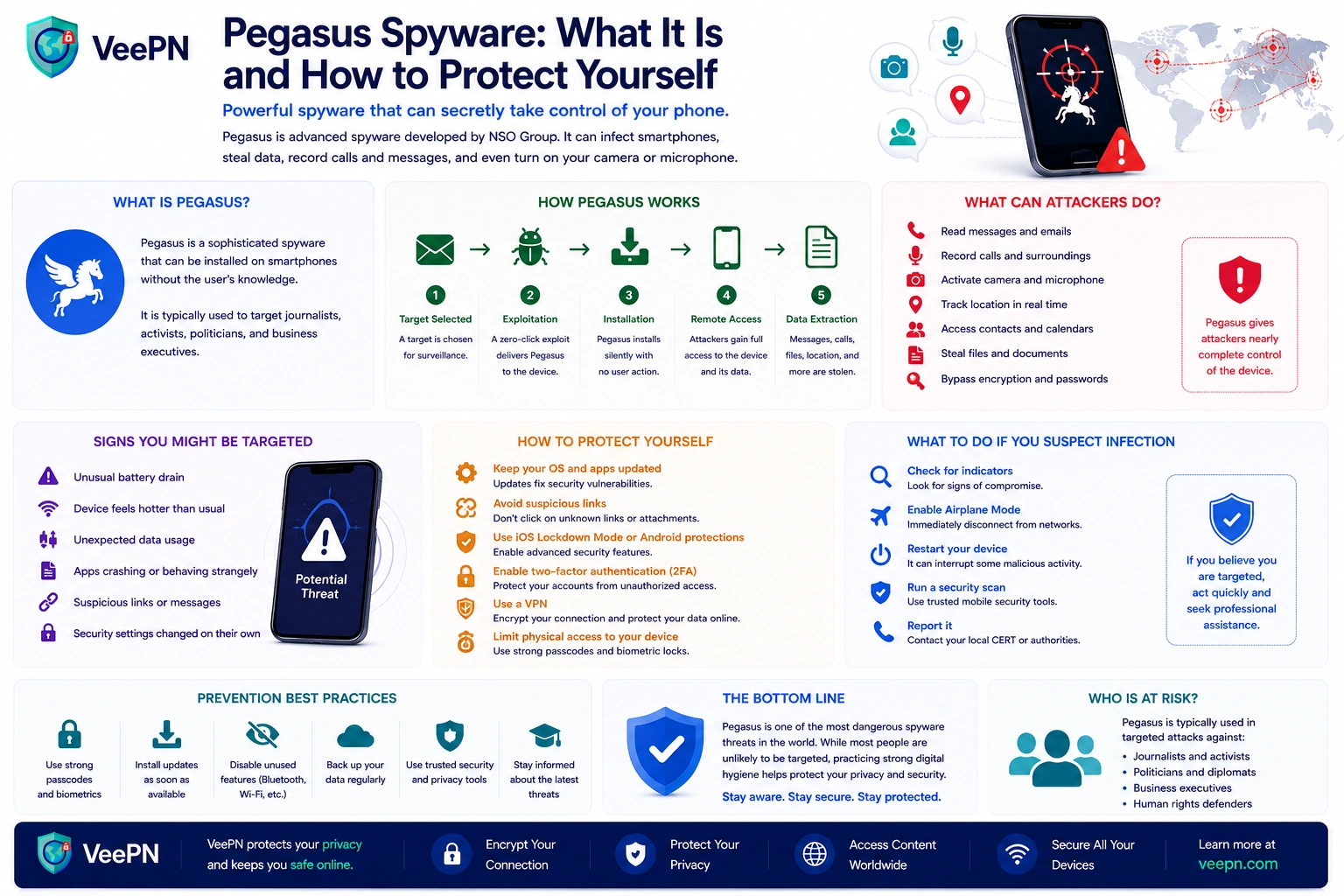
Pegasus is spyware for phones, used against both iPhones and Android devices. Once a phone is compromised, the operator can reach your messages, photos, call logs, contacts, and location data.
It gets worse from there. Reports also describe access to the device’s microphone and camera, and the ability to read messages inside otherwise-secure apps. At that point the phone stops being a phone and becomes a live surveillance device.
That is what sets Pegasus apart from ordinary malicious software. It is not built for broad spam campaigns. It is built for quiet, targeted monitoring.
How Pegasus spyware gets into mobile devices
How Pegasus spyware gets in is the part that unsettles most people. Some attacks used zero-click delivery: the victim did not have to tap anything. No download, no obvious mistake, no real user interaction.
Other cases relied on a malicious link, app flaws, or weak points in the operating system to deliver the payload, often with no clear warning to the target.
That is why the usual advice, “don’t click suspicious links,” still helps but isn’t enough on its own. Pegasus earned its reputation precisely because it could work around normal caution.
Researchers also found that Pegasus was not a single small tool but a larger system for delivery and data theft. One part of it was the Pegasus Anonymizing Transmission Network, which helped hide the operators while the infected device exchanged data with remote infrastructure.
Pegasus spyware timeline: how the threat evolved
Pegasus did not become a major surveillance story overnight. Researchers have tracked its use, delivery methods, and new exploit chains for years. Here are some of the key points in that history:
| Year | What happened | Why it mattered |
|---|---|---|
| 2016 | Citizen Lab documented Pegasus after an attempted attack against human rights defender Ahmed Mansoor. | The investigation helped expose NSO Group’s mobile spyware and showed how targeted links could lead to a full device compromise. |
| 2019 | Pegasus was linked to attacks delivered through WhatsApp calling functionality. | The cases showed that attackers were moving beyond traditional phishing links toward techniques requiring little or no interaction from the victim. |
| 2020 | Citizen Lab documented zero-click iPhone compromises in its “The Great iPwn” research. | Pegasus attacks could reach targets without requiring them to click a malicious link. |
| 2021 | The Pegasus Project investigation brought worldwide attention to alleged surveillance involving journalists, activists, politicians, and other public figures. | Pegasus became a major international privacy and human-rights issue rather than only a cybersecurity story. |
| 2021 | Citizen Lab analyzed the FORCEDENTRY zero-click exploit used to target Apple devices. | The exploit demonstrated how sophisticated Pegasus delivery chains could bypass normal user caution. |
| 2023 | Citizen Lab reported the BLASTPASS exploit chain after investigating Pegasus infections on fully patched iPhones. | The case showed that sophisticated zero-click attacks remained an active threat even as vendors continued closing earlier vulnerabilities. |
| 2026 | Citizen Lab reported that former European Parliament member Stelios Kouloglou had been hacked with Pegasus while serving on the PEGA committee investigating spyware abuses. | The finding showed that Pegasus investigations and forensic discoveries continue years after the spyware first became publicly known. |
The details have changed over time, but the pattern is consistent: once one exploit chain is discovered and patched, researchers continue looking for evidence of newer techniques. That is one reason installing security updates quickly remains important.
Pegasus vs. Predator spyware: what is the difference?
Pegasus is not the only commercial spyware platform capable of deeply compromising a smartphone. Another important example is Predator, spyware associated with Cytrox and the Intellexa alliance.
The comparison became especially significant in 2021, when Citizen Lab found that the iPhone of Egyptian opposition politician Ayman Nour had been infected with both Pegasus and Predator. According to the researchers, the two spyware systems were operated by different government clients.
| Feature | Pegasus | Predator |
|---|---|---|
| Associated vendor | NSO Group | Cytrox / Intellexa alliance |
| Main targets documented by researchers | Journalists, activists, politicians, lawyers, civil-society members, and other high-value targets | Politicians, journalists, activists, and other high-value targets |
| Target platforms | iOS and Android | iOS and Android |
| Known delivery methods | Malicious links and sophisticated zero-click exploit chains | Malicious links, exploit chains, and documented network-injection techniques |
| User interaction required | Not always — documented Pegasus attacks have used zero-click techniques | Some documented attacks used malicious links; researchers have also documented network injection |
| Potential access after compromise | Messages, calls, location, files, microphone, camera, and other device data | Extensive device data, communications, and other sensitive information |
| Public forensic indicators available | Yes | Yes |
The important point is not which spyware is “more powerful.” Both illustrate the broader market for mercenary spyware: sophisticated surveillance tools can be sold to government customers and then used against specific individuals.
Predator also shows why focusing only on Pegasus can give a false sense of security. Pegasus may be the best-known name, but researchers continue to investigate multiple commercial spyware families with similar surveillance goals.
Can you detect Pegasus spyware?
Here a bit of honesty helps. A warm phone, fast battery drain, or random crashes do not prove Pegasus, those happen for plenty of ordinary reasons, and no consumer security app can reliably confirm a case like this on its own.
Real detection usually relies on forensic analysis and specialized tooling. This is not something you confirm with a basic “phone cleaner” app. A few things that do make sense:
- Look for patterns, not one-off glitches. A single crash means nothing; repeated strange behavior is worth noticing.
- Raise your guard if you’re a high-risk target. Journalists, activists, lawyers, executives, and political figures have more reason to be careful.
- Don’t rush to factory-reset. Wiping the phone too quickly can erase the traces investigators need.
Pegasus can sometimes be found, but real detection is slow, technical, and handled by professionals.
What is MVT, and can it detect Pegasus spyware?
One of the best-known tools used in investigations of sophisticated mobile spyware is the Mobile Verification Toolkit (MVT). It is an open-source forensic toolkit originally developed by Amnesty International’s Security Lab to help investigators look for signs of compromise on Android and iOS devices.
MVT does not work like a normal antivirus app. Instead, it can examine forensic artifacts from a device and compare them against known indicators of compromise, or IOCs.
Depending on the platform and available data, MVT can help investigators:
- analyze records from iOS databases, logs, and system analytics;
- process encrypted iOS backups when the required password is available;
- collect and analyze diagnostic information from Android devices;
- compare extracted artifacts against known malicious indicators;
- identify suspicious domains, processes, files, or other traces associated with known spyware campaigns.
Public indicator sets are available for Pegasus and some other spyware families, including Predator. MVT can use STIX2-formatted indicators when checking collected device data.
However, an important limitation applies: a clean MVT result does not prove that a phone has never been compromised. Spyware techniques change, forensic traces may disappear, and detection depends on what evidence is still available and which indicators researchers currently know about.
MVT is also not designed as a simple consumer “scan my phone” application. Its own documentation describes it as a forensic research tool intended for technologists and investigators. If you have a serious reason to believe you were targeted with commercial spyware, preserving the device and seeking professional forensic assistance is safer than experimenting with it or immediately wiping it.
Citizen Lab, the Pegasus Project, and why this story got so big
Pegasus would not be a household name without the work of Citizen Lab researchers, Amnesty International, and the Pegasus Project.
Their reporting helped show that Pegasus was allegedly used far beyond serious-crime cases. The names that kept surfacing were journalists, activists, opposition figures, and civil-society members, which turned Pegasus from a security story into a human-rights one and raised wider concerns about unauthorized surveillance.
Citizen Lab mattered early on because its researchers exposed real Pegasus cases and the infrastructure behind them. The Pegasus Project later pushed the issue further by showing how wide the possible abuse may have been.
That is the bigger takeaway. Pegasus was never only about one tool. It exposed the risk of selling powerful surveillance technology into a market and trusting it won’t be misused.
NSO Group and the bigger problem
NSO Group has long said Pegasus was sold to governments to fight terrorism and serious crime. The public reporting around it painted a messier picture.
That gap is why Pegasus keeps resurfacing in debates about privacy, accountability, and the abuse of surveillance powers. The concern isn’t only the code. It’s the business model around it.
Once tools like this are sold, control weakens, and misuse becomes personal. Phones hold conversations, photos, work files, location history, and daily habits, a lot of power to hand to a hidden operator.
What regular people can actually do
Most readers are not realistic Pegasus targets. Even so, the basics here protect everyone:
- Keep your phone updated. Updates close known holes in the OS and apps, unglamorous, but it removes the exact footholds these attacks rely on.
- Be wary of links and unexpected messages. Even with advanced methods in play, many phone attacks still begin with a malicious link or fake page.
- Protect your accounts, not just the device. Use strong passwords and multi-factor authentication. If your email falls, everything around it becomes easier to attack.
- Use secure apps, but stay realistic. End-to-end encrypted messengers are still a smart choice, but if the phone itself is compromised, an attacker may read data before or after it’s encrypted.
Where VeePN helps, and where it can’t
Let’s be straight about the limits: VeePN cannot detect or remove Pegasus, because a device-level compromise like that sits outside anything a VPN touches. What it does cover is the ordinary layer most phone trouble actually starts on, malicious links, unsafe networks, and exposed accounts:
- NetGuard. Blocks known malicious sites, shady ads, and suspicious domains. Since even sophisticated attacks often begin with a link, cutting off known-bad destinations removes one of the most common entry points.
- Encryption on weak networks. VeePN encrypts your traffic on public Wi-Fi and other untrusted connections, the everyday risk that’s far more common than a Pegasus-level attack.
- Breach Alert. Tells you if your data turns up in a leak, so you can rotate passwords before that exposure feeds a wider attack on your accounts.
- Kill Switch. If the connection drops, it stops traffic from slipping outside the tunnel, a quiet safeguard against accidental leaks. Paired with a strict No Logs policy, so the privacy tool doesn’t become its own privacy problem.
Want a practical layer for risky networks, malicious sites, and everyday phone use? Try VeePN with a 30-day money-back guarantee.


VeePN is freedom
Download VeePN Client for All Platforms
Enjoy a smooth VPN experience anywhere, anytime. No matter the device you have — phone or laptop, tablet or router — VeePN’s next-gen data protection and ultra-fast speeds will cover all of them.
Download for PC Download for Mac IOS and Android App
Want secure browsing while reading this?
See the difference for yourself - Try VeePN PRO for 3-days for $1, no risk, no pressure.
Start My $1 TrialThen VeePN PRO 1-year plan