Deutsch
  Español
  Français
  العربية
  Indonesia
  Italiano
  한국어
한국어  Nederlands
  Polski
  Português
  Türkçe
  简体中文
简体中文  ไทย
ไทย  Tiếng Việt
  Čeština
  فارسی
فارسی  Română
  Filipino
  日本語
日本語 


P2P VPN Explained: Safer File Sharing Without the Myths
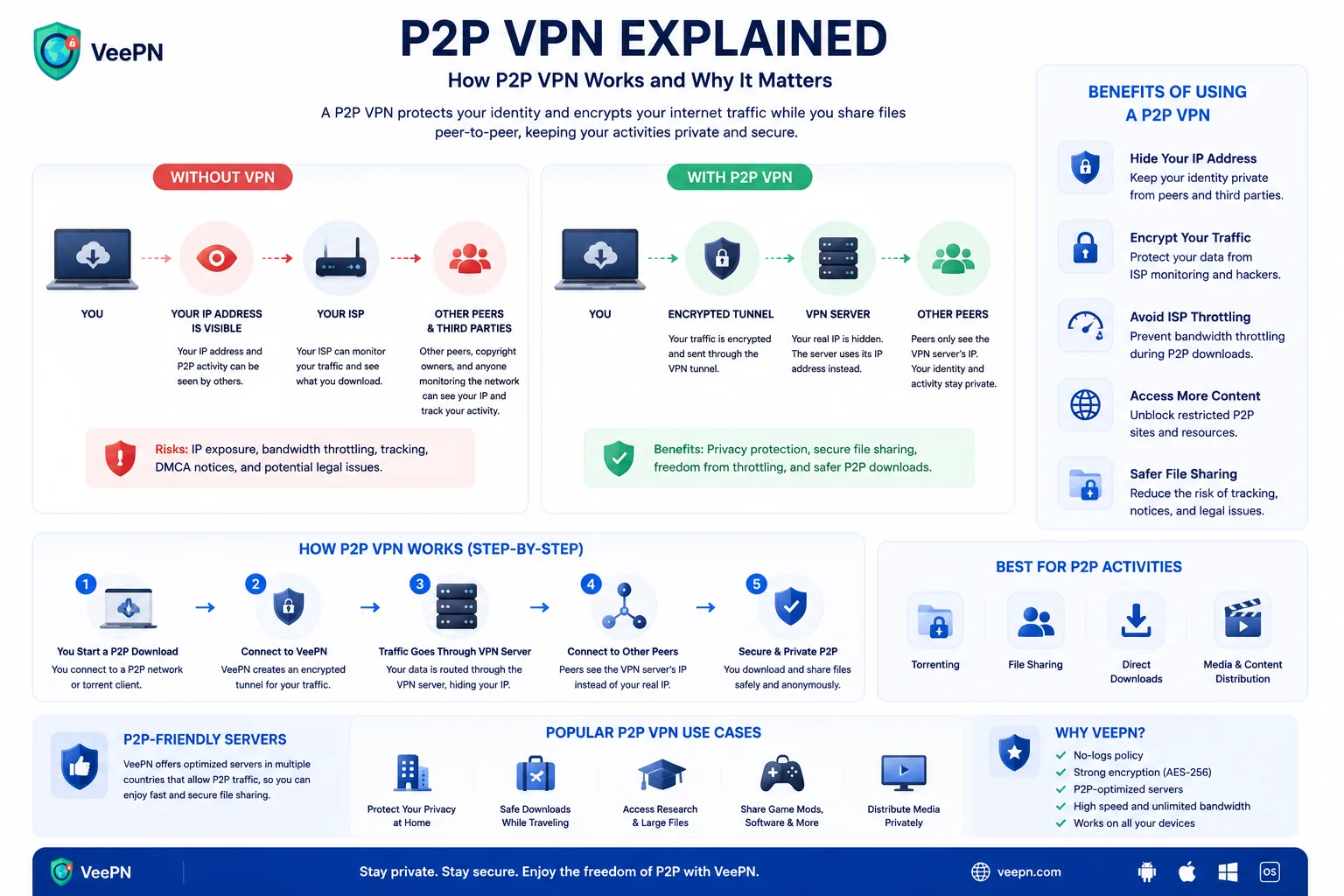
A P2P VPN is a virtual private network that allows peer to peer traffic safely. If we take more strict networking language, it can also mean a decentralized VPN built around peers instead of a central server. In real life, most people who search for a P2P VPN want a normal VPN service that supports torrents, protects their real IP address, and keeps network traffic inside an encrypted tunnel.
That matters because plain peer to peer networks are efficient, but they are not private by default. In a classic P2P network, each machine can act as both client and server, which is great for distributing large files fast, but it also means your visible IP address can become part of the exchange.
Regulators in Europe have documented cases where operators investigated or abandoned practices such as throttling categories of traffic, including P2P and VPN traffic. So, your Internet service provider or ISP may not love heavy torrent traffic, and a VPN can help reduce that visibility.
 VeePN Research Lab


 Quick Navigation
2. What a P2P VPN Does and Does Not Do
3. How To Use P2P More Safely
4. Performance Tips
5. Where VeePN Fits
6. The Privacy Problem With P2P Swarms
7. Legal Uses of P2P
8. Safer Torrent Client Setup
9. File Safety Is a Separate Problem
10. Speed, Seeding, and Server Choice
11. Claims to be careful with
12. A Short Setup Checklist
13. What About Port Forwarding?
14. Legal P2P examples
15. Why the Kill Switch Matters More Than Speed Claims
16. The privacy rule
FAQ
A P2P VPN is a VPN service that allows peer-to-peer traffic on selected servers. It encrypts your connection to the VPN server and shows the VPN server’s IP address to peers instead of your real IP.
It improves privacy for legal file sharing. It does not make illegal downloads legal, and it does not make malware-infected files safe.
What P2P Means
Peer-to-peer sharing lets devices exchange data directly with each other instead of downloading everything from one central server. BitTorrent is the best-known example, but P2P is also used for software distribution, game updates, open-source images, and some decentralized apps.
The privacy problem is simple: peers in the swarm can often see each other’s IP addresses.
What a P2P VPN Does and Does Not Do
| Claim | True? | Detail |
|---|---|---|
| Hides your real IP from peers | Yes | Peers see the VPN exit IP |
| Encrypts traffic between you and VPN | Yes | Your ISP sees VPN traffic, not the P2P destination |
| Makes files safe | No | Malware can still be inside downloads |
| Makes piracy legal | No | Copyright law still applies |
| Prevents all tracking | No | Accounts, browser fingerprints, and downloads can still identify you |
That last point matters. A VPN changes the network layer. It does not erase every other signal.
How To Use P2P More Safely
Use legal torrents from trusted sources. Keep your torrent client updated. Check file names and extensions before opening anything. Avoid executable files from unknown uploaders. Scan downloads before opening them. Use a kill switch so traffic does not continue outside the tunnel if the VPN disconnects.
Performance Tips
Choose a nearby P2P-friendly server. Use wired Ethernet if possible. Avoid stacking too many privacy layers if speed matters. Check that your client is not leaking traffic outside the VPN.
If the client supports binding to a network interface, bind it to the VPN adapter. That way, the torrent client stops if the VPN adapter disappears.
Where VeePN Fits
VeePN can help with P2P privacy by encrypting traffic between your device and the VPN server, masking your real IP from peers, and using Kill Switch to reduce accidental exposure if the connection drops.
Use VeePN Antivirus on supported devices if you often handle downloaded files. Antivirus does not make unknown downloads trustworthy, but it can catch known malware before you open it.
Responsible use still matters: follow copyright law, avoid suspicious files, and use trusted sources.
The Privacy Problem With P2P Swarms
In a typical BitTorrent swarm, peers exchange pieces of a file with each other. That design is efficient, but it also makes IP addresses visible to other peers. Anyone participating in or observing the swarm may collect peer IPs, timestamps, client versions, and the files being shared.
The original BitTorrent protocol specification describes a system built around peers finding and exchanging pieces. It was not designed as an anonymity system. A VPN helps because peers see the VPN exit IP instead of your home IP, but the file-sharing activity still exists.
That is the honest privacy benefit: IP masking at the network layer. It is useful, but it is not invisibility.
Legal Uses of P2P
P2P is not automatically suspicious. Linux distributions, open-source projects, public-domain media, large game updates, research datasets, and decentralized tools may use P2P because it reduces server load and improves distribution.
The activity matters. Downloading a legal Ubuntu ISO through BitTorrent is different from downloading copyrighted movies without permission. A VPN does not change copyright law, license terms, or platform rules.
Readers often arrive with one of two wrong assumptions: either “P2P is illegal” or “a VPN makes everything allowed.” Neither is true.
Safer Torrent Client Setup
The best P2P privacy setup combines a VPN kill switch with client-level binding where available. A kill switch stops general traffic if the VPN disconnects. Binding the torrent client to the VPN network interface adds a second guardrail: the client cannot continue over the normal connection if the VPN adapter disappears.
Not every client exposes this setting in the same place. In qBittorrent, for example, users often look under advanced network interface settings. The exact interface name depends on the operating system and VPN app. The principle is what matters: make the torrent client depend on the VPN path.
Also disable features you do not use. If remote web UI is enabled, protect it with a strong password and do not expose it to the internet. Keep the client updated. Old torrent clients can have vulnerabilities like any other software.
File Safety Is a Separate Problem
A VPN cannot tell whether a file is safe. Malware can be packaged inside installers, cracks, archives, subtitles, scripts, and fake media files. The FTC’s malware guidance warns users to be careful with downloads from untrusted sources because malicious files often look ordinary.
Practical checks:
- Prefer official project pages for open-source downloads.
- Check hashes when the project provides them.
- Be suspicious of executable files when you expected a video, PDF, or music file.
- Scan downloads before opening.
- Avoid password-protected archives from unknown uploaders.
- Do not run cracks, keygens, or “activators.”
VeePN Antivirus is relevant for file scanning on supported devices. It should not be treated as a guarantee that every P2P download is safe.
Speed, Seeding, and Server Choice
P2P performance depends on peers, seeders, distance to the VPN server, local network quality, and provider policy. A faraway VPN server can add latency. An overloaded server can reduce throughput. A weak router can bottleneck encrypted traffic.
Pick a nearby P2P-friendly server first. If speed is poor, test a different server in the same region before assuming the VPN is the problem. Use Ethernet if the device is stationary. Pause other heavy downloads. Check whether the torrent itself has enough seeders.
Seeding deserves a privacy note too. The longer you seed, the longer your VPN exit IP remains visible in the swarm. That may be fine for legal files, especially open-source projects that benefit from seeding. Just understand the exposure window.
Claims to be careful with
Do not say a P2P VPN makes torrenting anonymous. It masks the IP address peers see, but accounts, browser activity, payment records, torrent client behavior, malware, and downloaded content can still identify someone.
Do not say it makes unsafe downloads safe. It does not.
It is not a tool for piracy. The practical use is safer privacy for legal P2P and file sharing.
Related tools the reader may need: Kill Switch, VPN encryption, What Is My IP, and File Checker, which help test IP exposure and check file risk.
A Short Setup Checklist
Before opening the torrent client, connect to a P2P-friendly VPN server. Confirm your visible IP with What Is My IP. Turn on Kill Switch. If the client supports interface binding, bind it to the VPN interface. Download from a trusted legal source. Scan the file before opening it.
After downloading, disconnect only after the client is closed or paused. Many leaks happen because the VPN is turned off while the torrent client continues seeding in the background.
What About Port Forwarding?
Some P2P users ask about port forwarding because it can improve connectivity. It can also increase exposure if configured carelessly. If a VPN provider supports port forwarding, users should understand what application is listening, whether the port is necessary, and whether the client is updated.
Port forwarding is best treated as advanced. Most readers need the safer baseline first: legal files, VPN connected, Kill Switch on, client closed before disconnecting, and downloads scanned.
Legal P2P examples
Legal P2P is normal: downloading a Linux ISO, sharing a public-domain video project, distributing a large open-source dataset, or seeding an open-source release to help others. Those examples keep the topic away from piracy framing while still answering why P2P exists.
Also mention that some software updaters and game platforms use peer-assisted delivery or similar distribution ideas. The technical concept is broader than torrents associated with copyrighted media.
Why the Kill Switch Matters More Than Speed Claims
Speed is nice, but leak prevention matters more for privacy. If a VPN drops and the torrent client keeps running, peers may see the real IP address. That is why Kill Switch and client binding matter more than generic “fast server” claims.
The honest promise is control and clarity, not magic anonymity.
The privacy rule
A P2P VPN helps hide your real IP address from peers and encrypts traffic between your device and the VPN server. It does not make illegal downloads legal or unsafe files clean.
For safer legal sharing, connect the VPN first, turn on Kill Switch, verify your IP, and close the torrent client before disconnecting the VPN. Privacy and file safety are separate jobs.
FAQ
Is P2P VPN legal?
VPN use is legal in many countries, but the activity still matters. Legal file sharing remains legal. Copyright infringement does not become legal because a VPN is involved.
Does a VPN stop torrent malware?
No. A VPN protects the connection. It does not inspect every file or guarantee that a download is safe.
Why are some VPN servers labeled P2P?
Providers may optimize or allow peer-to-peer traffic only on certain servers to manage performance, abuse reports, and network load.


VeePN is freedom
Download VeePN Client for All Platforms
Enjoy a smooth VPN experience anywhere, anytime. No matter the device you have — phone or laptop, tablet or router — VeePN’s next-gen data protection and ultra-fast speeds will cover all of them.
Download for PC Download for Mac IOS and Android App
Want secure browsing while reading this?
See the difference for yourself - Try VeePN PRO for 3-days for $1, no risk, no pressure.
Start My $1 TrialThen VeePN PRO 1-year plan