Deutsch
  Español
  Français
  العربية
  Indonesia
  Italiano
  한국어
한국어  Nederlands
  Polski
  Português
  Türkçe
  简体中文
简体中文  ไทย
ไทย  Tiếng Việt
  Čeština
  فارسی
فارسی  Română
  Filipino
  日本語
日本語 


IP Reputation Attack: How To Fix a Bad IP Score
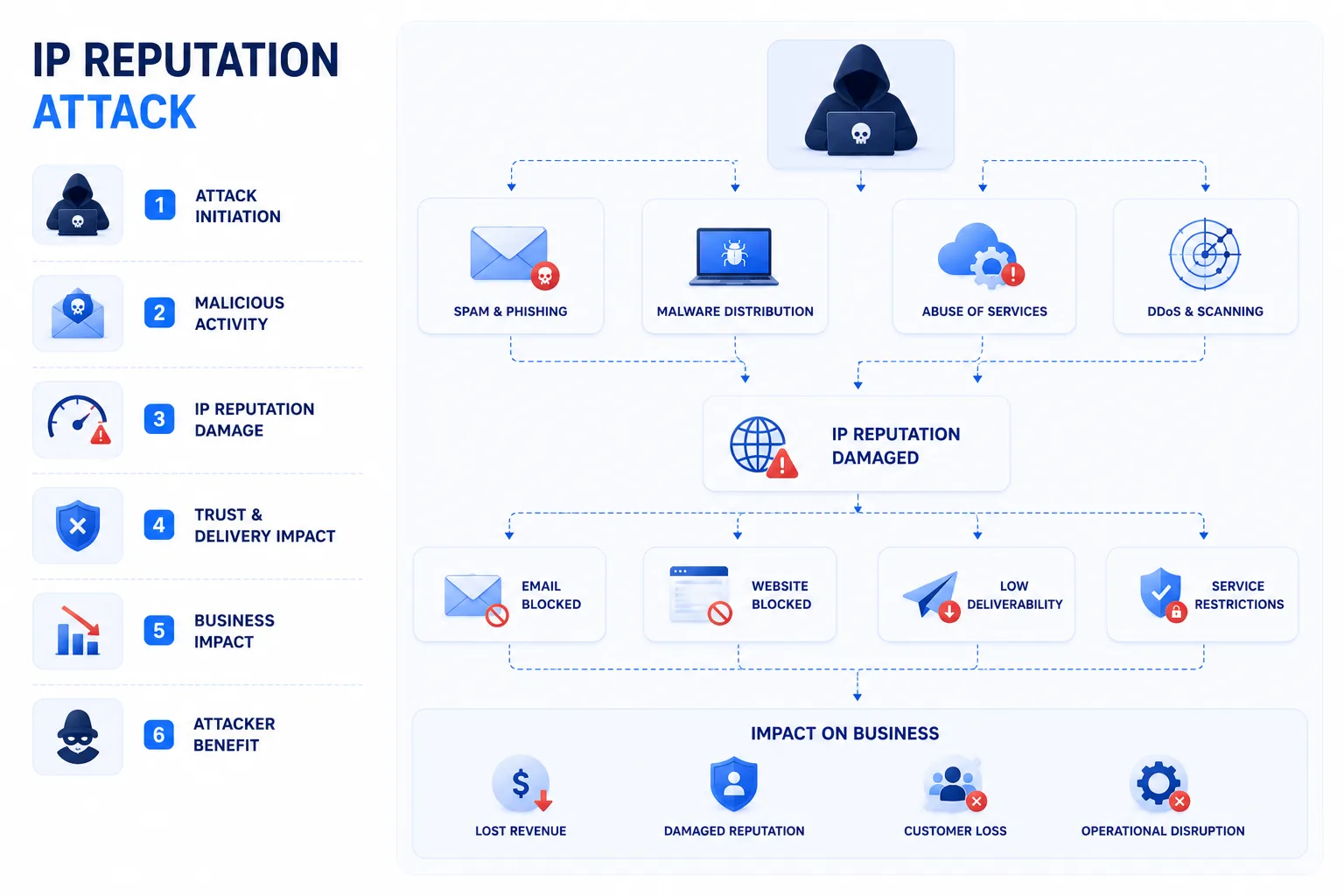
An IP reputation attack happens when attackers abuse your server, site, or mail setup so your IP address starts looking suspicious. That can push your emails into spam folders, trigger security warnings, and hurt access to important online services. In simple terms, someone dirties your address, and filters start treating your traffic like a problem.
We’ll tell you what IP reputation is, what usually damages it, and the best practices that help you get back to a good IP reputation.
 VeePN Research Lab


 Quick Navigation
2. Common Causes
3. How To Check Your IP Reputation
4. How To Repair It
5. Prevention Checklist
6. Where VeePN Fits
7. Diagnose the Reputation Problem Before You Fix It
8. Email Reputation: The DNS Records That Matter
9. Server and Website Reputation
10. Delisting Without Fixing the Root Cause Fails
11. Home IP Reputation and Shared Networks
12. How a VPN Can Help and Hurt
13. Evidence To Keep for Appeals
14. Metrics To Watch After Recovery
FAQ
An IP reputation attack happens when an IP address becomes associated with abuse: spam, credential attacks, malware traffic, scraping, bot activity, or suspicious login patterns. Sometimes the owner caused the problem. Sometimes they inherited it from a shared network, compromised device, hosting provider, proxy, or VPN exit node.
This guide is for site owners, marketers, small businesses, and privacy users who suddenly see blocked emails, CAPTCHA loops, failed logins, or security warnings.
What Bad IP Reputation Looks Like
| Symptom | Likely system involved | What to check first |
|---|---|---|
| Emails go to spam | Mail reputation and DNS records | SPF, DKIM, DMARC, blocklists |
| Website blocks login | Fraud/risk scoring | IP history, VPN/proxy use, failed attempts |
| Constant CAPTCHAs | Bot detection | Shared IP, automation, browser fingerprint |
| Hosting abuse notices | Provider monitoring | Malware, open proxy, compromised CMS |
| Payment declines | Fraud prevention | Location mismatch, proxy score |
Bad reputation is not one global score. Different services maintain different signals.
Common Causes
Compromised devices can send spam or scan the internet. Insecure routers can be abused. Email servers without proper authentication can be spoofed. Shared hosting IPs can be damaged by another customer. Public VPN or proxy IPs can attract extra scrutiny because many users share the same exit point.
The practical question is whether the bad behavior is still happening. If it is, delisting will not stick.
How To Check Your IP Reputation
- Identify the affected IP address.
- Check email blocklists if mail delivery is the problem.
- Review server logs for spikes in failed logins, outbound mail, or suspicious requests.
- Scan devices on the network for malware.
- Check DNS records for email: SPF, DKIM, and DMARC.
- Ask the affected platform what signal triggered the block if they provide an appeal path.
How To Repair It
If you run email, fix authentication first. SPF should authorize the services that send mail for your domain. DKIM should sign outbound messages. DMARC should tell receivers how to handle failures.
If you run a website or server, patch the CMS, plugins, and admin panels. Rotate passwords and API keys. Disable unused services. Review outbound traffic.
If your home IP is affected, rebooting the router may change the address on some ISPs, but that is not a real fix if the network is infected. Scan devices and update the router firmware.
If the issue is a shared IP, contact the provider. Sometimes the only clean fix is moving to a better-reputed IP range.
Prevention Checklist
| Control | Home user | Business/site owner |
|---|---|---|
| Router firmware updates | Yes | Yes |
| Malware scans | Yes | Yes |
| Strong admin passwords | Yes | Yes |
| SPF/DKIM/DMARC | No | Yes |
| Rate limits and bot protection | Usually no | Yes |
| Log monitoring | Basic | Essential |
Where VeePN Fits
A VPN can give you a different exit IP, which may help if a specific public network or ISP address is being unfairly blocked. It does not clean a compromised server, fix email authentication, or guarantee a perfect reputation everywhere.
Use VeePN for privacy on untrusted networks and to reduce direct exposure of your home IP. If the reputation issue involves malware, pair it with VeePN Antivirus on supported devices. If account abuse is part of the problem, Data Breach Alert can help you catch leaked credentials sooner.
Diagnose the Reputation Problem Before You Fix It
Bad IP reputation is a symptom, not a diagnosis. The fix depends on which system is complaining. Email filters, login-risk engines, payment processors, web application firewalls, ad platforms, and anti-bot tools all score behavior differently.
Start by writing down the exact failure. “Blocked” is too vague. Better notes look like this: Gmail sends outbound campaigns to spam, Cloudflare shows managed challenges, Microsoft 365 rejects messages with a specific error code, a bank login asks for extra verification, or a hosting provider sent an abuse complaint about port scanning.
Once you know the failure type, use the right path:
| Failure | Primary evidence | First owner to contact |
|---|---|---|
| Email bounce | SMTP error code and headers | Mail provider or DNS admin |
| Spam placement | Mail headers and sender score | Email marketing platform |
| CAPTCHA loop | Browser, IP, device pattern | Website support if legitimate |
| Abuse notice | Provider timestamp and logs | Hosting or network admin |
| Login block | Account security event | Platform support |
| Payment decline | Merchant or processor message | Payment provider |
This prevents a common waste of time: checking spam blocklists when the real issue is a compromised WordPress site sending malicious traffic, or rebooting a router when the real issue is missing DKIM.
Email Reputation: The DNS Records That Matter
For business domains, email reputation often comes down to authentication and sending behavior. SPF says which servers may send mail for your domain. DKIM signs messages so recipients can verify they were not altered. DMARC tells receivers what to do when SPF or DKIM fails.
Google’s email authentication guidance and Microsoft’s email authentication docs both point in the same direction: authenticated mail is table stakes. It will not guarantee inbox placement, but missing or broken authentication makes reputation recovery harder.
For a small business, the minimum practical setup is:
- SPF includes only the platforms that really send mail.
- DKIM is enabled for Google Workspace, Microsoft 365, or the email platform.
- DMARC starts at
p=nonefor monitoring, then moves toward stricter policy once legitimate senders are aligned. - Old marketing tools and abandoned CRMs are removed from SPF.
- Campaign lists are cleaned instead of reused forever.
If your domain sends through several vendors, document them. The worst SPF records are long, stale, and nobody knows who owns each include.
Server and Website Reputation
For hosting IPs, reputation problems usually come from compromised software, weak admin credentials, exposed services, or another customer on shared infrastructure. Check web server logs, CMS admin logs, plugin changes, cron jobs, outbound mail volume, and unexpected processes.
WordPress site owners should patch core, themes, and plugins, remove unused plugins, rotate admin passwords, and review new admin users. If the host provides malware scanning, use it, but do not stop there. A scanner may remove the payload while leaving the vulnerable plugin in place.
For VPS owners, check SSH logs for password spraying, disable password login where possible, use SSH keys, restrict admin panels, and close ports you do not need. Abuse reports often include timestamps. Use those timestamps to search logs instead of guessing.
Delisting Without Fixing the Root Cause Fails
Many blocklists and providers let you request review. Some delist automatically after a clean period. But if the traffic continues, the IP will be listed again. Repeated delisting requests without remediation can make future appeals harder.
Before requesting delisting, confirm:
- No suspicious outbound mail is leaving the server.
- Malware scans are clean.
- CMS and plugins are patched.
- Default passwords are gone.
- DNS records are correct.
- Shared hosting provider has investigated neighboring abuse if relevant.
- Logs show the bad behavior has stopped.
Then include specifics in the appeal: what happened, when it stopped, what you changed, and why it should not recur.
Home IP Reputation and Shared Networks
Home users usually notice IP reputation through CAPTCHAs, login warnings, blocked forums, or streaming/app errors. Causes include shared ISP pools, previous users of a dynamic IP, malware on a device, browser automation, or VPN/proxy scoring.
Rebooting the router may assign a new IP on some ISPs, but do not treat that as a cure. Run malware scans, update the router, change the router admin password, disable UPnP if you do not need it, and check whether unknown devices are on the network.
VeePN’s What Is My IP and DNS Leak Test tools are useful for confirming which IP and DNS servers a website sees. They are diagnostic tools, not reputation repair tools.
How a VPN Can Help and Hurt
A VPN can help when the current network IP has a poor history or when you do not want your home IP exposed to every site. It can also trigger extra checks on some platforms because many users share VPN exit IPs. That is normal risk scoring, not proof that the VPN is unsafe.
If a site blocks one server, switch locations. If a bank or work system rejects VPN traffic, use the normal network or follow that service’s policy. Do not use a VPN to evade abuse controls.
VeePN can provide privacy and a fresh network path, while VeePN Antivirus and Data Breach Alert help with adjacent causes such as malware and credential exposure. Reputation repair still requires fixing the source of bad traffic.
Evidence To Keep for Appeals
When appealing a block, include facts rather than emotion. Keep the bounce message, IP address, domain, timestamps with time zone, log excerpts, and a short remediation summary. If the issue was email, include authentication changes. If the issue was malware, include what was removed and when the traffic stopped.
A good appeal says: “We found a compromised plugin on June 14, removed it, patched the CMS, rotated admin passwords, and confirmed no outbound spam since June 15 08:00 UTC.” A weak appeal says: “Please unblock us, we are not spammers.”
Metrics To Watch After Recovery
After cleanup, monitor whether the problem returns. For email, watch bounce rate, spam placement, complaint rate, and authentication pass rates. For servers, watch outbound connections, failed logins, CPU spikes, mail queue size, and provider abuse messages. For home networks, watch whether CAPTCHAs and login warnings continue after devices are scanned.
Reputation repair is slow because trust is behavioral. One clean test is not enough. The goal is a stable pattern of normal traffic.
FAQ
Can I remove my IP from a blocklist?
Often yes, but only after the abusive traffic stops. Most blocklists provide delisting instructions, and some automatically delist after a clean period.
Does changing IP fix reputation?
It can fix the symptom. It does not fix the root cause if a device, server, or account is still compromised.
Can a VPN IP have bad reputation?
Yes. Shared VPN IPs can be flagged by some sites because many users share them. A reputable VPN manages abuse, but no provider can control every third-party scoring system.


VeePN is freedom
Download VeePN Client for All Platforms
Enjoy a smooth VPN experience anywhere, anytime. No matter the device you have — phone or laptop, tablet or router — VeePN’s next-gen data protection and ultra-fast speeds will cover all of them.
Download for PC Download for Mac IOS and Android App
Want secure browsing while reading this?
See the difference for yourself - Try VeePN PRO for 3-days for $1, no risk, no pressure.
Start My $1 TrialThen VeePN PRO 1-year plan