Deutsch
  Español
  Français
  العربية
  Indonesia
  Italiano
  한국어
한국어  Nederlands
  Polski
  Português
  Türkçe
  简体中文
简体中文  ไทย
ไทย  Tiếng Việt
  Čeština
  فارسی
فارسی  Română
  Filipino
  日本語
日本語 


How to Watch F1 in the USA: A Guide for Unrestricted Access
People in the US are really interested in F1 races. As the American soil is covered with several races, the social media are saturated with racial color, memes and paddock scandals, more individuals in the States are becoming increasingly addicted to F1 per season. However, despite all this attention, there remains the annoying process of watching all races in the US. The rights are shared by different broadcasters, there are those platforms that simply present a section of the season, and some are locked by regional or cable restrictions.
When you simply want to sit down, play a movie and watch the lights out but do not bother with where the race is this time, then you need a straightforward set up that actually works. A VPN will come in handy there. Having a good VPN and the appropriate streaming platform, you will be able to watch F1 in the USA and not experience intermittent blackouts, geographical mistakes, and connectivity problems.
We will step through the process of viewing F1 in the USA in this guide, what services provide the races, and how to use a VPN in order to ensure that you can access the races at home and when you are travelling.
 VeePN Research Lab


 Quick Navigation
How to watch Formula 1 in the USA: a quick guide
You are in a hurry and you do not want to read the entire article, then a simple step- by- step instruction on how to watch the Formula 1 live in the USA will assist you.
- Choose a reputable VPN service provider like VeePN.
- Download and install the VPN app on your preferred device.
- Connect to a remote VPN server in the chosen country.
- Enter the desired website or app to watch Formula 1.
- You’re all set! Enjoy the race while staying completely private.
We can now get down to some details and get to see where and why you might need to use a VPN to watch F1 in the US.
Where to watch F1 in the USA
Starting from the 2026 season, Apple TV is the main home of Formula 1 in the US. ESPN and ABC no longer show live races – F1 moved to an exclusive streaming deal with Apple.
Here is how it works now:
- Apple TV (Apple TV+).
Apple streams every F1 session live in the US – all Grands Prix, Sprints, practice, and qualifying – directly in the Apple TV app. The coverage is based on the full F1 TV Premium feed with multi-camera views, onboard cameras, team radio, and expert commentary. A paid Apple TV subscription is required for most content. - F1 TV inside Apple TV.
In the US you can no longer buy a standalone F1 TV Pro annual plan. Instead, F1 TV Premium content is bundled into Apple TV, so you access it through your Apple subscription rather than paying F1 separately. Existing US F1 TV Pro users were migrated to Apple’s platform after the 2025 season. - Free F1 on Apple TV.
Apple also offers some practice sessions and a few selected races for free to anyone with an Apple ID, so you can sample the coverage even without a paid plan.
If you travel outside the US, local rights and platforms change by country, so you may need a reliable VPN to keep using your usual F1 streaming setup while you are abroad.
F1 TV schedule for 2026 on Apple TV
| Round | Grand Prix | Date (Main Race) | US Broadcaster |
| 1 | 🇦🇺 Australian GP | March 8 | Apple TV |
| 2 | 🇨🇳 Chinese GP | March 15 | Apple TV |
| 3 | 🇯🇵 Japanese GP | March 29 | Apple TV |
| 4 | 🇧🇭 Bahrain GP | April 12 | Apple TV |
| 5 | 🇸🇦 Saudi Arabian GP | April 19 | Apple TV |
| 6 | 🇺🇸 Miami GP | May 3 | Apple TV |
| 7 | 🇨🇦 Canadian GP | May 24 | Apple TV |
| 8 | 🇲🇨 Monaco GP | June 7 | Apple TV |
| 9 | 🇪🇸 Barcelona-Catalunya GP | June 14 | Apple TV |
| 10 | 🇦🇹 Austrian GP | June 28 | Apple TV |
| 11 | 🇬🇧 British GP | July 5 | Apple TV |
| 12 | 🇧🇪 Belgian GP | July 19 | Apple TV |
| 13 | 🇭🇺 Hungarian GP | July 26 | Apple TV |
| 14 | 🇳🇱 Dutch GP | August 23 | Apple TV |
| 15 | 🇮🇹 Italian GP (Monza) | September 6 | Apple TV |
| 16 | 🇪🇸 Spanish GP (Madrid) | September 13 | Apple TV |
| 17 | 🇦🇿 Azerbaijan GP | September 26 (Sat) | Apple TV |
| 18 | 🇸🇬 Singapore GP | October 11 | Apple TV |
| 19 | 🇺🇸 United States GP (Austin) | October 25 | Apple TV |
| 20 | 🇲🇽 Mexico City GP | November 1 | Apple TV |
| 21 | 🇧🇷 São Paulo GP | November 8 | Apple TV |
| 22 | 🇺🇸 Las Vegas GP | November 21 (Sat) | Apple TV |
| 23 | 🇶🇦 Qatar GP | November 29 | Apple TV |
| 24 | 🇦🇪 Abu Dhabi GP | December 6 | Apple TV |
Reasons why it may challenging to watch F1
Like with many other live sports, F1 is broadcast by many different service providers, including national TV channels, websites, and streaming services mentioned above. And if you don’t have access to cable TV, you may have to choose between paid platforms or apps that cover all the desired events.
In addition, when you travel to a foreign country on vacation or work trip, you will be missing out on specific races. The issue is that a great number of streaming platforms, such as ESPN and F1 TV Pro, cannot be used outside of the US because of the copyright regulations and agreements.
As an example, SkySports has the exclusive right to air Formula 1 in the UK. F1 is currently aired on Fox Sports in Australia and beIN Sports in most of the countries in Southeast-Asia (including Indonesia, Hong Kong, Malaysia, and Brunei). It implies that in case you are temporarily staying in a foreign country, you cannot get the content of the desired F1 on your preferred platforms due to geo-blocks.
Simply put, a specific streaming platform, say Hulu or F1 TV Pro or YouTube TV will identify where you are by using your IP address. and in case it is not inside the US, they will prohibit your access to the platform. Fortunately, a convenient way out is available, and you can solve this issue during traveling and use the service of a stable virtual private network (VPN). It conceals your real IP and substitutes it with the one of a remote server. In addition to that, VPN secures your traffic by encryption to secure your privacy and security in the digital world.
But note that you need a trustworthy and powerful VPN to watch F1 races in the USA trouble-free.
How to choose a VPN to watch Formula 1
Here are the factors to consider when choosing a VPN to access and stream F1 on the desired platform.
- Credibility. Don’t trust services that promote themselves as “free.” Such VPNs are often not effective and have poorer performance than premium VPNs. Moreover, a free VPN may appear to be a fake tool collecting your private information and selling it to third parties.
- Number of servers. Select a VPN with a vast server network in multiple locations. Such services are often faster and more stable. Besides, it’s a perfect way to enhance your Internet freedom and stream the desired content when traveling.
- Performance. Make sure the chosen VPN service is powerful enough to make your connection not only secure, but also stable and fast. VPNs will slow the connection speed slightly, but the difference will not be that significant in case you decide to use a service that has a similar protocol WireGuard, which is the fastest VPN to date.
- Security. One of the main purposes of a VPN is to ensure users’ privacy and safety online. That is why it is necessary to choose service which will offer the necessary functionality to secure your Internet activities. These are Kill Switch, DNS leak protection and an anti monitoring tool such as NetGuard by VeePN.
- Compatibility. Look for a solution that supports your preferred devices and operating systems. A good VPN should be compatible with Windows, macOS, Linux, Android, iOS, Smart TV, streaming devices, and more.
- Customer support. Prioritize VPNs that offer multiple troubleshooting options, including 24/7 live chat and email support, to solve any potential issues right away.
Luckily, we’ve got the best solution for you – VeePN checks all the boxes above and is a perfect option for watching Formula 1 in the US and other countries. Let’s discover how to set it up on your device in several simple steps.
How to watch F1 with a VPN
Here’s how to get started with VeePN and watch F1 online in the USA or abroad.
- Sign up for VeePN. Check out the available pricing plans, pick the one that suits you best, and create your VeePN account.
- Download and install the app. VeePN supports all popular devices and platforms. Just make your choice and download the app on your device. You can use VeePN on up to 10 devices within a single subscription.
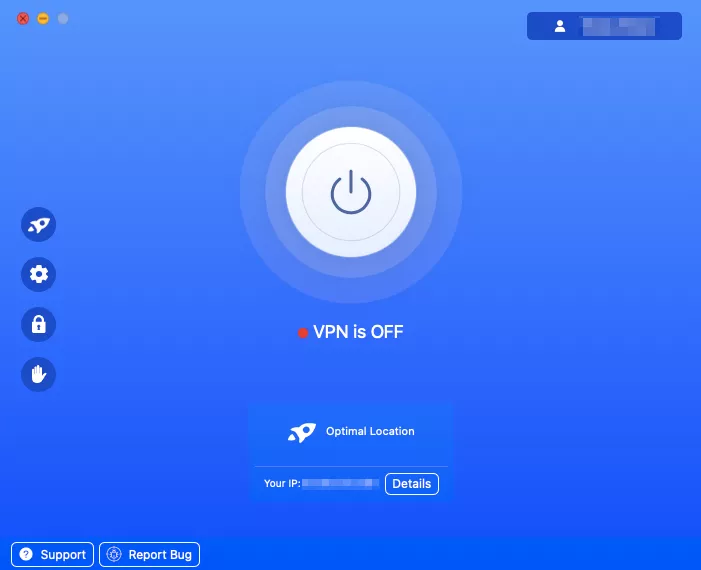
- Choose the desired server location. VeePN offers servers across 89 locations in 60 countries. All you need to do is to choose the desired location and connect to the server.
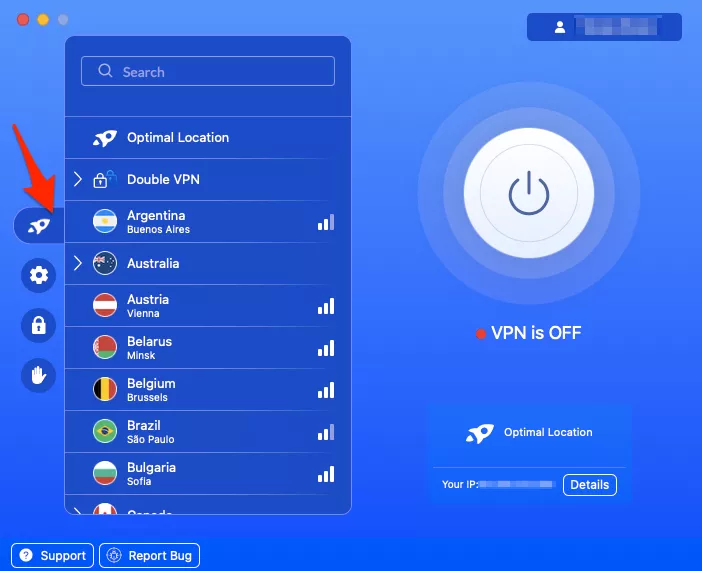
- Turn VeePN on. Tap the On/Off button at the center of your screen to launch your VPN.
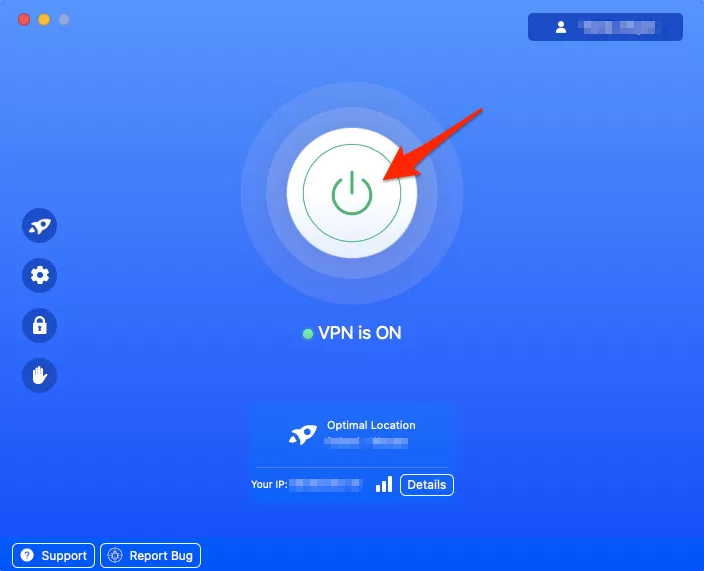
- Enjoy the race! You’re all set. Close your browser, log-in to your account on Hulu, YouTube TV, F1 TV Pro, or any other streaming service provider of your choice, and enjoy the content desiring the F1.
How to troubleshoot your VPN connection
In case you have any problems with connecting to a specific Formula 1 live event when you have your VPN enabled, you can try one of the options below to resolve the connection problem.
- Clear browsing history, cache and other data. This could assist you in eliminating your digital footprint on the internet.
- Try another VPN server. Some servers may be associated with the use of a VPN and blacklisted by certain online services. Luckily, connecting to another server location will take you just a few clicks.
- Change your VPN protocol. The stability, security and the general quality of your VPN connection is provided by tunneling protocols. TCP and UDP variations of OpenVPN, IKEv2/IPsec, WireGuard and Shadowsock can be used with VeePN.
- Contact customer support via email or live chat. If you can’t solve your problem using the methods above, contact your VPN service provider via one of the available channels to get some help.
- Use a premium VPN like VeePN. Finally, if you’re currently using a VPN service that doesn’t cover your needs, consider VeePN – one of the best options on the market.
Try it risk-free with a 30-day money-back guarantee and enjoy F1 and any other desired content while maintaining your online privacy and security
FAQ: How to Watch F1 in the USA
Starting with the 2026 season, all Formula 1 races in the USA stream on Apple TV. Every session is there in one place, including practice, qualifying, Sprint races, and the main Grand Prix. Some practice sessions and a few races are available for free in the Apple TV app, while the rest require a paid subscription.
If you travel outside the US, F1 on Apple TV may not be available in your new location because of geo-restrictions. In that case, a trusted VPN like VeePN can help you keep watching F1 on your usual US services while also protecting your connection.
You’ll most likely watch F1 testing 2026 in the USA on Apple TV, since Apple holds the broadcast rights from the 2026 season onward. Pre-season testing is usually shown on the same platform as the main races, so keep an eye on the Apple TV F1 section and the official Formula 1 announcements closer to the start of the season for exact session times and coverage details.
Yes, F1 TV (the app’s free version) and F1 TV Pro (the app’s premium version) are available in the US and several other selected countries. The service’s premium version, which broadcasts all F1 events, costs $79.99 annually. The free F1 TV version provides access to historic races, replays, and F1 documentaries.
F1 TV has a free version that provides access to historic races, replays, and F1 documentaries. In turn, the service’s premium version – F1 TV Pro – airs the entire F1 season (available in the US, the Netherlands, Austria, and Canada). This premium subscription comes at the cost of $79.99 per year.
No, F1 races aren’t currently available on Amazon Prime Video. At the moment, the streaming giant is planning to make F1 TV a paid add-on to their service for US-based viewers. But it’s unlikely to happen this season.
You can use a virtual private network (VPN) to watch the desired F1 events either in the US or while traveling to a foreign country. Take the following steps to access the desired Formula 1 races with VeePN – a premium VPN service offering servers in over 89 locations across 60 countries:
- Create a VeePN account and choose your subscription plan.
- Download and install the app on your preferred device.
- Connect to the desired VPN server location.
- Turn your VPN on.
- Restart your browser and head to the streaming platform of your choice.
- Enjoy F1 live while remaining completely private.


VeePN is freedom
Download VeePN Client for All Platforms
Enjoy a smooth VPN experience anywhere, anytime. No matter the device you have — phone or laptop, tablet or router — VeePN’s next-gen data protection and ultra-fast speeds will cover all of them.
Download for PC Download for Mac IOS and Android App
Want secure browsing while reading this?
See the difference for yourself - Try VeePN PRO for 3-days for $1, no risk, no pressure.
Start My $1 TrialThen VeePN PRO 1-year plan