Deutsch
  Español
  Français
  العربية
  Indonesia
  Italiano
  한국어
한국어  Nederlands
  Polski
  Português
  Türkçe
  简体中文
简体中文  ไทย
ไทย  Tiếng Việt
  Čeština
  فارسی
فارسی  Română
  Filipino
  日本語
日本語 


Can Emails Be Traced? What an Email Can Really Reveal
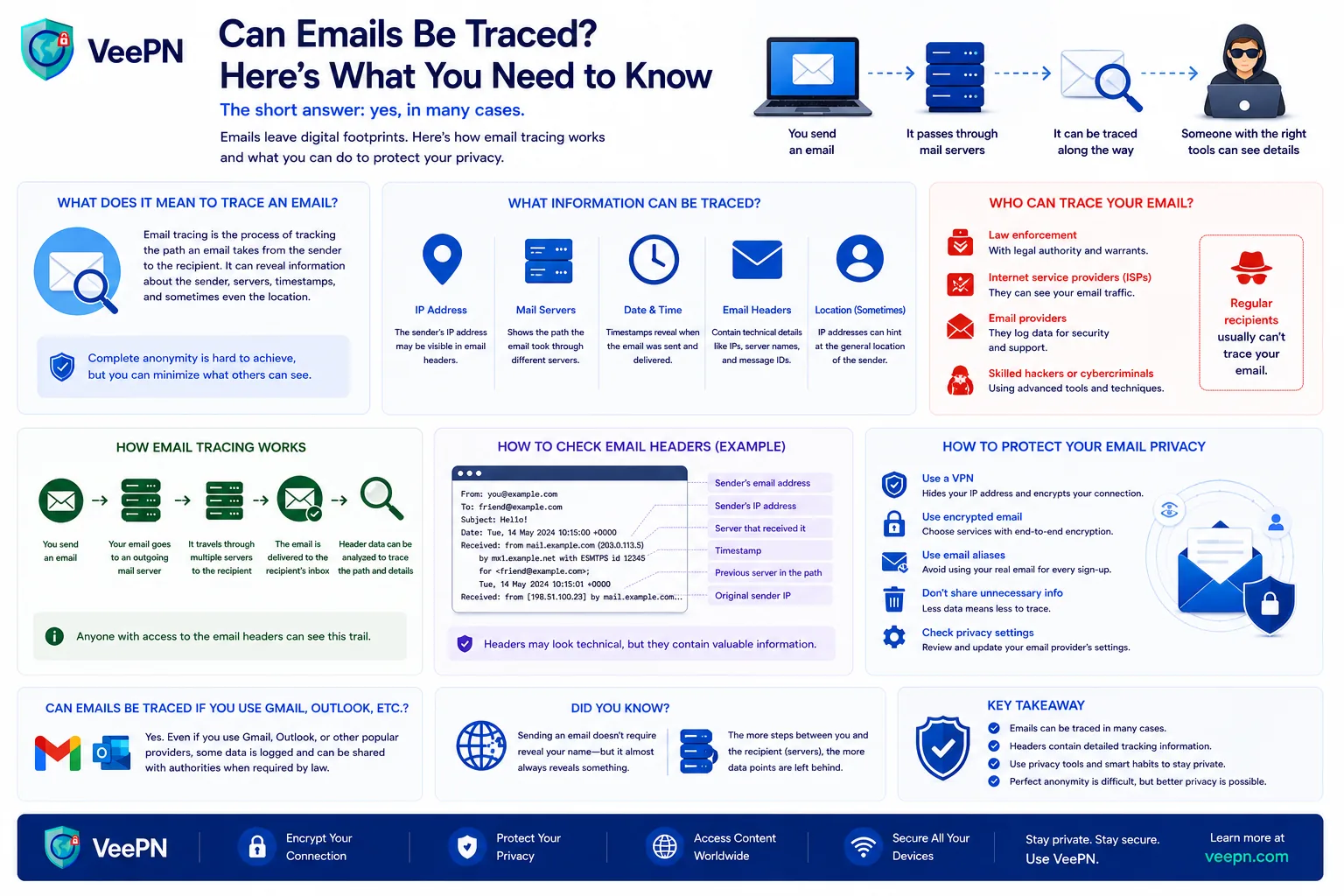
Yes. Emails can often be traced. However, not always in the way that you may expect. You are able to follow a message to a mail server, email provider or approximate path via several servers. You can also sometimes find the IP address associated with the message.
But tracing an email all the way to a real person, a home address, or a precise physical location is much harder. That usually takes more than a quick header check. It may require records from email service providers, an Internet service provider, or even law enforcement agencies.
So the short answer is yes, but usually only partly. In this guide, we’ll explain what you can actually find, how email tracing works, and how to reduce email tracking on your side.
 VeePN Research Lab


 Quick Navigation
2. How the IP address in an email header helps
3. How to trace a Gmail address through the full email header
4. How Apple Mail and another email client show hidden details
5. What email tracing can reveal, and what it cannot
6. How an email service and email provider can identify more
7. How email tracking works after the message arrives
8. How to reduce email tracing and tracking
9. How VeePN can improve email privacy
FAQ
Can emails be traced, and what does that actually mean?
When people ask this, they usually mean one of two things. Can you find out where the email came from, or can someone do the same to you?
In practice, tracing usually means checking the email’s path from sender to receiver. That includes the route through multiple servers, timestamps, authentication results, and sometimes the sender’s IP or sender’s IP address. This is why the first thing to inspect is the email header or full email header, not just the version you see in the normal inbox view.
But here is the important part. Tracing a message does not always reveal the real identity behind it. Often, it only shows the sending service, the route, and a rough approximate location.
How the IP address in an email header helps
The email header is where most of the useful clues are located. It shows when the message was processed, which mail server handled it, what domain it came from, and whether it passed security checks.
In some cases, the Received chain or other header fields may expose an IP address associated with an earlier stage of delivery. However, with major webmail providers, the visible addresses often belong to the provider’s mail infrastructure rather than the sender’s personal device. If that happens, you can use an IP lookup to estimate the sender’s approximate location. But that result is usually broad. It may point to a city, a region, or a network provider, not an exact specific location.
There is another catch too. The visible IP may belong to a proxy server, a company network, or a VPN exit node. So even if an IP is there, it does not always point to the real sender. That is why a header can offer valuable information, but not always a final answer.
How to trace a Gmail address through the full email header
If you use Gmail, you can inspect the full email header in a few clicks:
1. Open the message in Gmail.
2. Click the three-dot More menu next to the Reply button.
3. Select Show original.
4. Review the authentication results and full message header.
This opens the raw header and delivery details. Once you are there, check the “Received” lines, the sending domain, the authentication results, the timestamps, and the reply path. That is the best way to trace an email from a suspicious Gmail address or a message pretending to come from Google, a bank, or another trusted brand.
It also helps you spot fake email or a fake email address. A message may look fine in the subject line, but the header often tells a very different story.
How to read a real email header: SPF, DKIM, and DMARC
Opening the full header is only the first step. The next question is what all those technical-looking lines actually mean.
Here is a simplified example of what you might see in the authentication section of a legitimate message:
Authentication-Results: mx.google.com;
spf=pass (google.com: domain of [email protected] designates 192.0.2.10 as permitted sender);
dkim=pass [email protected] header.s=selector1;
dmarc=pass (p=NONE sp=NONE dis=NONE) header.from=example.com
At first glance, this looks complicated. In practice, there are three important results to check.
SPF: pass
SPF, or Sender Policy Framework, checks whether the server that sent the email is authorized to send mail for the relevant domain. A pass is a positive sign. A fail, softfail, or unexpected sending domain deserves closer inspection.
However, SPF alone does not prove that the visible From address is trustworthy.
DKIM: pass
DKIM, or DomainKeys Identified Mail, uses a cryptographic signature to verify that the message was signed by a particular domain and that signed parts of the email were not altered after signing.
In the example above, dkim=pass and [email protected] indicate that the DKIM signature was successfully verified for the example.com domain.
DMARC: pass
DMARC builds on SPF and DKIM and checks whether an authenticated domain aligns with the domain shown in the visible From address. A DMARC pass is therefore particularly useful when investigating possible sender spoofing.
For example, if a message claims to be from [email protected], but its authentication results point only to an unrelated domain, that mismatch is worth investigating.
What should you look for in a suspicious header?
Do not judge an email by one line alone. Compare several pieces of information:
- the visible
From:address; - the
Return-Path:domain; - the earliest relevant
Received:entries; - the SPF result and domain;
- the DKIM result and signing domain;
- the DMARC result;
- unexpected domains or mail servers in the delivery path.
A message with spf=pass, dkim=pass, and dmarc=pass has passed important authentication checks, but that does not automatically make its content safe. A compromised legitimate account or domain can still be used to send malicious messages.
On the other hand, authentication failures or domain mismatches can be useful warning signs, especially when an email asks you to enter a password, open an attachment, send money, or follow an urgent link.
How Apple Mail and another email client show hidden details
If you use Apple Mail, you can inspect message headers there too. On Mac, you can open the message and view all header details from the menu. This gives you access to the routing data, sending path, and other Internet headers that are hidden in the normal reading view.
That matters because your email client changes both how much you can inspect and how much others can learn about you. For example, Apple Mail has privacy features that can hide your IP and limit certain kinds of open tracking.
So while you may still inspect a suspicious email, the sender may get less information about you in return. That is especially useful if you want less exposure from tracking pixels and similar hidden tools.
What email tracing can reveal, and what it cannot
Email tracing can help you find the route the email took, the service that sent it, whether it looks spoofed, a rough approximate location, and signs of phishing or abuse. That alone can be enough for further investigation, especially if you are checking a message from an unfamiliar sender. It can help you decide whether the email looks legitimate or whether it deserves extra caution.
But it usually cannot prove a person’s exact physical location, full name, home address, or true identity with certainty. That is especially true if the sender uses big webmail services, public networks, a VPN service, or other privacy tools.
So yes, an email can often be traced back to its service or technical origin, but tracing it to a real human is a different level.
How an email service and email provider can identify more
This is the part ordinary users do not see. A normal recipient only gets the message and its header. But an email service, email provider, or Internet service provider may have much more in its logs, including login records, account details, and connection history.
This is where legal requests come in. If a case involves threats, fraud, or serious abuse, law enforcement agencies may ask providers for records. In some cases, that may involve a court order.
So if you are wondering whether emails are fully anonymous, the answer is usually no. They may look anonymous to the recipient, but providers may still hold data behind the scenes.
How email tracking works after the message arrives
Tracing is one side of the story. Tracking is the other. Many emails include tracking pixels or tracked links that report when you opened the message, what device type you used, and sometimes your IP-based location when the content loads.
That is why some marketing emails seem to know exactly when you opened them. To reduce this kind of tracking, it helps to block external images, be careful with unknown links, avoid random messages from an unfamiliar sender, and use additional addresses or aliases for signups.
A secondary address is especially useful because it helps separate your real personal email address from newsletters, stores, and random services.
How to reduce email tracing and tracking
You do not need advanced techniques to improve your privacy. A few habits already go a long way.
Check the email header before trusting a message
If something feels off, inspect the header first. A display name can be faked, and a clean-looking message body can be faked too. But the full header often shows whether the message really came from where it claims.
Disable remote content when possible
This helps block tracking pixels from loading. It also reduces the amount of data a sender gets when you open the message, which makes email tracking much less useful.
Use extra addresses for sign-ups
Using aliases or a secondary email helps protect your real inbox. It also makes leaks easier to spot. If one alias starts getting junk, you instantly know which service exposed it. That is why email masking is so useful.
Be careful on public networks
Checking mail on cafés, airports, and hotels is convenient, but it exposes more of your online activity. That is where a VPN service helps. It hides your visible IP, which makes profiling harder and adds an extra layer of privacy.
How VeePN can improve email privacy
A VPN cannot prevent email providers, recipients, or email headers from revealing information that is already part of an email. However, it can help reduce some of the network-level data associated with your online activity.
- Encrypted connection. A VPN encrypts your internet traffic, which can help protect your activity from interception on public Wi-Fi networks.
- IP address masking. By routing your connection through a VPN server, VeePN helps hide your public IP address from websites and online services you visit.
- Protection against malicious links. Security features such as NetGuard can help block known phishing and malicious domains that may be delivered through email messages.
While a VPN cannot make emails anonymous, it can add an extra layer of privacy and security when accessing your inbox, especially on untrusted networks.
FAQ
Yes, sometimes. You can often trace the message to a service, route, or rough approximate location by checking the full email header. But identifying the exact sender usually requires more than the header alone. Discover more in this article.
Sometimes, but not that you will certainty know who this is. A Gmail address or personal email address may lead to public clues, and reverse email lookup tools can help, but they do not guarantee you finding the real identity behind the message.
They might discover some information, but usually not everything. Through tracking pixels, links, and metadata, they may detect your IP address, device type, or habits you have. But that does not automatically reveal your exact home address or real-world identity.
Not fully in most cases. Anonymous emails can hide a lot from the recipient, but the email service, email provider, or Internet service provider may still hold data that can be used later through legal requests or a court order.


VeePN is freedom
Download VeePN Client for All Platforms
Enjoy a smooth VPN experience anywhere, anytime. No matter the device you have — phone or laptop, tablet or router — VeePN’s next-gen data protection and ultra-fast speeds will cover all of them.
Download for PC Download for Mac IOS and Android App
Want secure browsing while reading this?
See the difference for yourself - Try VeePN PRO for 3-days for $1, no risk, no pressure.
Start My $1 TrialThen VeePN PRO 1-year plan