Deutsch
  Español
  Français
  العربية
  Indonesia
  Italiano
  한국어
한국어  Nederlands
  Polski
  Português
  Türkçe
  简体中文
简体中文  ไทย
ไทย  Tiếng Việt
  Čeština
  فارسی
فارسی  Română
  Filipino
  日本語
日本語 


What is Geo Blocking and How to Get Around It?
If you’re trying to access a website or platform and suddenly hit a brick wall with a “This content is unavailable in your country” message instead of what you were after, it’s probably because you’re running into a geo block – plain and simple. Geo-blocking is basically blocking online content based on where you’re coming from. A geo block just means that an online service, a government, or your internet service provider (ISP) has worked out where you are by tracking your device’s IP address (your computer’s internet address) and has decided to shut you out. Geo-blocking works by using tracking and geolocation tech to identify your device’s IP address – effectively pinning down your general location, without giving away your precise address. However the IP address on your device can give away your general location, but it’s not always 100% accurate.
Geo-blocking can stop you getting at online content or services by analysing the data you’re requesting and the traffic data – which can happen at the network level (and that’s often referred to as network level blocking). Geo-blocking creates virtual borders online, allowing businesses to manage the way they distribute digital content according to what makes business sense, is legal, and keeps them safe. It’s also used for market segmentation and ‘dynamic pricing’, which can lead to price discrimination – where people in different regions are charged different prices for the same product or service. Geo-blocking is also used to comply with local data protection laws such as the GDPR in the EU – which can result in geo blocking website access due to a lack of compliance with these rules. Geo-blocking is essentially a way for services to block or restrict access to content based on your location – usually for a good reason, such as keeping up with licensing agreements, local laws or regulations.
Your device’s IP address is like a digital fingerprint that gives away where you are in the world. When you connect to the internet, your device borrows the router’s public IP address – this is how services can figure out where you are. Want to know more about geo-blocking? Keep on reading.
 VeePN Research Lab


 Quick Navigation
2.What’s geo blocking all about?
3.How does geoblocking work?
4.Geo Blocked: What does it look like for users?
5.Geo Blocking & the Law
6.Copyright Laws and Geo Blocking
7.Geo Blocking Regulation in the European Union
8.Digital Services and Geo Blocking
9.What kinds of content get blocked?
10.Making it Harder to Bypass Geo Blocks
11.Getting Around Geoblocking
12.How to get past geoblocking with a VPN
13.Getting the content you want with VeePN
14.FAQ
Introduction to Geo Blocking
Online services block their content by geo blocking so that they do not fall into the wrong hands – i.e your hands. Being able to watch a show on your favourite streaming service, or even shop online, in any case, what comes into play is geo blocking when the provider requires that only a select few view or utilize its content. This is normally accomplished by verifying your IP address – that is assigned by your internet service provider and tells off your approximate location. Online stores and other digital services based on streaming use geo blocking to implement licensing agreements with local laws and ensure that their content is not accessible in all regions. Through geo blocking, such providers can ensure their intellectual property is not infringed and remain within the boundaries of regional laws, ensuring that only those who are in the right areas will be able to use their services.
What’s geo blocking all about?
Geo-blocking is all about stopping you from getting at certain online services, websites, or web pages if you’re not in the right place. There are loads of examples of geo blocking, such as BBC iPlayer, live sports streaming services, and news websites. For example, BBC iPlayer is only available within the UK due to geo-blocking based on licensing agreements. Live sports streaming services often use geo-blocking to keep UK users from watching matches that are only being shown in the US. Some news websites use geo-blocking to restrict access to certain articles based on where the user is coming from. Streaming platforms like Netflix and Amazon Prime also use geo-blocking to control who can access their content across different countries. Companies use geo-blocking to block traffic from regions known for nasty activity. Geo-blocking is a method used by websites and ISPs to keep the internet free of sites that can cause harm – like sites that promote online gambling and other dodgy activities. And even when you’re browsing the web, loads of third parties – including the websites you visit – can see where you’re coming from. That’s why these platforms use geo blocks to stop access to content that doesn’t meet local laws and data protection regulations. Which means if you’re trying to access region-locked or censored content – forget it.
Geo-blocking is super common and for the most part, it’s perfectly legal as it’s used to follow regional rules. The main way it’s done is through your IP address – but that’s not 100% foolproof.
So why are those restrictions in place? Well here are the two most obvious reasons:
Why do geo limitations happen?
Most of the time, content gets blocked because of licensing agreements or local laws and censorship. Let’s have a look at both reasons.1. Content Licensing & Copyrights. Some content is owned by a specific service provider in certain countries, while in others it belongs to someone else. For example, Rick and Morty, a super popular animated show, isn’t available on Netflix in the States (it’s on Hulu and HBO Max though), but it is in many European Netflix libraries. Under international copyright law, providers are supposed to block access to content from jurisdictions where they don’t have the right to sell or distribute it. Geo-blocking is closely tied up with copyright laws that dictate where content can be distributed or accessed. The online media companies use geo-blocking to stick to licensing deals among media properties, the laws in certain countries, or other agreements and rules.
- Online Censorship. Some governments block their citizens from viewing certain content because of strict internet censorship. Think about it: all those popular websites and apps you know and love – like Facebook, Twitter, YouTube, Netflix, and even Google – aren’t even available in China.
So now you’ve got a better idea of what geoblocking is and why it exists, it’s time to dig in and find out how these limitations work.
How does geoblocking work?
Geo-blocking works by looking at the IP address that your network connection gives you – and it’s all thanks to your ISP (internet service provider). Internet service providers can actually play a role in geo-blocking by setting those IP addresses and sometimes restricting access on geographic grounds.
- When you try to visit a website, your request sends your IP address to the website’s server along with all the other information you requested. This can include information about where you are, and in some cases, online transactions even share your location and the currency used, which can also be used to infer your location and enforce geo-blocking.
- The website then uses your IP and all that other data to decide whether to let you in – or block you. Geo-blocking systems usually make an educated guess about the user’s location based on the information they can see, starting with the IP address, but also taking into account payment data, configuration data, GPS, and device language.
- Now the website knows where you’re coming from – so if it’s got geo-blocks in place for your specific location, you’re out of luck.
At the end of the day, geoblocking involves using geolocation technology to implement geoblocking by using IP addresses to figure out a user’s location. Geo-blocking is often used by streaming services to control who gets access to certain content based on geographic location, and regional licensing agreements. Online services use geo-blocking to enforce licensing agreements, stick to copyright laws, and make sure they’re compliant with the local laws and regulations. Putting IP address detection in place is the primary method of geoblocking, though it’s not foolproof – and there are ways around geo restrictions using certain tools.
Geo-blocking is pretty common, especially with streaming platforms who’ve got copyright and licensing issues to deal with. Some governments though, like in China and Iran, take things a lot further with super advanced content blocks like DPI, firewalls and more. Online services also use geo-blocking to follow the laws and regulations – especially in places with authoritarian regimes and limited online freedom. And then there’s laws like the GDPR in the EU that can block access to websites that don’t follow the rules.
But, if you’re stuck in a country with geo-blocking, you know how infuriating it can be, especially when you’re on holiday or working abroad and can’t get the content you want.
Geo Blocked: What does it look like for users?
If you’ve ever tried to access a website or streaming service and got a message like “This content is not available in your country,” you’ve come across geo blocking first-hand. For users, this can be a total pain – especially if you’re traveling or living somewhere your favorite content isn’t available. Streaming services and other platforms use your IP address to figure out where you are, and if you’re not in the right region, you’ll be blocked from accessing certain content. A lot of people turn to virtual private networks (VPNs) or similar tools that can mask their IP address and make it seem like they’re browsing from a different location. However, you’ve got to remember that accessing geo blocked content this way might go against the provider’s terms of service, and could even break copyright laws – so always be careful.
Geo Blocking & the Law
In the case of geo blocking, the legal side of the issue can be quite confusing and differ all over the globe and the rationale behind the ban. In the majority of cases geo blocking is utilized to comply with a copyright law, licensing and the local laws that regulate online content such as when content owners do not want certain movies, television shows or online services to be available in particular locations so that they can pursue exclusive licensing arrangements or local data protection policies. It is however quite legal, which permits companies to enforce privately contracted arrangements and negotiate copyright and licensing contracts by restricting accessibility by the geographic location of an individual. However, the question of whether geo-blocking is legal or not is very much relative to the reasons and location – it is usually employed to defend intellectual property or impose licensing agreements, but it is encapsulated by certain locations that it is unjust or even discriminatory to use without a good purpose.
The European Union is a bit of an odd one out though – geo-blocking is mostly illegal there. This is down to the Geo-Blocking Regulation , which stops online shopping websites from doing unjustified geo-blocking to protect consumer rights. Its all part of the EU’s digital single market strategy – to make the online market more open and fair, so all EU citizens have access to the same goods and services wherever they are in the EU. At the same time the EU is leaving room for geo-blocking to be used where copyright and regional licensing agreements are about to get in the way.
Geo-blocking is pretty good at stopping people accessing digital content based on their location, especially when it comes to enforcing licensing agreements for streaming services. But it has some limitations – if users are determined they can often still get around geo-blocking using VPNs or proxies. And if they do, it might have some legal implications – as different providers and regions have different rules about getting past geo-blocking restrictions.
Copyright Laws and Geo Blocking
Copyright laws are a big reason why geo-blocking is still around. Content providers have got to follow pretty tight rules about where and how they can distribute their stuff, which often ties in with licensing agreements with different regions. Geo-blocking helps these providers out by stopping people outside of a certain region from getting access to their content – for example, a streaming service might have the rights to show a movie in the States but not in Europe. By using geo-blocking, they can make sure only the right people are watching the right stuff, avoiding copyright infringement and sticking to their licensing agreements. This way, content providers can protect their intellectual property and make sure they’re not breaking any laws when they offer their services in different countries.
Geo Blocking Regulation in the European Union
The European Union has got some specific rules in place to deal with geo-blocking and its impact on the market. The geo-blocking regulation (Regulation (EU) 2018/302) is designed to prevent people from being discriminated against because of where they live in the EU. Its part of the EU’s digital single market strategy, which aims to make a unified digital market across EU countries. This regulation means that consumers in all EU countries can get the same access to goods and certain online services, no matter where they live.
Its worth pointing out though, that the geo-blocking regulation doesn’t cover all types of online content – so content that’s got copyright protection like movies and TV shows , and other streaming services are excluded. So streaming platforms can still use geo-blocking to block people from getting access to content based on regional licensing agreements and copyright laws. So users in different EU countries might still find geo-blocked content on popular streaming services because of these licensing restrictions.
For those who are trying to access geo-blocked content within the EU , tools like VPNs and proxy servers can sometimes get around geo-blocking restrictions by making it look like you’re browsing from somewhere else. But you should be aware of the terms of service of streaming platforms and the legal implications of getting around geo restrictions.
Overall, the EU’s geo-blocking regulation is a big step towards having a more unified digital market, but regional licensing agreements and copyright laws are still going to play a big part in deciding what content is available in different parts of the world.
Digital Services and Geo Blocking
Its not just movies and music that get geo-blocked – digital services like online banking and e-commerce platforms also use geo-blocking to stop people accessing their platforms based on their location. This is often done to meet local laws and regulations, especially when it comes to data protection and financial transactions. For instance, an online banking service might use geo-blocking to stop users logging in from certain countries where the service isn’t licensed to operate. By doing this they can protect sensitive user information and stop unauthorized transactions. Geo-blocking helps digital services stay on the right side of local laws and makes sure that only users in approved regions can access their platforms.
What kinds of content get blocked?
Geo blocking – its used to control who gets to see what online – and its workings can get pretty complicated. The way its implemented can vary wildly depending on the local laws, licensing agreements and business strategies in play. For example, streaming services use geo blocking to make it look like they have a lot more to offer in different regions, or to charge different prices in different countries. And its also used for targeted advertising, so streaming services can push videos that are really popular in your part of the world. Geo blocking can also be used to comply with data protection laws – like the GDPR in the EU – which can shut down websites that don’t play by the rules. And its even used to enforce local laws and regulations, especially in countries where the government just wants to control what people can and can’t see.
Here are a few examples of the kinds of things you might find yourself unable to access when you’re not at home.
Streaming Services like Netflix
You might be surprised to learn that your favorite streaming service – Netflix or Amazon Prime, for instance – is actually available in a pretty big number of countries (around 190 and 100 respectively). But they still use geo blocking to control who gets to see what. For example, Netflix will restrict access to certain content because of licensing agreements – and Amazon Prime will block access due to licensing restrictions too. And because of these agreements, the libraries of these streaming services vary wildly depending on where you are in the world. So you might find that your favorite show is not available in the country you’re visiting right now. Check out our in-depth comparison of Netflix in the US and UK for more on that.
What’s more, some other pretty popular streaming services are only available in a handful of places. For example, Hulu is only available in the US – and HBO Max and Disney Plus are currently only available in around 60 countries. And of course, there are loads of local streaming services like Voot in India that you wont be able to access from anywhere else. And if you try to access one of these services and you’re not in the right country, you’ll probably just get some pretty frustrating “not available in your area” error message.
Music Streaming Services like Spotify
Spotify, Apple Music and YouTube Music arent available everywhere either – so if you’re planning a trip abroad, you might find that you cant listen to your favorite artists and bands without having to pay per song. And some of your favorite tracks might even be grayed out – which is all down to licensing agreements with the music labels.
Places where blocked content is the rule – You’ll probably have noticed that some YouTube clips just wont play in your area. Thats because a lot of YouTube content is uploaded by fans who dont actually own the rights to the material. As a result, the people who do own the rights to it may have required them to block access to certain videos in certain regions because of copyright restrictions.
Live Sports Events
When it comes to live sports events, things get a whole lot more complicated. Thats because the rights to broadcast a game can belong to multiple different companies in different regions – from big corporations like ESPN and FOX Sports to local radio stations or small online streamers. So for example, Hulu + Live TV might be able to show a Lakers game in New York, but not in L.A. where some other distributor has exclusive rights to air it.
Social Networks
The main reason that social media platforms get geoblocked is because of strict internet censorship. For instance, you wont be able to access your Facebook, Twitter, Instagram or Snapchat account in China. The Indian government has blocked access to TikTok and WeChat, and loads of other popular social networking sites are banned in places like Iran, North Korea, Turkmenistan and Russia.
Online Gambling and Sports Betting websites
Online casinos, lotteries and sports betting websites are either banned or heavily restricted in loads of parts of the world. That includes countries like the UAE, Singapore, Qatar, North Korea, Japan, Cyprus, Poland and the USA – where only a handful of states allow some forms of online gambling. If you’re a keen gambler you may find it pretty tricky to access your favourite sites when you’re travelling.
Making it Harder to Bypass Geo Blocks
How Providers Make It Harder to Bypass Geo BlocksAs more people try to sneak around geo-blocking using VPNs, proxies & other tricks, the big content providers are upping their game to make geo-blocking even more effective. They’re using some seriously advanced techniques to detect & block attempts to get around their restrictions. Take for example providers who analyse IP traffic characteristics like packet latencies & routing paths to figure out where a user is really located – they can even use machine learning algorithms to spot patterns that suggest someone’s using a VPN or proxy. Then there’s stricter authentication which can be used to verify a users location & identity, like two factor auth. By combining all these methods, the providers make it a whole lot harder for users to bypass geo-blocking restrictions, so that only the people who are meant to be accessing their content in the right region are able to get at it.
Getting Around Geoblocking
Luckily there are loads of tools out there that can help you access a website or service that’s been blocked in your region. Users tend to try to access content that’s blocked by geo-blocking using VPN services, proxy servers or dns services. VPN’s will encrypt your data and give you access to a global network of servers, allowing you to get around geo-restrictions & access content that’s otherwise restricted to certain countries. Some DNS services, like smart DNS, can help hide where you’re coming from by rerouting dns requests, allowing you to access geo-blocked content. Getting around geo restrictions & dodging geo blocking systems can be a bit of a challenge, as they’re designed to stop people accessing the content because of where they live. Bypassing geo-blocking can also create some technical difficulties, as the providers are using advanced detection methods to block such attempts. Its also worth considering the security risks when using these tools, as messing with your IP address and using VPN’s can actually help protect your privacy. Its worth noting that in some places, dodging geo-blocking is actually against the law – but in most places the worst thing that usually happens is you get banned from the platform and don’t actually face any legal consequences. Dodging geo-blocking can also be a lifesaver when youre traveling and your home subscription wont work.
Lets take a look at the most common options in a bit more detail, considering both the pros & cons.
Proxy Servers
A proxy server is just a middle-guy destination for your traffic before it reaches the server of the website you’re trying to get to. The main thing a proxy does is give you a new IP address instead of the one you’re currently using. This lets you get to online resources that’d otherwise be blocked in your location. Proxy servers can be used to dodge geo-blocking by acting as an intermediary that changes your IP address.
Geo-blocking can be implemented in loads of different places – from the network level (where its implemented by dropping IP packets based on where you are) to the domain name system (dns) which translates domain names into IP addresses, which websites or ISPs use to control access based on your region.
To get a bit more technical, here’s how a proxy server works:
- You type the url of the website you want to access into your browser
- Your request goes to a proxy server
- Your IP address is swapped out with the server’s own address
- The proxy then forwards your request on to the destination server (ie the website youre trying to get to)
- The response from the website then gets sent back to the proxy server, and then on to your device
A proxy can be a decent way to get around geoblocking, but they also have their downsides. If you want to learn more, you might want to check out our blog post on the difference between proxies and vpn’s. For now we’re just going to run through the main benefits and drawbacks of using proxies to access geo-limited content.
The pros and cons of proxy servers
Pros:
- Theyre easy to set up – its just a case of setting up a proxy on your browser, connecting to a server, and you’re away
- They change your IP address, which is often enough to get you access to the content thats been blocked in your region
Cons:
- free proxies make a profit by showing you loads of intrusive ads
- They dont give you any encryption, so your data is still accessible to snoopers
- Theyre also often a bit dodgy, and some will even sell your private data to ad agencies
The Tor Browser The Onion Router (Tor)
Tor is a pretty handy privacy browser – its main job is to make sure you can make anonymous online calls, and also let you onto all those onion websites that live in the dark web. It also comes in handy for getting around geoblocks while you’re browsing.
Here is the lowdown on how tor works:
- First you download and install tor on your device, then you join the tor network. Browsing with tor is known as onion routing. This is the bit that makes all this stuff work.2. Every time you ask the internet for something, the request gets bounced around between a bunch of different nodes before it gets to where its going. To start, it makes contact with the guard node.
- Next, it does a lap through the middle nodes – this is where your data gets encrypted all over the place.
- Finally, your request reaches the exit node. This is the last stop before the internet sends the info you asked for back to you, all decrypted. And then the whole process gets reversed.
Geo-blocking systems are no fans of Tor. They try to work out where you are from things like the time it takes for packets to get there, patterns in IP traffic, and traffic info. And even with all these fancy tools, they can usually figure it out even when you are using Tor.
Tor is pretty good at keeping things private, but it’s certainly not foolproof. If you want to learn more about that, have a look at our rundown of Tor’s weak spots. So is it a good idea to use Tor to get around geo-blocks? Let’s take a look at the main advantages and disadvantages and see.
Smart DNS services do a similar job to getting around geo-blocks, but they go about it a bit differently: they just redirect your DNS requests to somewhere else.
The Pros and Cons of Using Tor
Pros:
- You stay hidden. Tor is all about keeping your data under wraps on the web. It does this using multi-layer encryption.
- It’s free (and has been since the start). Tor is free to use – it’s supported by people who genuinely care about your online privacy.
Cons:
- No control over the server. When using Tor, you get to choose which server you use, but you can’t pick one in a specific country to get access to the stuff in that country.
- It’s slow. Because Tor has to encrypt and decrypt all your data on the way, it’s a lot slower than regular browsers. So don’t rely on it for things like watching videos or playing games online – Tor isn’t the right tool for that.
- Not 100% secure. Tor is great for keeping you private, but it won’t solve all your online security worries. Also keep an eye out for fake websites on the dark web – they can be trickier than you think and full of dodgy malware.
Virtual Private Networks (VPNs)
A VPN is a pretty useful tool for keeping your online traffic secure and your location hidden. VPNs are virtual networks that let you encrypt your data and change your location – all while making it easy to bypass geo-restrictions and geo-blocks. What a VPN does is mask your IP address and encrypt your whole internet connection, which makes you much safer online. And it’s a good option if you want to get around geo-blocks too – you can just use a VPN or proxy to get access to stuff that is blocked in your area. A good VPN will give you all the benefits of proxies and Tor – it lets you choose which server to use, and it’s got all the security features you need.
So how does a VPN actually work?
- First, you pick a VPN server to connect to and turn your VPN on. Right away, your whole internet connection gets encrypted by the VPN.
- Next, your request hits the VPN server you picked and it changes your IP address to its own, and then encrypts your data. That’s so your ISP and the website you are trying to get to can’t figure out where you really are.
- While your data is all encrypted and on its way, it’s being handled by a set of rules called VPN protocols, like OpenVPN, IKEv2/IPsec, or WireGuard. These protocols tell the server how to keep things safe, how fast the data should go – all that jazz.
- When the website you asked for finally gets your data, all it can see is the VPN server’s IP address. And at this point your data’s all decrypted and it gets sent right back to you.
Smart DNS services and other DNS services can do the same job of getting around geo-blocks as VPNs do, but they do it a different way – just by making the DNS request from somewhere else, without actually changing your IP address.
Geo-blocking systems can try to figure out where you are using other bits of data too – like your payment location, your IP address, your GPS location, and even your language settings.
So is it worth using a VPN to get around geo-blocks? Here are the main advantages and disadvantages.
The Pros and Cons of a VPN
Pros:
- Full encryption. A VPN wraps your data in a secret code so that nobody can see what you’re doing online. And unlike proxies, it also stops DNS and IP leaks from happening.* That extra layer of security. It’s not just about getting the content you want, a good VPN will also protect you from all the nasty stuff that’s floating around out there – whether it’s public Wi-Fi scams, malware, phishing attacks – the whole online threat factory. Intuitiveness – and let’s be honest, setting up and using a VPN is a walk in the park – we’ll get you through it in a few minutes.
- Effectiveness – when it comes to sneaking past those geoblocks, a VPN is the clear winner, and if you do hit a dead end, switching to a different VPN server usually does the trick.
Cons:
- Paid services – sure, there are loads of free VPNs knocking about, but they’re usually pretty dodgy and may be selling your details to the highest bidder – so, as the saying goes, you get what you pay for when it comes to the decent services.
- A bit of a slowdown in connection speed – using a VPN will knock off a bit of speed because of the encryption and decryption, but with a reputable service like VeePN you won’t even notice most of the time.
Overall, if you’re looking to get access to content that’s not available in your location, a decent VPN is your best bet. So here’s how to get around geoblocking with one
How to get past geoblocking with a VPN
To sort out those geoblocks and get access to the websites or services you want with VeePN, follow these simple steps.
- Get a VPN app on your device – VeePN is pretty versatile so it’ll work across loads of devices and operating systems, including iOS, Android, Windows, macOS and Linux
On a phone or tablet, geo-blocking systems might use your GPS to figure out where you are, which can mess with your ability to get past restrictions – the same goes for networks. - Pick a VPN server that suits your needs – if you’re in Europe on a visit and want to watch Hulu, you can pick a US-based server for example.
- Choose a VPN protocol – IKEv2/IPsec is usually the top choice for streaming media when you’re on the move, though – it does a good job of keeping speeds up and getting around those geoblocks that streaming services put in place.
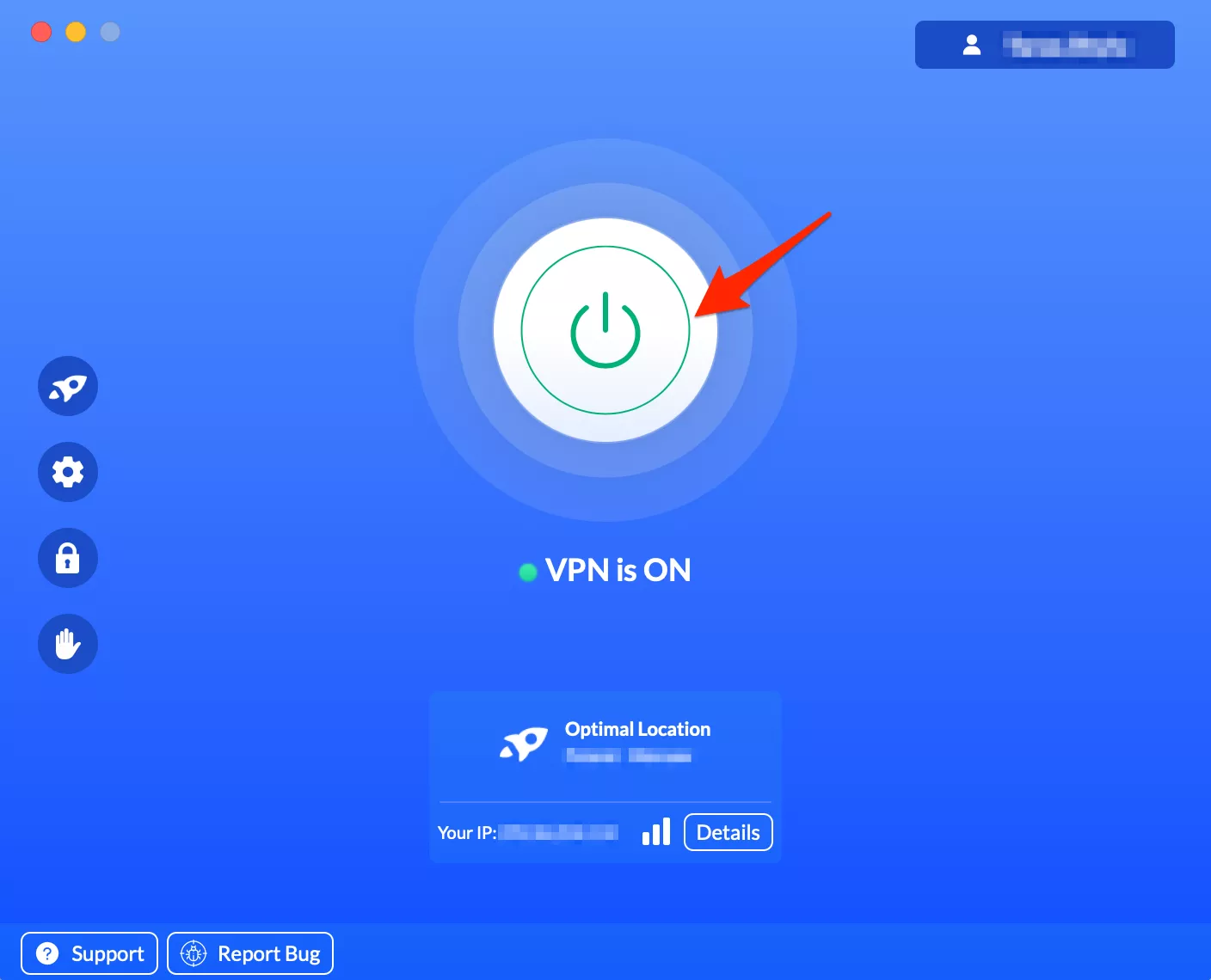
- Switch on your VPN – just tap that big button in your VeePN app and you’ll be browsing freely in no time.
or you can always use Smart DNS services that’ll send your DNS request to another part of the world. Just bear in mind geo-blocking systems can get pretty sophisticated – using all sorts of information to figure out where you are
Be aware that VeePN just doesn’t support, endorse or encourage any use of a VPN that would break the rules of your streaming service. You can find all the details in the VeePN Terms of Service.
How to get around geoblocking with a VPN
Take the following steps to avoid geoblocks and access the desired websites or services with VeePN.
- Download and install a VPN app on your device. VeePN is a multi-platform solution that supports various types of devices and operating systems, including iOS, Android, Windows, macOS, and Linux.
- Choose the most suitable VPN server. For instance, if you’re temporarily visiting Europe and need to access your Hulu account, select a US-based server.
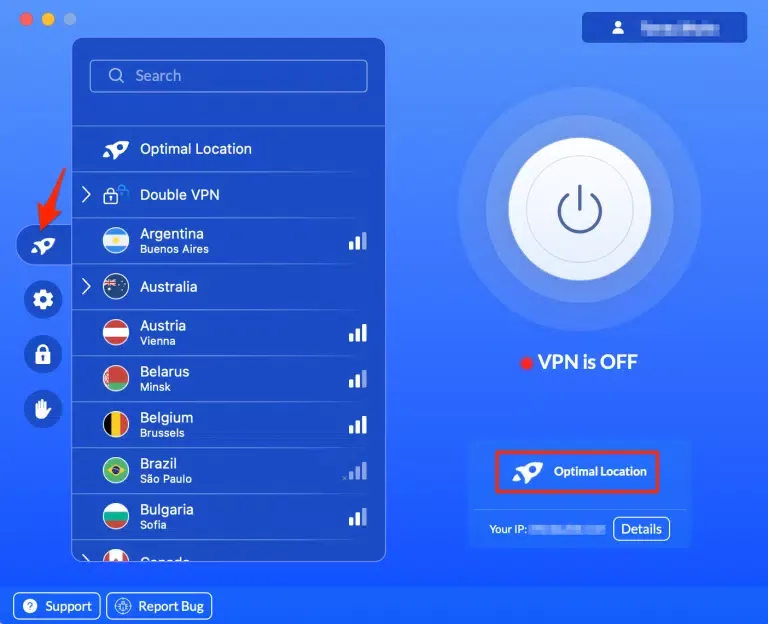
- Pick a VPN protocol. IKEv2/IPsec is considered the best VPN for streaming media when traveling since it provides good speeds and effectively overcomes geoblocks.
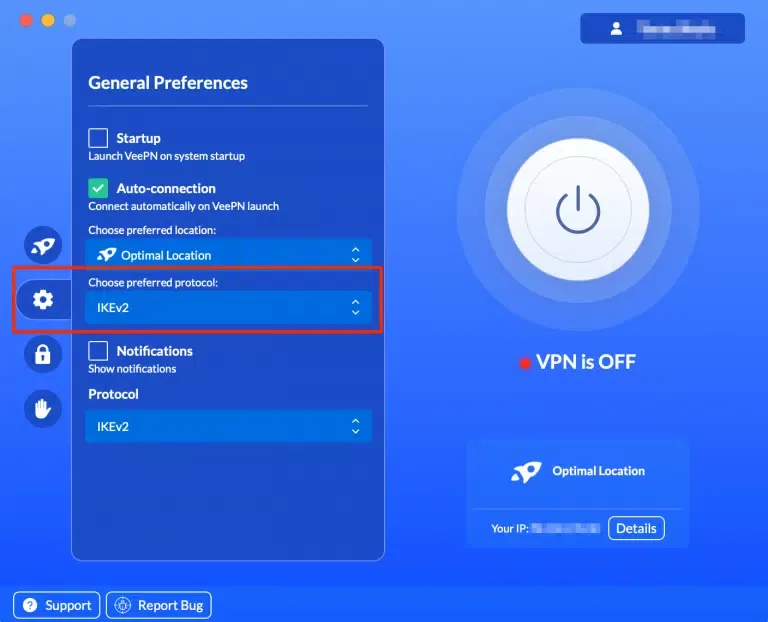
- Turn your VPN on. Simply tap that big button in your VeePN app – and enjoy your browsing freedom.
Note that VeePN does not promote, condone, or encourage using a VPN in ways that would potentially violate Terms of Service of streaming service providers. For more details, please read the VeePN Terms of Service.
Access the desired content with VeePN
If you need a simple and efficient solution to get your hands on geo-blocked content when traveling, try VeePN. It’s a reputable VPN service offering an extensive server network covering 89 locations in 60 countries worldwide. Besides, VeePN will protect your data with top-grade AES-256 encryption and boost your cybersecurity with many powerful features like NetGuard, Kill Switch, and Double VPN.
Choose a VeePN plan and safeguard yourself with a 30-day money-back guarantee!
FAQ: What Is Geoblocking?
In most cases, geoblocking of media streaming content is a lawful way to protect particular licensing agreements. It becomes illegal only if it violates some existing regulations. An example of an unjustified geoblocking practice is when the citizens of some European Union countries cannot buy goods online in other parts of the EU. As for online censorship restrictions, they are mostly legal in countries with authoritarian governments.
You can overcome geoblocks using one of the following tools:
- A proxy server
- The Tor browser
- A VPN
To learn more about the pros and cons of these methods, read this article.
In general, getting around geographical limitations while traveling is legal, as well as the use of VPNs, proxies, and Tor (these tools are restricted only in several countries worldwide). However, some online services, such as streaming platforms, may consider it a violation of their Terms of Service. Note that VeePN is the VPN service not intended to be used for bypassing copyright regulations or other illegal behavior. For more details, please read the VeePN Terms of Service.


VeePN is freedom
Download VeePN Client for All Platforms
Enjoy a smooth VPN experience anywhere, anytime. No matter the device you have — phone or laptop, tablet or router — VeePN’s next-gen data protection and ultra-fast speeds will cover all of them.
Download for PC Download for Mac IOS and Android App
Want secure browsing while reading this?
See the difference for yourself - Try VeePN PRO for 3-days for $1, no risk, no pressure.
Start My $1 TrialThen VeePN PRO 1-year plan