English
  Deutsch
  Español
  Français
  العربية
  Indonesia
  Italiano
  한국어
한국어  Nederlands
  Polski
  Português
  Türkçe
  简体中文
简体中文  ไทย
ไทย  Tiếng Việt
  Čeština
  فارسی
فارسی  Filipino
  日本語
日本語 


Cum să ocoliți restricțiile de internet și să vizualizați conținutul dorit
V-ați săturat să vă fie blocat accesul la site-urile, serviciile și conținutul online preferat? Indiferent de motivul pentru care site-ul web este blocat, fie că este vorba de locul de muncă, școală sau țara în care locuiți, nu vă pierdeți încă speranța. Cu un VPN, puteți ocoli restricțiile de internet și puteți debloca accesul nelimitat la internet. Citiți mai departe pentru mai multe sfaturi despre cum să evitați blocajele de internet.
 VeePN Research Lab


 Quick Navigation
Using a VPN to Unblock Websites
By encrypting your data and hiding your IP address, a VPN lets you bypass Internet restrictions and access geo-blocked content from anywhere in the world.
How VPN Work to Bypass Restrictions:
- When you connect to a VPN, your Internet traffic is routed through a secure VPN server, which masks your IP address and encrypts your data. This means that websites see the VPN server’s IP address instead of your own, allowing you to access content that may be blocked based on your physical location.
- With a VPN, you can choose from a variety of server locations, giving you the freedom to access content from all over the world. Plus, many VPN providers offer additional security features like malware protection and ad-blocking, making your online experience even safer.
Cum să deblocați site-uri web cu VPN
Easily! Bypass Internet restrictions with VeePN. VeePN is available on most popular devices and platforms. It lets you choose from over 2,500 servers in 89 locations across Europe, North and South America, Asia, Africa, and Australia. Here’s how to unblock websites with our app:
- Sign up with 85% off.
- Descărcați VeePN pe dispozitivul dvs. și deschideți aplicația.
- Under the Connect button on the main screen, choose a needed server location from the list. Go for a country in which your service or website is available.
Deci, să spunem că doriți să accesați biblioteca Netflix din Marea Britanie, dar călătoriți în SUA – trebuie doar să alegeți unul dintre serverele din Marea Britanie în aplicația VeePN.
4. Faceți clic pe Conectare și felicitări – v-ați teleportat în Marea Britanie (virtual, dar totuși) și puteți vizualiza conținutul său pe Netflix.
Avantaje și dezavantaje ale utilizării unui VPN
| Avantaje | Contra |
|---|---|
| Vă schimbă locația virtuală | Cele mai de încredere VPN-uri nu sunt gratuite |
| Criptează datele dvs. | Work or school computer may not allow you to set up VPN |
| Accesibil pentru utilizatorii neexperimentați | VPN-urile gratuite sunt de cele mai multe ori nesigure |
So, using VPN to bypass Internet restrictions is one of the most effective tools so far.
Cum să ocoliți site-urile blocate
With content restrictions tightening, what tools can you use and how bypass Internet blocks and retain freedom online? We’ve handpicked some of the most popular ones for you — let’s take a closer look.
Use Tor
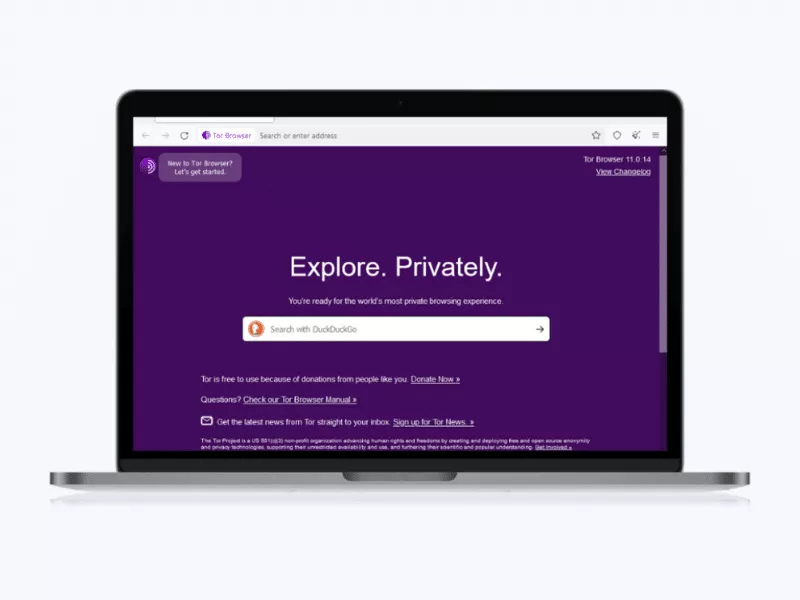
Tor, or The Onion Router, is a free and open-source software that allows you to browse anonymously. Unlike a VPN that sends your traffic through a specified secure server, the Tor technology encrypts traffic and randomly routes it through different nodes. Tor uses numerous layers of encryption to make user tracking difficult (hence, the onion). The network is decentralized, relying on volunteers to operate the thousands of relays needed to provide anonymity.
În același timp, folosind Tor, cel mai probabil vă veți confrunta cu viteze mai mici. Prin urmare, deși vă va permite să accesați site-uri web blocate, nu ar trebui să îl utilizați pentru navigarea zilnică. De asemenea, deși Tor vă poate ascunde bine adresa IP, nu maschează niciunul dintre datele trimise prin intermediul său. Acesta este motivul pentru care, odată ce datele trec prin ultimul nod, ar fi ușor să le obțineți. În cele din urmă, este posibil ca computerul dumneavoastră de la serviciu sau de la școală să nu vă permită să instalați Tor.
Dacă Tor pare a fi o opțiune atractivă pentru accesarea conținutului blocat, faceți următoarele:
- Go to the Tor website and install the Tor browser on the needed platform by following directions on the website.
- Lansați Tor și configurați-l, dacă este necesar (de exemplu, dacă vă aflați într-o țară care cenzurează Tor, precum China sau Egipt).
- Cu Tor lansat, vă puteți conecta și obține acces anonim la site-urile web de care aveți nevoie.
Avantaje și dezavantaje ale utilizării Tor
| Avantaje | Contra |
|---|---|
| Utilizare gratuită | Viteze de conectare mai mici |
| Poate debloca multe site-uri web | Nodurile de ieșire nu criptează traficul |
| Mai sigur decât browserele obișnuite | Unele site-uri web blochează Tor |
Use web proxy or proxy extension
Both work well for bypassing content restrictions on public computers, or if you’re accessing from a work or school computer that won’t let you set up a VPN or Tor. It hides your actual IP address and lets you dodge content restrictions in the way. It’s a great tool for anonymous web browsing or accessing content unavailable in specific regions.
To use a web proxy, simply go to a proxy website, like ProxySite, type in the URL of the website you want to visit, and click on a button to access it. A drawback here is that you have to go back to the proxy website each time you want to access a desired website.
În același timp, deși foarte asemănătoare, extensia proxy este un pic mai convenabilă decât un proxy web, deoarece prima este chiar în browser, astfel încât nu va trebui să navigați constant către proxy. Totuși, deși sunt de obicei gratuite, proxy-urile nu oferă același nivel de securitate ca un VPN, de exemplu, și de obicei funcționează mai lent decât acesta din urmă.
Pentru a rezuma puțin lucrurile, dacă tot ce aveți nevoie este să accesați rapid un site web blocat o singură dată, un proxy poate fi modalitatea sigură de a face acest lucru.
Avantaje și dezavantaje ale utilizării unui proxy
| Avantaje | Contra |
|---|---|
| De obicei gratuit | Nu vă protejează datele |
| Ascunde adresa dvs. de IP | Nu este optimizat pentru streaming |
| Poate fi utilizat cu ușurință pe un computer public | Viteze de conectare mai mici |
Use SSH tunnel
Finally, working similarly to a VPN, a Secure Shell (SSH) tunnel can securely “tunnel” your traffic. But while a VPN protects all of your data, SSH works on an application level. You can connect to the SSH server remotely, which will send your browsing traffic over the secure connection. It helps in bypassing any filtering on the local network and encrypting your traffic. It’ll allow you to avoid content restrictions, although your connection will be a little slower.
So, how exactly can you bypass filtering with SSH? You can create an SSH tunnel with PuTTY on Windows or with the SSH command on other platforms. But it will require you to be tech-savvy.
Avantaje și dezavantaje ale utilizării unui tunel SSH
| Avantaje | Contra |
|---|---|
| Vă poate cripta datele | Dificil de configurat pentru utilizatorii neexperimentați |
| Ocolește filtrarea pe rețelele locale | Criptează aplicațiile, nu întregul trafic provenit de la dispozitivul dvs. |
| Suportă control de la distanță | Viteze de conectare mai mici |
Setting Up and Using a Custom DNS Server and Encrypted DNS
How to Set Up a Custom DNS Server
Using a custom DNS server can help enhance your internet speed, security, and access to geo-blocked content. Here’s how you can set it up on various devices:
- On Windows:
- Open the Control Panel and go to Network and Internet > Network and Sharing Center.
- Click on Change adapter settings on the left panel.
- Right-click on your active network connection and select Properties.
- Select Internet Protocol Version 4 (TCP/IPv4) and click Properties.
- Choose Use the following DNS server addresses and enter the custom DNS (e.g., Google DNS: 8.8.8.8 and 8.8.4.4 or Cloudflare DNS: 1.1.1.1 and 1.0.0.1).
- Click OK and restart your internet connection.
- On macOS:
- Open System Preferences and go to Network.
- Select your active network (Wi-Fi or Ethernet) and click Advanced.
- Go to the DNS tab and click the + button to add a new DNS server (e.g., 8.8.8.8 and 8.8.4.4 for Google DNS).
- Click OK and then Apply to save the changes.
- On Android:
- Open Settings and go to Network & Internet.
- Select Private DNS and choose Private DNS provider hostname.
- Enter dns.google for Google’s DNS or 1dot1dot1dot1.cloudflare-dns.com for Cloudflare DNS.
- Save and restart your device.
- On iOS:
- Go to Settings > Wi-Fi and tap on your connected network.
- Scroll down to Configure DNS, select Manual, and add 8.8.8.8 and 8.8.4.4 (Google DNS) or 1.1.1.1 (Cloudflare).
- Save and reconnect to Wi-Fi.
How to Use Encrypted DNS
To use DNS and browse the web safely, you still need to encrypt your Internet traffic. Encrypted DNS enhances privacy and security by preventing ISPs and third parties from spying on your DNS queries.
- DNS over HTTPS (DoH) and DNS over TLS (DoT)
- DoH encrypts DNS queries over HTTPS, while DoT encrypts them using TLS.
- Major browsers like Chrome and Firefox support DoH.
- Enable Encrypted DNS in Chrome
- Open Settings in Chrome.
- Navigate to Privacy and Security > Security.
- Enable Use secure DNS and select a provider like Cloudflare or Google.
- Enable Encrypted DNS in Firefox
- Open Settings and go to General > Network Settings.
- Click on Settings, scroll down, and enable Enable DNS over HTTPS.
- Choose a provider or enter a custom DoH server.
- Using a VPN for Secure DNS
- A VPN (such as VeePN) encrypts all your traffic, including DNS queries, preventing DNS leaks and ISP tracking.
- Most premium VPNs offer built-in encrypted DNS to protect your online activity.
By setting up a custom and encrypted DNS, you ensure faster and safer browsing while reducing exposure to DNS hijacking and tracking.
Pros and Cons of Using Custom and Encrypted DNS Servers
| Feature | Avantaje | Contra |
|---|---|---|
| Security & Privacy | Protects against DNS hijacking, phishing, and ISP tracking. | Some DNS providers may still log user activity. |
| Faster Browsing | Can improve website loading speeds by using optimized DNS resolvers. | Performance varies based on location and provider. |
| Access to Blocked Content | Helps bypass geo-restrictions on certain websites. | Doesn’t work for all restrictions, especially those based on IP addresses. |
| Setup & Compatibility | Works on most devices and can be manually configured. | Requires manual setup and may not work on restrictive networks. |
Mirror sites & IP addresses
What Are Mirror Sites?
Mirror sites are exact replicas of a website, hosted on different domains or servers to ensure accessibility when the main site is down, blocked, or experiencing high traffic. They serve as backup versions and are often used for:
- Bypassing Censorship – If a website is restricted in certain regions, users can access a mirror site instead.
- Faster Access – Some mirrors are geographically closer to users, improving load speeds.
- Distributing Content – File-sharing, academic research, and open-source software often use mirrors to distribute large files.
Pros and Cons of Mirror Sites:
| Feature | Avantaje | Contra |
|---|---|---|
| Bypass Restrictions | Allows access to blocked content. | Not all mirrors are legitimate or secure. |
| Improved Availability | Reduces downtime if the main site is down. | Some may contain outdated or altered content. |
| Better Speed | Mirrors closer to users can load faster. | Can be used for phishing or malware if unverified. |
What Are IP Addresses?
An IP (Internet Protocol) address is a unique identifier assigned to a device on a network, allowing communication over the internet. There are two main types:
- IPv4 (e.g., 192.168.1.1) – The most common, but with limited address space.
- IPv6 (e.g., 2001:0db8:85a3::8a2e:0370:7334) – A newer version with more available addresses.
How IP Addresses Affect Online Activity:
- Geo-Restrictions – Websites use IP addresses to determine a user’s location and may block access accordingly.
- Tracking & Privacy – ISPs and websites can log IPs to track browsing activity.
- Anonymity & VPNs – VPNs mask real IPs to enhance privacy and bypass restrictions.
Pros and Cons of IP Address Awareness:
| Feature | Avantaje | Contra |
|---|---|---|
| Online Privacy | Changing IPs with a VPN protects identity. | ISPs and websites can still track activity. |
| Access to Global Content | VPNs can help bypass location-based restrictions. | Some services detect and block VPN use. |
| Security | Hiding IP prevents tracking and DDoS attacks. | Exposed IPs can make users vulnerable online. |
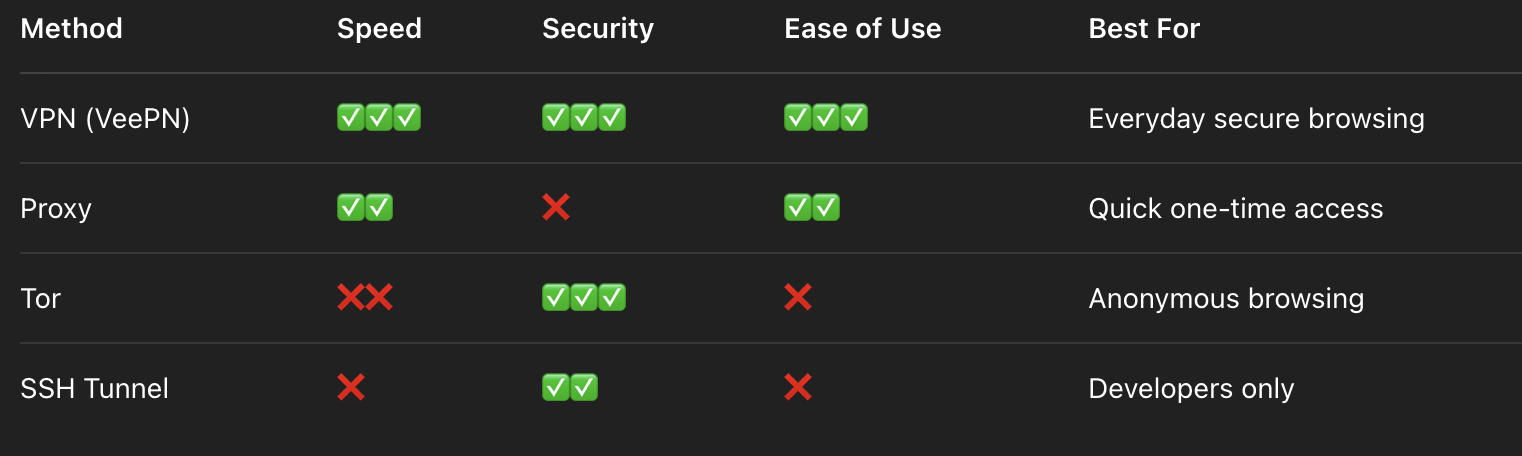
All these methods can be effective in different cases, but we must admit that using VPN is a win-win decision for bypassing Internet restrictions. Just check the table below to see obvious advantages:
Why Websites and Content Get Blocked
Dar care sunt motivele pentru care site-urile sunt blocate în primul rând? Să aruncăm o privire.
1. Unele servicii restricționează accesul la conținutul lor
They do this by using geo-blocking tools to limit access to their content in certain countries. One example that instantly pops up in mind is Netflix, which has different libraries in different countries. So, show selection in some states may be richer compared to others. For example, here are the countries with the biggest number of TV shows and movies available on Netflix as of March 2023 (and yeah, it caught us by surprise, to say the least):
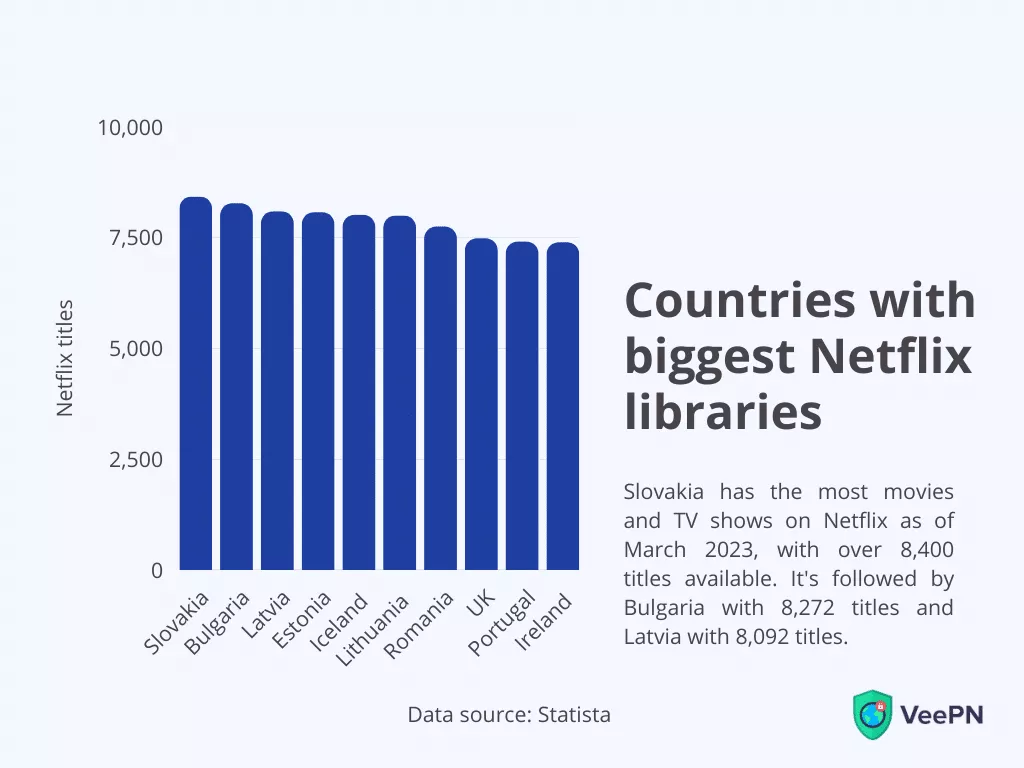
În plus, această restricție de conținut se poate aplica și articolelor de știri sau chiar serviciilor întregi care nu pot fi accesate în afara țării lor de origine, cum ar fi Hulu.
2. Government censorship and Internet restrictions
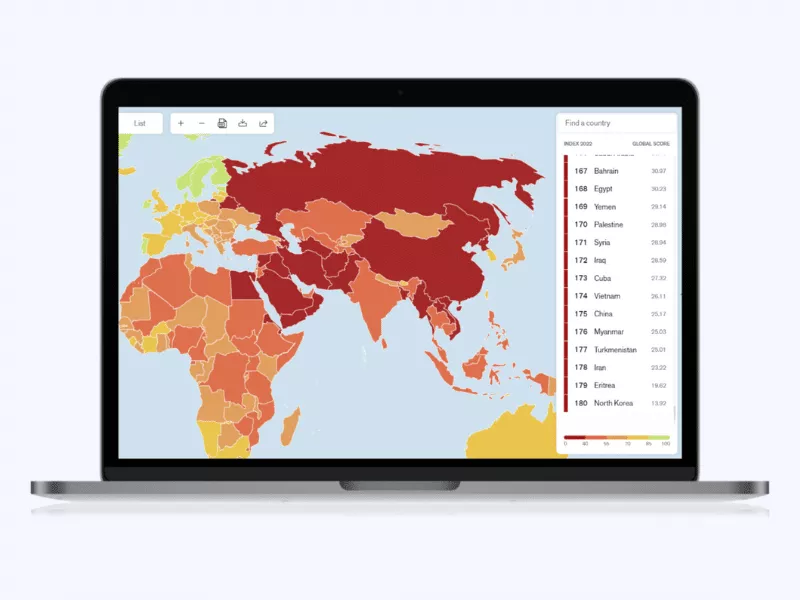
We often associate online censorship with countries like China or Turkey without realizing how widespread this issue actually is. Often carried out by governments for political, security, and other reasons, internet censorship is suppressing what people can access on the Internet. Let’s take a look at some specifics.
According to the 2022 edition of the World Press Freedom Index that examined press freedom in 180 countries, the “worst” countries to access content freely are North Korea, Eritrea, Iran, Turkmenistan, Myanmar, China, and others. At the same time, Scandinavians rule in this regard.
3. Employers and schools can block websites on their internal networks
Un alt motiv larg răspândit. De ce fac asta, vă puteți întreba? Cel mai probabil pentru ca angajații și studenții să rămână productivi. Deși această măsură este cu siguranță rezonabilă pentru ca cineva să evite tentația de a derula pe rețelele sociale, de exemplu, poate fi prea restrictivă atunci când doriți să localizați informațiile necesare imediat pe site.
With all this in mind, at least a good thing is that you can bypass WiFi restrictions, with just a bit of magic (read — perfectly feasible technological solutions).
Bottom line: How do I remove Internet restrictions from my WiFi?
Internet restrictions don’t seem so frustrating now, do they? Use a VPN and don’t let any limits ruin your online experience — unblock needed content and stay anonymous online. If you’re looking to bypass network restrictions, a reliable VPN is key.
The most important thing to do, though, is to choose a trustworthy service. VeePN provides an extensive network of 2,500+ servers along with 89 virtual locations, protects your traffic with top-grade 256-bit AES encryption, and is extremely user-friendly. Ready to bypass Internet restrictions and access unlimited content? Sign up for VeePN today and get 85% off!
FAQ
Da – un VPN vă ascunde adresa IP reală, permițându-vă să navigați anonim și să evitați orice restricții pe care le puteți întâlni online.
Cel mai simplu mod de a face acest lucru este să configurați un VPN pe router. În acest fel, toate dispozitivele conectate la rețeaua dvs. de acasă vor fi protejate, iar dvs. vă puteți sustrage restricțiilor de conținut de pe fiecare, cu adresa dvs. de IP ascunsă.
În primul rând, trebuie să înțelegeți că ocolirea restricțiilor impuse de școală ar putea avea repercusiuni grave. Dar dacă sunteți cu adevărat disperat, puteți încerca să descărcați un VPN sau Tor (rețineți totuși că unele dispozitive școlare nu vă vor permite să faceți acest lucru) sau să utilizați un server proxy. Aflați mai multe în acest articol.


VeePN is freedom
Descarcă Clientul VeePN pentru Toate Platformele
Bucură-te de o experiență VPN fluidă oriunde, oricând. Indiferent de dispozitivul pe care îl ai — telefon sau laptop, tabletă sau router — protecția avansată a datelor și vitezele ultra-rapide de la VeePN vor acoperi toate acestea.
Descarcă pentru PC Descărcare pentru Mac Aplicatie IOS și Android
Doriți navigare securizată în timp ce citiți asta?
Vezi diferența singur - Încearcă VeePN PRO timp de 3 zile pentru $1, fără riscuri, fără presiune.
Porniți încercarea mea de $1Atunci planul VeePN PRO de 1 an