English
  Deutsch
  Español
  Français
  العربية
  Indonesia
  Italiano
  한국어
한국어  Nederlands
  Polski
  Português
  Türkçe
  简体中文
简体中文  ไทย
ไทย  Tiếng Việt
  فارسی
فارسی  Română
  Filipino
  日本語
日本語 


Jak obejít omezení internetu a zobrazit požadovaný obsah
Už vás nebaví blokování přístupu k oblíbeným webovým stránkám, službám a online obsahu? Ať už je důvodem zablokování webových stránek práce, škola nebo země, ve které žijete, neztrácejte naději. S VPN můžete obejít internetová omezení a odblokovat neomezený přístup k internetu. Přečtěte si další tipy, jak se vyhnout blokování internetu.
 VeePN Research Lab


 Quick Navigation
Using a VPN to Unblock Websites
By encrypting your data and hiding your IP address, a VPN lets you bypass Internet restrictions and access geo-blocked content from anywhere in the world.
How VPN Work to Bypass Restrictions:
- When you connect to a VPN, your Internet traffic is routed through a secure VPN server, which masks your IP address and encrypts your data. This means that websites see the VPN server’s IP address instead of your own, allowing you to access content that may be blocked based on your physical location.
- With a VPN, you can choose from a variety of server locations, giving you the freedom to access content from all over the world. Plus, many VPN providers offer additional security features like malware protection and ad-blocking, making your online experience even safer.
Jak odblokovat webové stránky pomocí VPN
Easily! Bypass Internet restrictions with VeePN. VeePN is available on most popular devices and platforms. It lets you choose from over 2,500 servers in 89 locations across Europe, North and South America, Asia, Africa, and Australia. Here’s how to unblock websites with our app:
- Sign up with 85% off.
- Stáhněte si VeePN do svého zařízení a otevřete aplikaci.
- Under the Connect button on the main screen, choose a needed server location from the list. Go for a country in which your service or website is available.
Řekněme, že chcete mít přístup ke své domácí britské knihovně Netflixu, ale cestujete do USA – stačí si v aplikaci VeePN vybrat jeden z britských serverů.
4. Klikněte na tlačítko Připojit a gratulujeme – přenesli jste se do Velké Británie (virtuálně, ale přece) a můžete sledovat její obsah na Netflixu.
Výhody a nevýhody používání sítě VPN
| Klady | Nevýhody |
|---|---|
| Změny virtuální polohy | Většina důvěryhodných VPN není zdarma |
| Šifrování dat | Work or school computer may not allow you to set up VPN |
| přístupné nezkušeným uživatelům | Bezplatné sítě VPN jsou většinou nespolehlivé |
So, using VPN to bypass Internet restrictions is one of the most effective tools so far.
Jak obejít blokované stránky
With content restrictions tightening, what tools can you use and how bypass Internet blocks and retain freedom online? We’ve handpicked some of the most popular ones for you — let’s take a closer look.
Use Tor
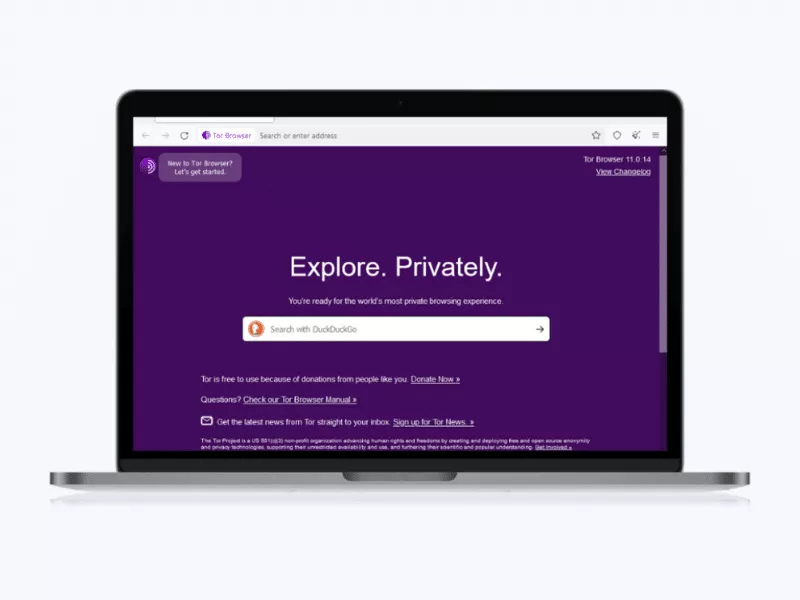
Tor, or The Onion Router, is a free and open-source software that allows you to browse anonymously. Unlike a VPN that sends your traffic through a specified secure server, the Tor technology encrypts traffic and randomly routes it through different nodes. Tor uses numerous layers of encryption to make user tracking difficult (hence, the onion). The network is decentralized, relying on volunteers to operate the thousands of relays needed to provide anonymity.
Současně je pravděpodobné, že při použití Toru dosáhnete nižších rychlostí. I když vám tedy umožní přístup k blokovaným webovým stránkám, neměli byste jej používat pro veškeré každodenní prohlížení. Tor také sice dokáže dobře skrýt vaši IP adresu, ale nemaskuje žádná data, která přes něj odesíláte. Proto jakmile data projdou posledním uzlem, bude snadné je získat. A konečně, váš pracovní nebo školní počítač vám nemusí umožnit instalaci Toru.
Pokud se vám Tor zdá jako lákavá možnost přístupu k blokovanému obsahu, postupujte následovně:
- Go to the Tor website and install the Tor browser on the needed platform by following directions on the website.
- Spusťte Tor a případně jej nakonfigurujte (například pokud jste v zemi, kde je Tor cenzurován, jako je Čína nebo Egypt).
- Se spuštěnou službou Tor se můžete připojit a získat anonymní přístup k webovým stránkám, které potřebujete.
Výhody a nevýhody používání Toru
| Klady | Nevýhody |
|---|---|
| Bezplatné použití | Nižší rychlost připojení |
| Může odblokovat mnoho webových stránek | Výstupní uzly nešifrují provoz |
| Bezpečnější než běžné prohlížeče | Některé webové stránky blokují Tor |
Use web proxy or proxy extension
Both work well for bypassing content restrictions on public computers, or if you’re accessing from a work or school computer that won’t let you set up a VPN or Tor. It hides your actual IP address and lets you dodge content restrictions in the way. It’s a great tool for anonymous web browsing or accessing content unavailable in specific regions.
To use a web proxy, simply go to a proxy website, like ProxySite, type in the URL of the website you want to visit, and click on a button to access it. A drawback here is that you have to go back to the proxy website each time you want to access a desired website.
Zároveň je rozšíření proxy serveru o něco pohodlnější než webový proxy server, protože je přímo v prohlížeči, takže nemusíte neustále přecházet na proxy server. Přesto, ačkoli jsou obvykle zdarma, proxy servery neposkytují stejnou úroveň zabezpečení jako například VPN a obvykle pracují pomaleji než druhá jmenovaná síť.
Pokud potřebujete pouze jednorázově a rychle získat přístup na blokované webové stránky, může být proxy server spolehlivým způsobem, jak toho dosáhnout.
Výhody a nevýhody používání proxy serveru
| Klady | Nevýhody |
|---|---|
| Obvykle zdarma | Nezabezpečuje vaše data |
| Skrývá vaši IP adresu | Není optimalizován pro streamování |
| Lze snadno používat na veřejném počítači | Nižší rychlost připojení |
Use SSH tunnel
Finally, working similarly to a VPN, a Secure Shell (SSH) tunnel can securely “tunnel” your traffic. But while a VPN protects all of your data, SSH works on an application level. You can connect to the SSH server remotely, which will send your browsing traffic over the secure connection. It helps in bypassing any filtering on the local network and encrypting your traffic. It’ll allow you to avoid content restrictions, although your connection will be a little slower.
So, how exactly can you bypass filtering with SSH? You can create an SSH tunnel with PuTTY on Windows or with the SSH command on other platforms. But it will require you to be tech-savvy.
Výhody a nevýhody používání tunelu SSH
| Klady | Nevýhody |
|---|---|
| Může zašifrovat vaše data | Obtížné nastavení pro nezkušené uživatele |
| Obchází filtrování v místních sítích | Šifruje aplikace, nikoli celý provoz přicházející ze zařízení. |
| Podporuje dálkové ovládání | Nižší rychlost připojení |
Setting Up and Using a Custom DNS Server and Encrypted DNS
How to Set Up a Custom DNS Server
Using a custom DNS server can help enhance your internet speed, security, and access to geo-blocked content. Here’s how you can set it up on various devices:
- On Windows:
- Open the Control Panel and go to Network and Internet > Network and Sharing Center.
- Click on Change adapter settings on the left panel.
- Right-click on your active network connection and select Properties.
- Select Internet Protocol Version 4 (TCP/IPv4) and click Properties.
- Choose Use the following DNS server addresses and enter the custom DNS (e.g., Google DNS: 8.8.8.8 and 8.8.4.4 or Cloudflare DNS: 1.1.1.1 and 1.0.0.1).
- Click OK and restart your internet connection.
- On macOS:
- Open System Preferences and go to Network.
- Select your active network (Wi-Fi or Ethernet) and click Advanced.
- Go to the DNS tab and click the + button to add a new DNS server (e.g., 8.8.8.8 and 8.8.4.4 for Google DNS).
- Click OK and then Apply to save the changes.
- On Android:
- Open Settings and go to Network & Internet.
- Select Private DNS and choose Private DNS provider hostname.
- Enter dns.google for Google’s DNS or 1dot1dot1dot1.cloudflare-dns.com for Cloudflare DNS.
- Save and restart your device.
- On iOS:
- Go to Settings > Wi-Fi and tap on your connected network.
- Scroll down to Configure DNS, select Manual, and add 8.8.8.8 and 8.8.4.4 (Google DNS) or 1.1.1.1 (Cloudflare).
- Save and reconnect to Wi-Fi.
How to Use Encrypted DNS
To use DNS and browse the web safely, you still need to encrypt your Internet traffic. Encrypted DNS enhances privacy and security by preventing ISPs and third parties from spying on your DNS queries.
- DNS over HTTPS (DoH) and DNS over TLS (DoT)
- DoH encrypts DNS queries over HTTPS, while DoT encrypts them using TLS.
- Major browsers like Chrome and Firefox support DoH.
- Enable Encrypted DNS in Chrome
- Open Settings in Chrome.
- Navigate to Privacy and Security > Security.
- Enable Use secure DNS and select a provider like Cloudflare or Google.
- Enable Encrypted DNS in Firefox
- Open Settings and go to General > Network Settings.
- Click on Settings, scroll down, and enable Enable DNS over HTTPS.
- Choose a provider or enter a custom DoH server.
- Using a VPN for Secure DNS
- A VPN (such as VeePN) encrypts all your traffic, including DNS queries, preventing DNS leaks and ISP tracking.
- Most premium VPNs offer built-in encrypted DNS to protect your online activity.
By setting up a custom and encrypted DNS, you ensure faster and safer browsing while reducing exposure to DNS hijacking and tracking.
Pros and Cons of Using Custom and Encrypted DNS Servers
| Feature | Klady | Nevýhody |
|---|---|---|
| Security & Privacy | Protects against DNS hijacking, phishing, and ISP tracking. | Some DNS providers may still log user activity. |
| Faster Browsing | Can improve website loading speeds by using optimized DNS resolvers. | Performance varies based on location and provider. |
| Access to Blocked Content | Helps bypass geo-restrictions on certain websites. | Doesn’t work for all restrictions, especially those based on IP addresses. |
| Setup & Compatibility | Works on most devices and can be manually configured. | Requires manual setup and may not work on restrictive networks. |
Mirror sites & IP addresses
What Are Mirror Sites?
Mirror sites are exact replicas of a website, hosted on different domains or servers to ensure accessibility when the main site is down, blocked, or experiencing high traffic. They serve as backup versions and are often used for:
- Bypassing Censorship – If a website is restricted in certain regions, users can access a mirror site instead.
- Faster Access – Some mirrors are geographically closer to users, improving load speeds.
- Distributing Content – File-sharing, academic research, and open-source software often use mirrors to distribute large files.
Pros and Cons of Mirror Sites:
| Feature | Klady | Nevýhody |
|---|---|---|
| Bypass Restrictions | Allows access to blocked content. | Not all mirrors are legitimate or secure. |
| Improved Availability | Reduces downtime if the main site is down. | Some may contain outdated or altered content. |
| Better Speed | Mirrors closer to users can load faster. | Can be used for phishing or malware if unverified. |
What Are IP Addresses?
An IP (Internet Protocol) address is a unique identifier assigned to a device on a network, allowing communication over the internet. There are two main types:
- IPv4 (e.g., 192.168.1.1) – The most common, but with limited address space.
- IPv6 (e.g., 2001:0db8:85a3::8a2e:0370:7334) – A newer version with more available addresses.
How IP Addresses Affect Online Activity:
- Geo-Restrictions – Websites use IP addresses to determine a user’s location and may block access accordingly.
- Tracking & Privacy – ISPs and websites can log IPs to track browsing activity.
- Anonymity & VPNs – VPNs mask real IPs to enhance privacy and bypass restrictions.
Pros and Cons of IP Address Awareness:
| Feature | Klady | Nevýhody |
|---|---|---|
| Online Privacy | Changing IPs with a VPN protects identity. | ISPs and websites can still track activity. |
| Access to Global Content | VPNs can help bypass location-based restrictions. | Some services detect and block VPN use. |
| Security | Hiding IP prevents tracking and DDoS attacks. | Exposed IPs can make users vulnerable online. |
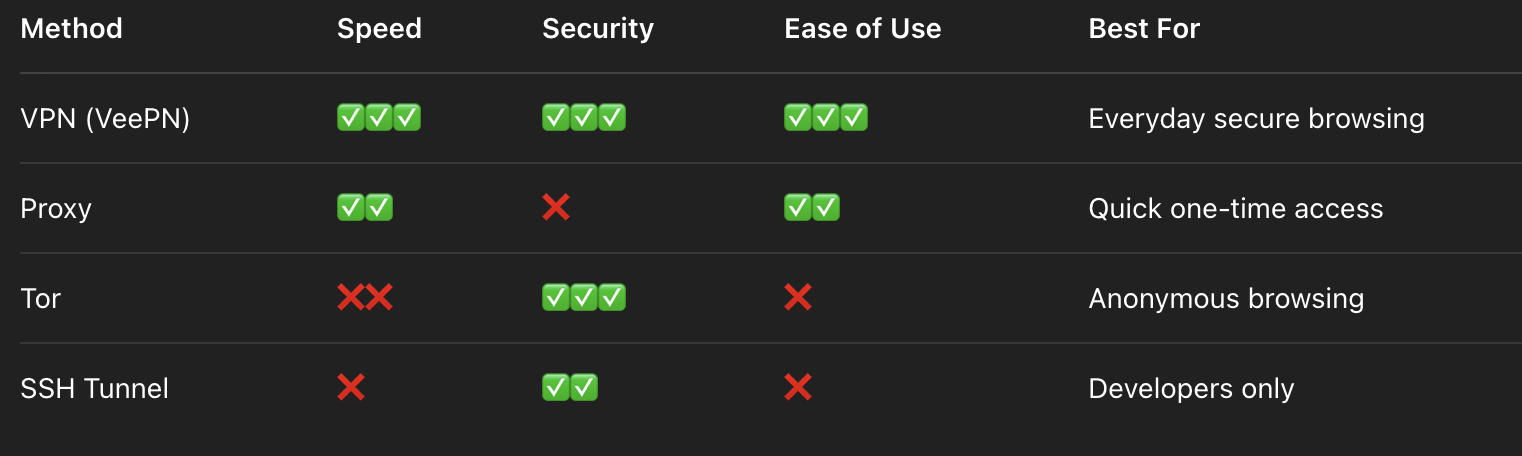
All these methods can be effective in different cases, but we must admit that using VPN is a win-win decision for bypassing Internet restrictions. Just check the table below to see obvious advantages:
Why Websites and Content Get Blocked
Jaké jsou však důvody blokování webových stránek? Podívejme se na ně.
1. Některé služby omezují přístup ke svému obsahu
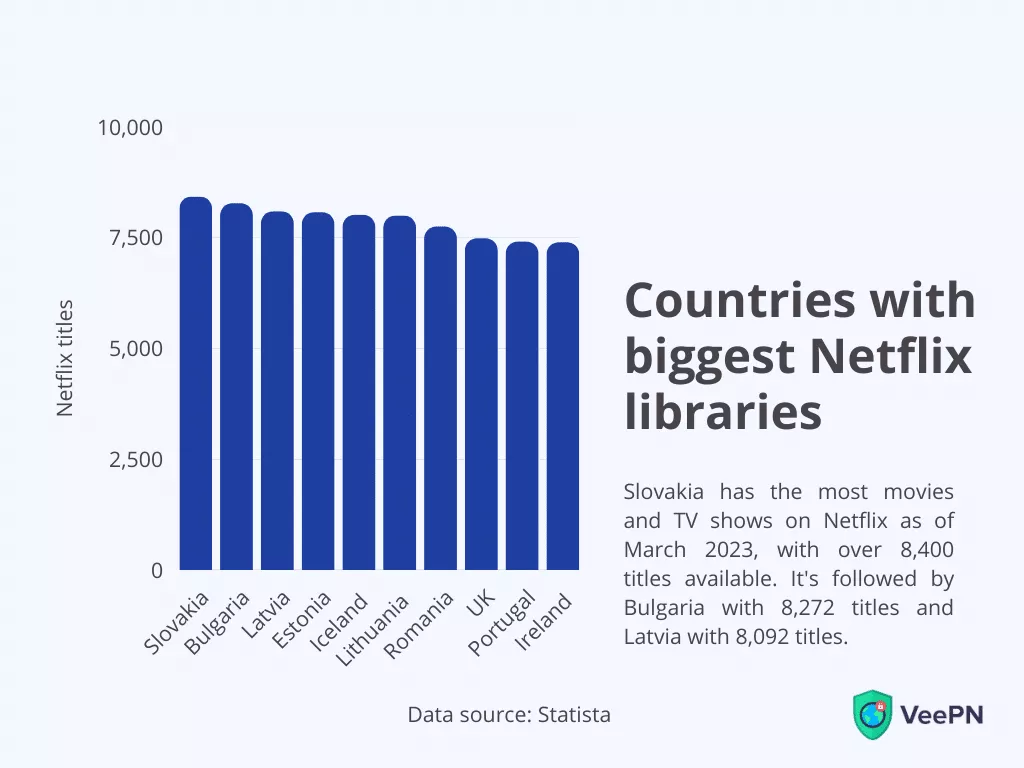
They do this by using geo-blocking tools to limit access to their content in certain countries. One example that instantly pops up in mind is Netflix, which has different libraries in different countries. So, show selection in some states may be richer compared to others. For example, here are the countries with the biggest number of TV shows and movies available on Netflix as of March 2023 (and yeah, it caught us by surprise, to say the least):
Kromě toho se toto omezení obsahu může týkat i zpravodajských článků nebo dokonce celých služeb, které nejsou přístupné mimo zemi původu, jako je například Hulu.
2. Government censorship and Internet restrictions
We often associate online censorship with countries like China or Turkey without realizing how widespread this issue actually is. Often carried out by governments for political, security, and other reasons, internet censorship is suppressing what people can access on the Internet. Let’s take a look at some specifics.
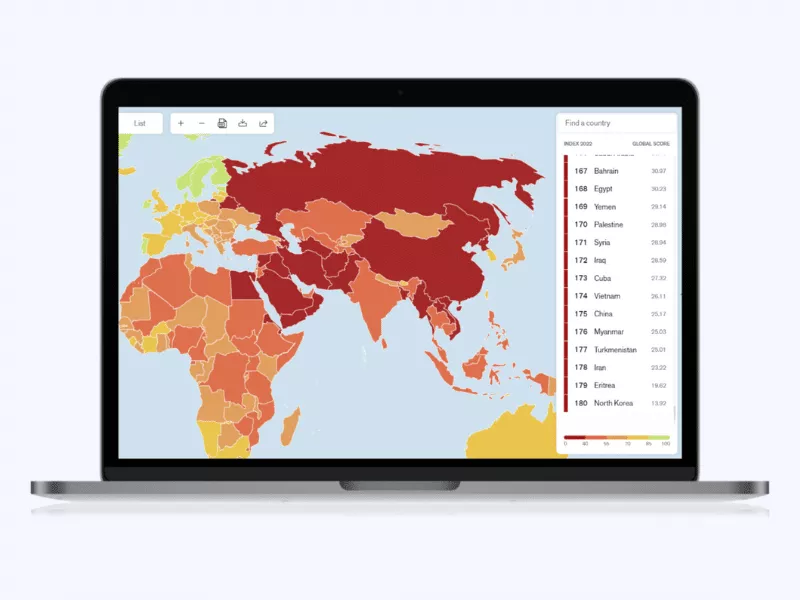
According to the 2022 edition of the World Press Freedom Index that examined press freedom in 180 countries, the “worst” countries to access content freely are North Korea, Eritrea, Iran, Turkmenistan, Myanmar, China, and others. At the same time, Scandinavians rule in this regard.
3. Employers and schools can block websites on their internal networks
Další rozšířený důvod. Ptáte se, proč to dělají? Nejspíše proto, aby zaměstnanci a studenti zůstali produktivní. I když je toto opatření jistě rozumné, aby se člověk vyhnul pokušení procházet například sociální média, může být příliš omezující, když chcete potřebné informace najít hned na místě.
With all this in mind, at least a good thing is that you can bypass WiFi restrictions, with just a bit of magic (read — perfectly feasible technological solutions).
Bottom line: How do I remove Internet restrictions from my WiFi?
Internet restrictions don’t seem so frustrating now, do they? Use a VPN and don’t let any limits ruin your online experience — unblock needed content and stay anonymous online. If you’re looking to bypass network restrictions, a reliable VPN is key.
The most important thing to do, though, is to choose a trustworthy service. VeePN provides an extensive network of 2,500+ servers along with 89 virtual locations, protects your traffic with top-grade 256-bit AES encryption, and is extremely user-friendly. Ready to bypass Internet restrictions and access unlimited content? Sign up for VeePN today and get 85% off!
FAQ
Ano – VPN skryje vaši skutečnou IP adresu, což vám umožní anonymně procházet internet a vyhnout se všem omezením, na která můžete narazit.
Nejjednodušší způsob, jak toho dosáhnout, je nastavit na routeru síť VPN. Tímto způsobem budou chráněna všechna zařízení připojená k vaší domácí síti a vy se budete moci vyhnout omezením obsahu na každém z nich, přičemž vaše IP adresa bude skrytá.
Především si musíte uvědomit, že obcházení školních omezení může mít vážné následky. Pokud jste ale opravdu zoufalí, můžete si zkusit stáhnout VPN nebo Tor (mějte však na paměti, že některá školní zařízení vám to neumožní) nebo použít proxy server. Více se dozvíte v tomto článku.


VeePN is freedom
Stáhněte si VeePN klienta pro všechny platformy
Užijte si plynulý VPN zážitek kdekoli a kdykoli. Bez ohledu na zařízení, které máte — telefon nebo laptop, tablet nebo router — VeePN pokryje všechny z nich díky své příští generaci ochrany dat a ultra-rychlé rychlosti.
Stáhnout pro PC Stáhnout pro Mac IOS a Android Aplikace
Want secure browsing while reading this?
See the difference for yourself - Try VeePN PRO for 3-days for $1, no risk, no pressure.
Začněte $1 zkušebníPak VeePN PRO na 1 rok